• Skip to primary navigation
  • Skip to main content
  • Skip to primary sidebar

John August

  • Arlo Finch
  • Scriptnotes
  • Library
  • Store
  • About

Highland

Fountain for coders, or the joy of writing

April 15, 2014 Apps, Fountain, Geek Alert, Highland

Charles Forman, whose company OMGPOP developed Draw Something, is [writing a screenplay in Fountain](http://setpixel.com/writing/writing-a-screenplay-in-fountain/):

> I don’t work at a bank. However, I’m sure that on the first day of orientation, they teach you how to use an application written in 1999 in Visual Basic. It hasn’t been updated since 2001, it doesn’t work very well, everyone hates it, but it’s the way it is, and if you trick it, you might be able to do what you want, or wait until it’s 5 PM. It’s probably exactly what it’s like to use Final Draft.

> The joy of writing shouldn’t feel like working at a bank.

Forman offers a detailed look at writing in Fountain from the perspective of someone who’s written a lot of code. For his screenplay, he used both [Slugline](https://itunes.apple.com/us/app/slugline/id553754186?mt=12) and [Highland](https://itunes.apple.com/us/app/highland/id499329572?mt=12), but also built his own tools based on the libraries available on GitHub.

>”How many scenes do I have?” It’s a pretty simple question. Normally, in order to do this, you have to go through the whole script and count the sluglines. I used Javascript to parse my Fountain script. I looped through the sluglines and counted them. Then I was curious about the unique locations. How many times did person A talk vs. person B? I generated some basic stats and spit it out in the console by creating a tool in 20 minutes.

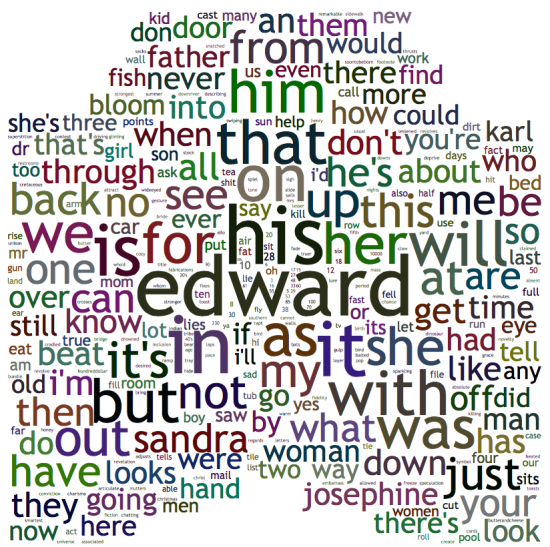
He also built a tool that [generates a word cloud](http://playground.setpixel.com/wordcloud/) based on a screenplay.

Here’s Big Fish:

big-fish-wordcloud

Forman listens to the podcast, so he’s heard us discussing the possibilities of a new screenplay format. He argues that we already have it in Fountain.

> Because Fountain is pretty flexible, you could add metadata for anything you might want to extend the screenplay with. In my case, I have included storyboards. You could add metadata for the song that is playing. You could add metadata about which characters are in the scene, if its not totally clear. You could add metadata about what the purpose of a scene is. You could add anything. If I could make a small ask to the Fountain team, I would love a specific way to insert metadata. I am using notes. I’m thinking about putting curly bracket objects inside of notes going forward.

This kind of thinking is why I’m so bullish Fountain: not just what it can do today, but what it can be repurposed for in the future.

The Deal with the Deal

Episode - 138

Go to Archive

April 8, 2014 Follow Up, Formatting, Highland, News, Scriptnotes, Transcribed, WGA, Writing Process

John and Craig talk with WGA President Chris Keyser about the tentative deal reached between writers and the studios, and why it’s more groundbreaking than it might appear at first glance.

We continue our discussion of a new screenwriting format by looking at how we got here, both the history of “modern” screenplay layout and the alternatives.

Finally, John just delivered a new script, the first one he wrote entirely in Highland. We discuss the difference between drafts and assemblies, and how much we like to know before digging in on a sequence.

Links:

* [Courier Prime](http://quoteunquoteapps.com/courierprime/)
* WGA President Chris Keyser on [IMDb](http://www.imdb.com/name/nm0450899/) and [Wikipedia](https://en.wikipedia.org/wiki/Christopher_Keyser)
* Deadline’s January article on [Chip Johannessen and Billy Ray’s letter to WGA members](http://www.deadline.com/2014/01/writers-guild-producers-pension-health-contribution-cuts-new-contract/)
* [Thomas Ince](https://en.wikipedia.org/wiki/Thomas_H._Ince) on Wikipedia
* [Sample pages](http://johnaugust.com/Assets/four-alternate-formats-final.pdf) from alternatively formatted screenplays
* Screenwriting.io on [multicamera script formatting](http://screenwriting.io/how-are-multicamera-tv-scripts-formatted/)
* [Highland](http://quoteunquoteapps.com/highland/)
* [The Way to Go](http://www.amazon.com/dp/1594204683/?tag=johnaugustcom-20) by Kate Ascher
* Lilly Onakuramara on [the Pitch Perfect wiki](http://pitch-perfect.wikia.com/wiki/Lilly_Onakuramara), and [a YouTube compilation of some of her best moments](https://www.youtube.com/watch?v=wdG6v7gkxm4)
* [Outro](http://johnaugust.com/2013/scriptnotes-the-outros) by Scriptnotes listener Blake Kuehn ([send us yours!](http://johnaugust.com/2014/outros-needed))

You can download the episode here: [AAC](http://traffic.libsyn.com/scriptnotes/scriptnotes_ep_138.m4a) | [mp3](http://traffic.libsyn.com/scriptnotes/scriptnotes_ep_138.mp3).

**UPDATE** 4-11-14: The transcript of this episode can be found [here](http://johnaugust.com/2014/scriptnotes-ep-138-the-deal-with-the-deal-transcript).

Highland 1.6 uses the force

March 14, 2014 Apps, Highland, Weekend Read

highland iconHot on the heels of the [Weekend Read update](https://itunes.apple.com/us/app/weekend-read/id502725173?mt=8), we have a new [Highland](https://itunes.apple.com/us/app/highland/id499329572?mt=12) in the Mac App Store today.

Highland 1.6 features all the improvements to PDF-melting from Weekend Read, including better support for PDFs created with Fade In and Celtx.

There are also a slew of little bug fixes, with more coming. I use Highland for all my daily screenwriting, so whenever I encounter an issue, Nima tackles it immediately.

### The force is strong with this one

Highland is the first app to support the basically-official Fountain 1.1 spec, which adds several new features:

– Forced character elements
– Lowercase character extensions
– Forced action elements
– Lyrics

The ability to force a **Character** element is helpful for names that require lower-case letters (i.e. McDONALD), and for non-Roman languages, where a character might be named something like 黒澤.

To force a Character element, precede a line with the “at” symbol: @

@McCLANE 
Yippie ki-yay! I got my lowercase C back!

                    McCLANE

Yippie ki-yay! I got my lowercase C back!

The parser will remove the @ and interpret McCLANE as Character, preserving its mixed case. We picked @ because everyone is already accustomed to thinking of @name referring to a person.

**Character extensions**, those notations like (on the radio) which live on the same line as a Character element, are no longer required to be uppercase:

Sometimes you really want two lines of **Action**, with no blank line between them. You’re going to for a style — but Fountain doesn’t know that. So instead you get:

BOOM

BOOM BOOM. Closer.

In Fountain 1.0, we allowed the user to force Action elements with two trailing spaces.

BOOM{two spaces}

BOOM BOOM. Closer.

This has turned out to be problematic in practice. The spaces are invisible, and can be introduced by accident as you write. Highland and Slugline users got confused. Hell, I got confused, and I co-created the syntax.

In the end, we’d like more transparency and less invisibility. Using spaces to force Action is now deprecated.

Instead, you can force Action by preceding a line with an exclamation point:

!BOOM
BOOM BOOM. Closer.

The parser removes the ! and interprets BOOM as Action.

BOOM  

BOOM BOOM. Closer.

Highland has had **Lyrics** for a while now. Nothing has changed.

For screenplays, we use the same basic margins as dialogue, but set the text in italics. For stageplays, we move the lyrics to the left margin and set them uppercase.

You create a Lyric by starting with a tilde ~.

~Willy Wonka! Willy Wonka! The amazing chocolatier!

~Willy Wonka! Willy Wonka! Everybody give a cheer!

Lyrics are always forced. There is no “automatic” way to get them.

###What’s next

[Fountain](http://fountain.io) is an open-source project, and continues to evolve. Right now we’re discussing:

* Flagged changes (the equivalent of asterisks in the margins)
* “Logical pages” independent of device or font
* Multi-cam formatting
* Better title pages

Some of these are deferred issues (multi-cam), while others are just things we got wrong (title pages). As with Lyrics, we’ll likely use Highland to experiment with some of these ideas before they become official parts of the spec.

An upcoming build of Weekend Read will feature the new Fountain 1.1 elements, but you can get started with them in Highland today. [Enjoy](https://itunes.apple.com/us/app/highland/id499329572?mt=12).

Weekend Read gains new powers, new scripts

March 13, 2014 Apps, Highland, Weekend Read

[product photo](http://highland.quoteunquoteapps.com/wr-blog) Weekend Read has an update in the App Store today. Version 1.0.2 greatly improves PDF reading and adds a lot of new content. It’s free, so [go get it.](https://itunes.apple.com/us/app/weekend-read/id502725173?mt=8)

[As promised](http://johnaugust.com/2014/weekend-read-learning-from-launch), this release tackles issues with screenplay PDFs originating in Celtx and Fade In, and has much better support for A4 paper sizes and international characters.

We also worked with The Black List ([blcklst.com](http://www.blcklst.com)) to allow members to read watermarked scripts inside the app.

If you have script that didn’t look right under the old build, delete it and load it back into your library. There’s a good chance it will work now.

Ripping apart and reassembling PDFs is an imperfect art, so we’ll never be able to read every screenplay PDF. ((Some PDFs are nothing but images, while others use watermarks that deliberately prevent text-parsing. And some are odd for their own odd reasons, such as Asghar Farhadi’s script for The Past. It looks normal to the human eye, but under the hood it’s anything but.)) But this build gets us closer than ever. And because Weekend Read shares code with [Highland](https://itunes.apple.com/us/app/highland/id499329572?mt=12), these improvements will carry over to the next build of our flagship Mac app, which should be out soon.

While bug fixes are great, I’m most excited about our new content.

###Filling the shelves

A great reader needs great writing, so we rebuilt the For Your Consideration section in a way that lets us add new material — new scripts, new outlines, entire new categories — in real time. We’ll use this ability to feature both established screenwriters and folks you’ve never heard of. And because so much of the best writing is happening in television, we will regularly include pilots and series as Featured Shows.

– Our first Featured Writer is Rian Johnson, who brings us his scripts for Brick, Looper and The Brothers Bloom.

– Our first Featured Show is Hannibal, offering all the scripts from the first season, courtesy of show creator Bryan Fuller.

– We’ve also included the transcripts for every episode of [Scriptnotes](https://itunes.apple.com/us/podcast/scriptnotes-podcast/id462495496?mt=2).

Our plan is to add and replace content frequently, so if you find something you like, make sure to add it to your library so it doesn’t disappear on you.

One final note: As a developer, one downside to frequent app updates is that each new build hides the reviews from earlier users. So if you love Weekend Read, please consider [leaving us a review](https://itunes.apple.com/us/app/weekend-read/id502725173?mt=8), even if you already did for version 1.0.1.

Thanks, and enjoy the read.

« Previous Page
Next Page »

Primary Sidebar

Newsletter

Inneresting Logo A Quote-Unquote Newsletter about Writing
Read Now

Explore

Projects

  • Aladdin (1)
  • Arlo Finch (27)
  • Big Fish (88)
  • Birdigo (2)
  • Charlie (39)
  • Charlie's Angels (16)
  • Chosen (2)
  • Corpse Bride (9)
  • Dead Projects (18)
  • Frankenweenie (10)
  • Go (29)
  • Karateka (4)
  • Monsterpocalypse (3)
  • One Hit Kill (6)
  • Ops (6)
  • Preacher (2)
  • Prince of Persia (13)
  • Shazam (6)
  • Snake People (6)
  • Tarzan (5)
  • The Nines (118)
  • The Remnants (12)
  • The Variant (22)

Apps

  • Bronson (14)
  • FDX Reader (11)
  • Fountain (32)
  • Highland (74)
  • Less IMDb (4)
  • Weekend Read (64)

Recommended Reading

  • First Person (87)
  • Geek Alert (151)
  • WGA (162)
  • Workspace (19)

Screenwriting Q&A

  • Adaptation (65)
  • Directors (90)
  • Education (49)
  • Film Industry (489)
  • Formatting (128)
  • Genres (89)
  • Glossary (6)
  • Pitches (29)
  • Producers (59)
  • Psych 101 (118)
  • Rights and Copyright (96)
  • So-Called Experts (47)
  • Story and Plot (170)
  • Television (165)
  • Treatments (21)
  • Words on the page (237)
  • Writing Process (177)

More screenwriting Q&A at screenwriting.io

© 2026 John August — All Rights Reserved.