• Skip to primary navigation
  • Skip to main content
  • Skip to primary sidebar

John August

  • Arlo Finch
  • Scriptnotes
  • Library
  • Store
  • About

Highland

What I learned from a year of Highland Pro

April 22, 2026 Apps, Follow Up, Highland

One year ago, we launched Highland Pro. I was confident in the app itself, having put it through its paces over its multi-year development journey. I’d written dozens of scripts and novels in Highland over the years, and knew that Highland Pro was the best version we’d ever made. Our beta testers loved it, too.

Still, I was nervous about the launch itself.

We were switching from a paid upfront model to subscription. The 30-day trial period made it easy for users to get started in the app — but would they stick around?

It turns out, they did!
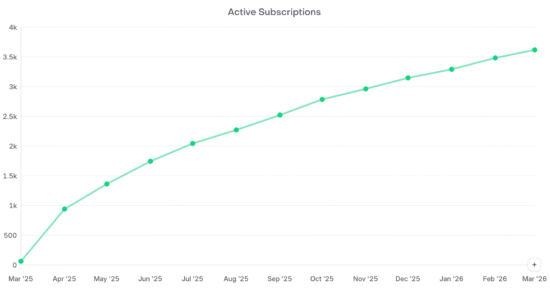
line chart showing curved arc from last April to today

Roughly 60% of our trial users converted to paying customers. Monthly recurring revenue continues to grow each month at a steady, sustainable level. It’s not a hockey stick, but rather a reassuring climb.

Our first year of Highland Pro brought in more money than the last four years of Highland 2 combined. Most of our annual subscriptions have renewed. We can approach the next twelve months knowing we’re on a solid foundation.

Money is great, but honestly the biggest advantage to a subscription model is that it properly aligns the interests of an app and its users. Rather than chase new customers, we can make the app better and more delightful for existing subscribers. We’re grateful to the thousands of writers who rely on Highland Pro.

On our official blog, Daniel wrote about what we accomplished in this first year, including stats and details on our many new features.

Here I wanted to share some of personal observations as Highland Pro’s part-time CEO and biggest fan.

Twelve lessons we learned

Highland Pro’s first year was successful, but certainly not flawless. Some choices paid off. Others didn’t.

1) We worried that Highland 2 users wouldn’t make the leap to Highland Pro. They did. Three quarters of Highland 2’s weekly active users made the switch in the first two months. Our core users embraced the change and saw the advantages to Highland Pro.

2) Likewise, we worried too much about complaints from people who “don’t like subscription software.” These people were not going to be happy no matter what we did. That’s okay! Let people have their opinions.

3) We moved our #TeamHighland community from Slack to Discord. They’ve been instrumental in helping us quash bugs and develop new features. Discord can feel messy and chaotic, but it’s easy to see the activity. Traditional forum software ends up becoming a ghost town.

4) As a company, we all needed to take a more active role in the support queue and #TeamHighland Discord. Customer service is not a separate department, especially with a subscription app. It’s much easier to fix bugs when you directly engage with the people encountering them. Often, they’re using the app in unexpected ways.

5) Onboarding and paywalls matter — but what’s going to work is not at all intuitive. We A/B tested multiple versions of the paywall and always guessed wrong. For now, a hard paywall when you first launch the app appears to be the most successful.

6) iOS and iPadOS are uniquely frustrating. For years, Highland users have clamored for a version they could use on their iPads and iPhones — but when you give it to them, they’re understandably frustrated by the limitations and compromises. Our reviews for the iOS version are considerably lower than macOS version, and I get it. If your only experience with Highland Pro is on the iPhone, you’ll be disappointed. Whereas if you see the iPhone app as a companion to the “real” version on the Mac, your expectations are appropriately modest.

7) One of the biggest issues for iOS/iPadOS is iCloud syncing. It’s a black box that should “just work,” but often doesn’t, leaving users frustrated and developers at a loss to explain exactly what’s happening. We did a lot of work to improve syncing, including robust new backup features to protect users against data loss in case something goes wrong. But it’s not as seamless as anyone would hope.

8) We expanded the team. This year was our first with a dedicated, full-time marketing director. Daniel tackled all the projects we never fully understood, including revamping our SEO. We also brought in our first outside coder on contract. We learned how to set milestones and appropriately scope new features. It was good practice.

9) We used the latest Apple frameworks as much as possible, but held off on implementing Liquid Glass for the UI. This was the right choice. On iOS, Liquid Glass is sometimes delightful. On macOS, it’s generally a distracting mess.

10) We sponsored the Austin Film Festival this year, including hosting the opening night party. We went all out: printed materials in every conference bag, hundreds of Team Highland t-shirts, and a special conference session about Highland Pro. The four of us who attended had a great time and met interesting writers. We pre-sold a lot of Scriptnotes books. It had limited measurable impact on Highland Pro sales, however. Our promo codes got redeemed at a surprisingly low rate.

11) We experimented with sponsoring smaller film festivals and conferences, focusing on university-affiliated programs. (Highland Pro is free for college students.) These ended up being pretty cost-effective, particularly when you’re giving away subscriptions and t-shirts.

12) For accounting reasons, we moved all our apps to a new App Store account tied to our LLC. It was only after the first two months that we realized our Small Business Program certification hadn’t transferred. We were paying Apple 30% rather than 15%. We got it fixed quickly, but oof. It’s the things you don’t even consider that can cost you the most.

Looking back at a year of Highland Pro, my biggest takeaway is gratitude. I’m endlessly thankful to the team who built it, tested it, and put it out there in the world. I’m grateful to everyone who tried it, whether they ended up subscribing or not. One of the biggest obstacles for a new app is inertia. Writers are used to Microsoft Word or Final Draft, even if they complain about them. I’m thankful to every writer who allowed themselves to be uncomfortable for a few minutes and try something new. (And better!)

I have the unique pleasure of being Highland Pro’s co-creator and most active user. It’s where all my words go. I’m writing inside it for hours each day — including this blog post, which I will fling to the team for comments. (And in the process, catch weird Fling bugs which Nima will quash.)

To me, Highland Pro feels indispensable and almost inevitable, so it’s wild to reflect on just how much has happened over the past 12 months. For the next few months, we’re focused on stability and accessibility improvements in the app itself, and better community engagement. But as always, we have ambitious plans for Highland and beyond. I’m already looking forward to next year’s blog post.

How I use Highland Fling

March 20, 2026 Apps, Highland

Fling is a brand new feature for Highland Pro that addresses a long-simmering frustration: getting feedback on what you’ve written.

Whenever I finish a draft, I want to give it to some trusted people to read — both for comments and general proofreading. In the old days, that generally meant printing and handing it to them, or emailing a PDF. In the case of my assistant, I’ll often Slack him the original Highland file and ask him to mark up typos in Revision Mode.

This works, but it’s not ideal. You end up with multiple copies of every document.

What I really longed for was something like Google Docs links. When my college-aged daughter wants me to read something she wrote, she’ll simply send me the URL. I can make my notes right there in the document.

That makes sense for Google Docs, because it’s already on the web. I wondered: could we do the same thing for a native app like Highland Pro?

Surprisingly, yes!

Highland Fling creates a temporary, online version of your document that you can share with anyone. Your readers can then easily leave their notes and comments, all of which appear immediately back in your original document.

Your readers don’t need Highland Pro. For them, it’s just a web page. The whole experience is kinda magic.

Here’s a video about it:

I use Fling all the time, both for screenwriting and all the other documents I write. It’s the best of both worlds: Highland Pro’s powerful native editing, and the simplicity of sharing a link. We made a step-by-step guide for using Highland Fling, but honestly you’re likely to immediately intuit it.

Fling’s short duration (either one hour, one day, or seven days) is a feature, not a bug. A Fling isn’t meant to last. You’re not publishing something for the ages, just right now when you need someone to read something.

Around the office, we still use Notion for items where multiple people are writing and editing, and for reference material we want to keep around. But for everything that’s “just read this please,” Fling is ideal.

An example: This spring, one of my jobs as WGA Negotiating Committee co-chair was writing a 30-minute speech to members about our priorities in this negotiation. I wrote the speech in Highland Pro, of course. Fling was the perfect way to share it with my collaborators. They could make their notes right in the document, and see each other’s notes.

This blog post you’re reading? I flung it to Drew for proofreading. It’s our default way of putting eyes on anything.

Fling is available for the Mac version of Highland Pro right now. I’m really proud of how it turned out. I suspect many writers will find it just as game-changing as I do.

Introducing Highland Pro

March 4, 2025 Apps, Highland, News

Today, we’re launching Highland Pro. It’s the next generation of our flagship screenwriting app, now available on Mac, iPad and iPhone.

Here’s a video I made about it.

With Highland Pro, our mission is to keep you focused on your work. From its clean interface to innovative features like the shelf and /lookup, Highland is designed to help you avoid distractions and get things written.

I’m incredibly proud of Highland Pro and the tiny team who made it. Nima Yousefi does our coding. Dustin Bocks handles design. Chris Csont heads up support, while Daniel Sauvé-Rogan leads our marketing. Drew Marquardt and I tackle whatever else needs to be done, like the video above.

Highland Pro wouldn’t be nearly as good without our hundreds of beta testers. Thank you Team Highland!

Highland Pro is now available on the App Store worldwide, with a 30-day free trial. A single subscription covers all platforms. Try it today!

The Free Stuff

August 11, 2022 Apps, Bronson, Highland, Meta, News, Software, Tools, Weekend Read, Writer Emergency Pack

My friend Nima recently pointed out that most of the stuff our company makes is free.

That’s probably not a great business model, but it’s always been our culture. We only charge for those things that have significant ongoing costs — like upkeep and hosting — or a per-unit cost to produce.

If you’re a writer, here are the things we offer at absolutely no cost. As in free.

### [johnaugust.com](https://johnaugust.com)
This blog has been running since 2003. Nearly all of its 1,500 posts are screenwriting advice. The Explore tab on the right is a good way to get started looking through the archives. For example, you might start with the [129 articles on formatting](https://johnaugust.com/qanda/formatting).

### [Scriptnotes](https://johnaugust.com/scriptnotes)
Craig Mazin and I have been recording this [weekly screenwriting podcast](https://johnaugust.com/scriptnotes) for over ten years. It’s always been free, with no ads whatsoever. The most recent 20 episodes are available in every podcast player. Back episodes are available to [Scriptnotes Premium](http://scriptnotes.net) members, or can be purchased in 50-episode “seasons.”

### [Inneresting](https://inneresting.substack.com)
Chris Csont edits this [weekly newsletter](https://inneresting.substack.com), which serves as a good companion to Scriptnotes. Every Friday, it has links to things about writing, centering on a given theme. It’s a Substack, but completely free.

### [Highland 2](https://quoteunquoteapps.com/highland-2/)
For years, I’ve written all my scripts and novels in this terrific app our company makes. It’s a free download on the [Mac App Store](https://apps.apple.com/us/app/highland-2/id1171820258?mt=12). The Standard edition is fully functional, with no time limits. Students can receive the enhanced Pro edition through our [student license program](https://quoteunquoteapps.com/highland-2/students.php).

### [Courier Prime](https://quoteunquoteapps.com/courierprime)
English-language screenplays are written in Courier, but not all Couriers are alike. Many are too thin, and the italics are ugly. So we commissioned a new typeface called [Courier Prime](https://quoteunquoteapps.com/courierprime). It’s Courier, but better. Since it’s free and open licensed, you can use it through Google Fonts and similar services.

### [Weekend Read](https://quoteunquoteapps.com/weekendread)
Reading a screenplay on an iPhone is a pain in the ass — unless you use [Weekend Read](https://quoteunquoteapps.com/weekendread). It melts down screenplay PDFs so they format properly on smaller screens. Weekend Read also has an extensive library of older scripts, including many award nominees. It’s free on the App Store.

### [The Library](http://johnaugust.com)
The [Library](http://johnaugust.com) has most of the scripts I’ve written, and hosts a few other writers’ work as well. For several projects, I’ve included treatments, pitches, outlines and additional material.

### [Screenwriting.io](screenwriting.io)
While johnaugust.com offers detailed articles on various topics, screenwriting.io answers [really basic questions about film and TV writing](screenwriting.io). If you’re Googling, “how many acts does a TV show have?” we want to [give you the answer](https://screenwriting.io/how-many-acts-does-a-tv-show-have/) with no cruft or bullshit.

### [100 Most Frequently Asked Questions about Screenwriting](https://gallery.mailchimp.com/2b0232538adf13e5b3e55b12f/files/100_FAQ_About_Screenwriting.v1.2.pdf)
We gathered the 100 most frequently searched-for entries on screenwriting.io in this handy [85-page PDF](https://gallery.mailchimp.com/2b0232538adf13e5b3e55b12f/files/100_FAQ_About_Screenwriting.v1.2.pdf).

### [Launch](https://podcasts.apple.com/us/podcast/launch/id1319436103)
I recorded this seven-episode podcast series about the pitch, sale, writing and production of my first Arlo Finch book. If you’ve ever thought about writing a book, you’ll want to check it out. Free [wherever you listen to podcasts](https://podcasts.apple.com/us/podcast/launch/id1319436103).

# The Paid Stuff

Given all the free stuff we put out, how does our company make money? We sell things.

### [Highland 2 Pro](https://quoteunquoteapps.com/highland-2/)
Highland 2 Standard Edition is free, but most users choose to upgrade to Pro for its added features: revision mode, priority email support, extra templates, custom themes, and watermark-free PDFs. It’s an in-app purchase, $39 USD. ((Prices may change. Also note that Apple sets international pricing, so some apps cost a little more or a little less in some countries.))

### [Writer Emergency Pack](http://writeremergency.com)
Writer Emergency Pack began its life as a Kickstarter, and is now one of the most popular gifts for writers of all ages. Available through [our store](https://quoteunquoteapps.com/weekendread) and [Amazon](https://amzn.to/3Afgahb).

### [Bronson Watermarker PDF](https://quoteunquoteapps.com/bronson/)
Bronson is the app I needed when watermarking scripts for a Broadway reading. Now it’s become the default watermarking app in Hollywood. It’s $20 on the [Mac App Store](https://apps.apple.com/us/app/bronson-watermarker-pdf/id881629098?mt=12).

### [T-shirts and hoodies](https://cottonbureau.com/people/john-august-1)
We used to print and ship our own t-shirts, but we now sell them through Cotton Bureau. We put out a new [Scriptnotes shirt](https://cottonbureau.com/search?query=scriptnotes) every year. It’s definitely not a profit center, but it’s fun seeing merch out in the wild.

### [Weekend Read Unlocked](https://quoteunquoteapps.com/weekendread)
Users can unlock their expanded library for $10 USD.

### [Scriptnotes Premium](http://scriptnotes.net)
The Scriptnotes podcast runs out of a separate LLC from our software business. Premium subscriptions pay for the salaries of our producer, editor and transcriptionist, along with hosting and management fees. Craig and I don’t make a cent off it.

Next Page »

Primary Sidebar

Newsletter

Inneresting Logo A Quote-Unquote Newsletter about Writing
Read Now

Explore

Projects

  • Aladdin (1)
  • Arlo Finch (27)
  • Big Fish (88)
  • Birdigo (2)
  • Charlie (39)
  • Charlie's Angels (16)
  • Chosen (2)
  • Corpse Bride (9)
  • Dead Projects (18)
  • Frankenweenie (10)
  • Go (29)
  • Karateka (4)
  • Monsterpocalypse (3)
  • One Hit Kill (6)
  • Ops (6)
  • Preacher (2)
  • Prince of Persia (13)
  • Shazam (6)
  • Snake People (6)
  • Tarzan (5)
  • The Nines (118)
  • The Remnants (12)
  • The Variant (22)

Apps

  • Bronson (14)
  • FDX Reader (11)
  • Fountain (32)
  • Highland (75)
  • Less IMDb (4)
  • Weekend Read (64)

Recommended Reading

  • First Person (87)
  • Geek Alert (151)
  • WGA (162)
  • Workspace (19)

Screenwriting Q&A

  • Adaptation (65)
  • Directors (90)
  • Education (49)
  • Film Industry (489)
  • Formatting (128)
  • Genres (89)
  • Glossary (6)
  • Pitches (29)
  • Producers (59)
  • Psych 101 (118)
  • Rights and Copyright (96)
  • So-Called Experts (47)
  • Story and Plot (170)
  • Television (165)
  • Treatments (21)
  • Words on the page (237)
  • Writing Process (177)

More screenwriting Q&A at screenwriting.io

© 2026 John August — All Rights Reserved.