• Skip to primary navigation
  • Skip to main content
  • Skip to primary sidebar

John August

  • Arlo Finch
  • Scriptnotes
  • Library
  • Store
  • About

Search Results for: notes on notes

Find and Replace, a screenwriter’s best friends

May 14, 2014 Apps, Fountain, Highland

Since the early days, I’ve been using Find and Replace to take care of small issues in scripts. For example, I change the location in a series of scene headers. Or I’ll search for two spaces and replace them with one, because I’m [now a one-spacer](http://johnaugust.com/2014/period-space).

Today, I came upon a new use for Find and Replace.

In Fountain, you can leave notes for yourself by surrounding them in double brackets [[like this]]. These notes don’t show up when you print or export, so it’s fine to leave them in your script.

But sometimes, you want the notes to print. David Wain wrote me this afternoon:

> I’d love to be able to send a PDF of my Fountain script that looks like a screenplay, but still has the bracketed notes inline so the reader can see all info in the document.

A super-simple way to do this is to get rid of the closing brackets on those notes. That way, they’ll print as action lines.

Just do a Find/Replace. Search for ]], and replace them with nothing. If you don’t want the opening [[, just search for those and replace them with nothing — or maybe something like “Note: ”

This technique works in any text editor. But if you’d like a little more power, there’s now a better way.

[Highland 1.7](https://itunes.apple.com/us/app/highland/id499329572?mt=12) has new find-and-replace talents that can do much more sophisticated matching.
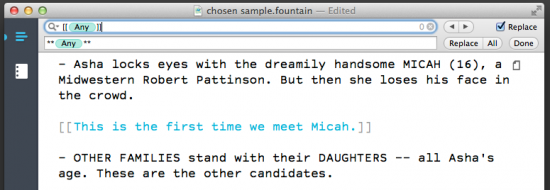
screenshot of find

Using the pattern above, you can change out double brackets for double asterisks all in one pass. Your notes will print in the script as bold action lines.

Here’s how to do it.

First off, save your document. Better saved than sorry, and you’ll want a version that keeps your notes all note-like.

Do a Find (⌘F).

The pattern you’re looking for is [[(any random text)]]. The brackets are easy. Matching the text between them has traditionally been more difficult.

Highland now has a wildcard token called (Any). You can find it by clicking the magnifying glass and choosing Insert Pattern from the menu.
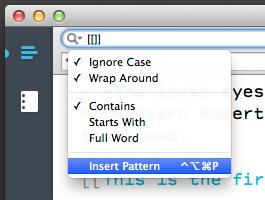
screenshot insert pattern

In the next menu, choose “Any Characters.”
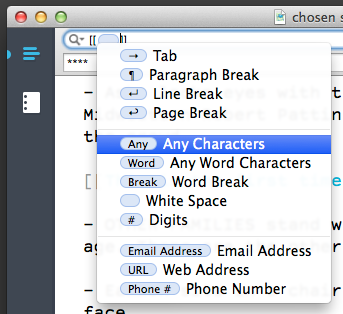
screenshot insert

Your find field should now be [[(Any)]].

Tick the Replace checkbox on the right. In the next field, you tell Highland what you want it to put in place of what you found.

Let’s start with two asterisks. Then put another (Any) token. You can get it from the same Insert Pattern menu, or just copy-paste it from the line above. ((Behind the scenes, this is done with regular expressions. If you copy-and-paste this (Any) token, you’ll find it works in many Mac apps, even ones that use older Find dialog boxes.)) Finally, put another two asterisks so the whole line gets bold formatting.

Click the All button to replace all of the notes in the script. Those bracketed notes are now bolded action lines.

The options in the magnifying glass are useful for other things as well.

– By unchecking Ignore Case, you can match TOM versus Tom. To swap out a character’s name, do one pass for TOM, another for Tom.
– Use Full Word in order to match “ant” but not “antagonize.”
– The find menu lists recent searches, saving you a step.

Finally, one of my favorite features in Highland 1.7 is the faceless Find Again. Even when the Find field is closed, ⌘G will repeat your last search. It’s a handy way to hop through your script.

Almost all of this functionality comes for free with Mac OS. It’s one of the reasons it’s not easy to port Highland directly over to Windows or Linux or a web-based application.

Photoplays and archetypes

Episode - 143

Go to Archive

May 13, 2014 Broadway, Follow Up, How-To, Screenwriting Software, Scriptnotes, Transcribed

In a wide-ranging episode, Craig and John look at a 1912 screenwriting book, Levinson’s beef with the WGA, and the Periodic Table of Storytelling.

We also answer listener questions about keeping secrets from readers, firing managers, and what happens to a Broadway show after Broadway. Plus, more follow-up on old One Cool Things.

There are still (maybe?) tickets for the live show on the 15th. See the links for details.

Links:

* [Voting for the Live Three Page Challenge is open](http://johnaugust.com/threepagelive) until May 14 at noon
* [Get your tickets now](https://www.wgfoundation.org/screenwriting-events/scriptnotes-summer-superhero-spectacular/) for the Scriptnotes Summer Superhero Spectacular
* John’s blog post on [which apps screenwriters are using](http://johnaugust.com/2014/which-apps-are-screenwriters-using)
* Scriptnotes, Episode 141: [Uncomfortable Ambiguity, or Nobody Wants Me at their Orgy](http://johnaugust.com/2014/uncomfortable-ambiguity-or-nobody-wants-me-at-their-orgy)
* Matt Selman [on Wikipedia](https://en.wikipedia.org/wiki/Matt_Selman)
* The Simpsons, Episode 492: The Book Job, on [Wikipedia](https://en.wikipedia.org/wiki/The_Book_Job) and [Amazon Instant Video](http://www.amazon.com/dp/B006B318N8/?tag=johnaugustcom-20)
* The Simpsons, Episode 266: The Trilogy of Error [on Wikipedia](https://en.wikipedia.org/wiki/Trilogy_of_Error)
* John’s blog post on [How to Write a Photoplay](http://johnaugust.com/2014/how-to-write-a-photoplay) and [the book on archive.org](https://archive.org/details/howtowritephotop00hoag)
* Deadline on [Barry Levinson leaving the WGA](http://www.deadline.com/2014/05/barry-levinson-quits-wga-over-sloppy-credit-arbitration-on-screen-version-of-philip-roths-the-humbling/)
* [The Periodic Table of Storytelling](http://designthroughstorytelling.net/periodic/)
* Seattle’s [Experience Music Project Museum](http://www.empmuseum.org/), and [John’s photo of the Archetypes of Fantasy chart](http://johnaugust.com/Assets/archetypes.jpg)
* Joseph Campbell’s [The Hero with a Thousand Faces, Collected Works](http://www.amazon.com/dp/1577315936/?tag=johnaugustcom-20), and his and Bill Moyers’ video series, [The Power of Myth](http://www.amazon.com/dp/B00A4E8E1O/?tag=johnaugustcom-20)
* [Bulfinch’s Mythology](http://www.amazon.com/dp/1440426309/?tag=johnaugustcom-20)
* [Memos to Hollywood](http://www.nytimes.com/2014/05/04/movies/critics-weigh-in-on-patriarchy-and-the-vanished-film-print.html) from The New York Times
* Big Fish’s [upcoming shows](http://www.theatricalrights.com/big-fish)
* Vote now (for Big Fish!) for the [Broadway.com Audience Choice Awards](http://awards.broadway.com/buzz/2014/5/5/votebway-vote-now-for-the-winners-of-the-2014-broadwaycom-audience-choice-awards)
* All our [One Cool Things](http://johnaugust.com/onecoolthings)
* [WorkEZ Executive Laptop Stand](http://www.uncagedergonomics.com/workez-executive/) and [on Amazon](http://www.amazon.com/dp/B00B9HGHPU/?tag=johnaugustcom-20)
* [Sometimes You Die](https://itunes.apple.com/us/app/sometimes-you-die/id822701037?mt=8) for iOS
* [Outro](http://johnaugust.com/2013/scriptnotes-the-outros) by Scriptnotes listener Sam Worseldine ([send us yours!](http://johnaugust.com/2014/outros-needed))

You can download the episode here: [AAC](http://traffic.libsyn.com/scriptnotes/scriptnotes_ep_143.m4a) | [mp3](http://traffic.libsyn.com/scriptnotes/scriptnotes_ep_143.mp3).

**UPDATE 5-16-14:** The transcript of this episode can be found [here](http://johnaugust.com/2014/scriptnotes-ep-143-photoplays-and-archetypes-transcript).

Which apps are screenwriters using?

May 9, 2014 Follow Up, Fountain, Geek Alert, Highland, Screenwriting Software

We had [57 entries](http://johnaugust.com/threepagelive) for the Three Page Challenge we’re conducting on May 15th.

I wondered which apps these screenwriters were using, so I checked the metadata for each file. ((Mac Nerds: After a lot of Googling, I couldn’t find a way to display creator information for each file in a folder; I had to do them one-by-one using Finder’s Get Info. If you have a command-line trick for this, I’d love to know it.))

| **App** | **# of Entries** | **% of Total** |
|—————|————–|———–:|
| Final Draft 8 | 18 | 32% |
| (unclear) ((The (unclear) category is for PDFs that don’t have a recognizable creator. For example, some PDFs show up as being from Preview on the Mac, which is primarily a reader but can be used to paste together multiple files.)) | 7 | 12% |
| Fade In | 7 | 12% |
| Final Draft (Windows) | 6 | 11% |
| Slugline | 5 | 9% |
| Final Draft 9 | 4 | 7% |
| Screenwriter | 3 | 5% |
| Celtx | 2 | 4% |
| Final Draft 7 | 2 | 4% |
| Highland | 1 | 2% |
| TextEdit | 1 | 2% |
| Word | 1 | 2% |
| **Total** |**57** | 100% |

Adding up its various incarnations, we find that Final Draft created just over half the entries. That’s about what I would have expected.

But I find it interesting that so many users have stuck with Final Draft 8, rather than version 9. There are still holdouts with version 7 as well.

I was happy to see six dedicated screenwriting apps (Final Draft, Fade In, Slugline, Screenwriter, Celtx and Highland) among the entrants. I didn’t find any Adobe Story or WriterDuet scripts. ((If you submitted a script written in Adobe Story or WriterDuet, let me know and I’ll amend the figures.))

Writers submitting to the Three Page Challenge are, almost by definition, listeners to the Scriptnotes podcast, in which we’ve discussed Final Draft, Fade In, Slugline and Highland among other apps. I wonder to what degree that has influenced their choices.

Three Page Challengers are also generally aspiring screenwriters, rather than working pros. To me, that makes entrants more likely have recently purchased software (or web-based subscription services) than established writers, who tend to stick with what they know.

The online submission for Three Page Challenges worked well enough that we’ll keep using some version of it. In the next incarnation, we’ll ask upon submission which app the writer used.

Voting for the Three Page Challenge

May 9, 2014 News

At the live [Scriptnotes show on May 15th](https://www.wgfoundation.org/screenwriting-events/scriptnotes-summer-superhero-spectacular/), we’ll be conducting a Three Page Challenge with special guest judge Susannah Grant.

Tuesday was the deadline for entering. All of the entries are now available for reading, both on [Weekend Read](https://itunes.apple.com/us/app/weekend-read/id502725173?mt=8) and [here](http://johnaugust.com/threepagelive).

Once you’ve had a look, vote for your favorite(s) — you can choose up to three entries you’d like us to discuss on the 15th. We will probably only have time for two three-pagers on the live show, but I wanted voters to be able to support more than just one entry.

Should you vote for the best written entry, or the one that needs the most constructive criticism? Your call.

Voting is [open now](http://johnaugust.com/threepagelive), and runs through noon on Wednesday, May 14th.

« Previous Page
Next Page »

Primary Sidebar

Newsletter

Inneresting Logo A Quote-Unquote Newsletter about Writing
Read Now

Explore

Projects

  • Aladdin (1)
  • Arlo Finch (27)
  • Big Fish (88)
  • Birdigo (2)
  • Charlie (39)
  • Charlie's Angels (16)
  • Chosen (2)
  • Corpse Bride (9)
  • Dead Projects (18)
  • Frankenweenie (10)
  • Go (29)
  • Karateka (4)
  • Monsterpocalypse (3)
  • One Hit Kill (6)
  • Ops (6)
  • Preacher (2)
  • Prince of Persia (13)
  • Shazam (6)
  • Snake People (6)
  • Tarzan (5)
  • The Nines (118)
  • The Remnants (12)
  • The Variant (22)

Apps

  • Bronson (14)
  • FDX Reader (11)
  • Fountain (32)
  • Highland (75)
  • Less IMDb (4)
  • Weekend Read (64)

Recommended Reading

  • First Person (87)
  • Geek Alert (151)
  • WGA (162)
  • Workspace (19)

Screenwriting Q&A

  • Adaptation (65)
  • Directors (90)
  • Education (49)
  • Film Industry (489)
  • Formatting (128)
  • Genres (89)
  • Glossary (6)
  • Pitches (29)
  • Producers (59)
  • Psych 101 (118)
  • Rights and Copyright (96)
  • So-Called Experts (47)
  • Story and Plot (170)
  • Television (165)
  • Treatments (21)
  • Words on the page (237)
  • Writing Process (177)

More screenwriting Q&A at screenwriting.io

© 2026 John August — All Rights Reserved.