• Skip to primary navigation
  • Skip to main content
  • Skip to primary sidebar

John August

  • Arlo Finch
  • Scriptnotes
  • Library
  • Store
  • About

Search Results for: celtx

Highland updates

May 30, 2012 Apps, Follow Up

Since the launch of the [Highland public beta](http://johnaugust.com/2012/highland-for-all) last week, we’ve gotten great feedback. Thank you to our second-wave testers.

I’m particularly happy with how our report card system is working. By gathering the information in one place, we’ve been able to see some clear patterns.

Not everyone is using Lion.
—-

We built and tested Highland on Mac OS X Lion (10.7), but a lot of Mac users are still on Snow Leopard (10.6). They’re getting crashes and odd behavior. That’s not okay.

We have two choices:

1. Go back and figure out support for Snow Leopard, or
2. Draw the line at Lion and get ready for Mountain Lion (10.8).

There are a few unannounced features we have planned for Highland that make sticking with Lion very appealing, but we haven’t decided yet.

One thing we know for certain: since we’re planning on selling the app through the Mac App Store, 10.6 is the earliest OS we can support.

Honest question: Why aren’t people upgrading to Lion? Are you holding on to some piece of software that will otherwise break?

People actually use Celtx.
—-

Several users filed report cards noting that PDFs created by Celtx weren’t importing properly, with wordsrunningtogetherlikethis. We should be able to take care of this issue. I’m just noting it because I have no real sense what percentage of the screenwriting software market Celtx (or the other apps) actually have.

Windows users want theirs.
—

Many screenwriters use Windows. Unfortunately, the work we’ve done for the Mac version doesn’t translate very well to the PC. I don’t think you’ll ever see a PC version of Highland.

[Fountain](http://fountain.io), however, is open-source and platform-agnostic. My hope is that we’ll see many screenwriting utilities for Windows, Linux and other operating systems.

Preview is working better than Export.
—

Many users are finding that Highland’s Preview shows what they expect, but the .fdx or .pdf has issues. We’ll make that a focus on upcoming releases.

Good news is useful, too.
—

We obviously need to hear when things go wrong, but it’s nice to know when things go right:

> Just about perfect. Not all the title page elements imported under the correct key identifier and centered text didn’t import as centered, but everything else was spot on.

Mixed news is also helpful:

> Looks great overall. Conversion from PDF is great. Unfortunately, a few of the “–Day” and “– Night”s got sent to the next line as action and not scene headings. A few parentheticals also stayed in dialog when it was after a few words and not directly after a character name.

It’s also reassuring when users seem to grok the underlying potential:

> I’m not sure exactly why I’m so excited about Highland, but I am. It most likely stems from the fact I dislike most screenwriting apps and have grown fond of writing in the Fountain format.

My hope is that Highland will help close the loop for screenwriters who want to work in Fountain, letting any text editor do just enough.

We hope to get new Highland betas out frequently. They won’t all be wonderful. Things will break as they get better. But with ongoing feedback, I think we’ll end up with something terrific.
Adobe Story, an early look

September 22, 2009 Screenwriting Software

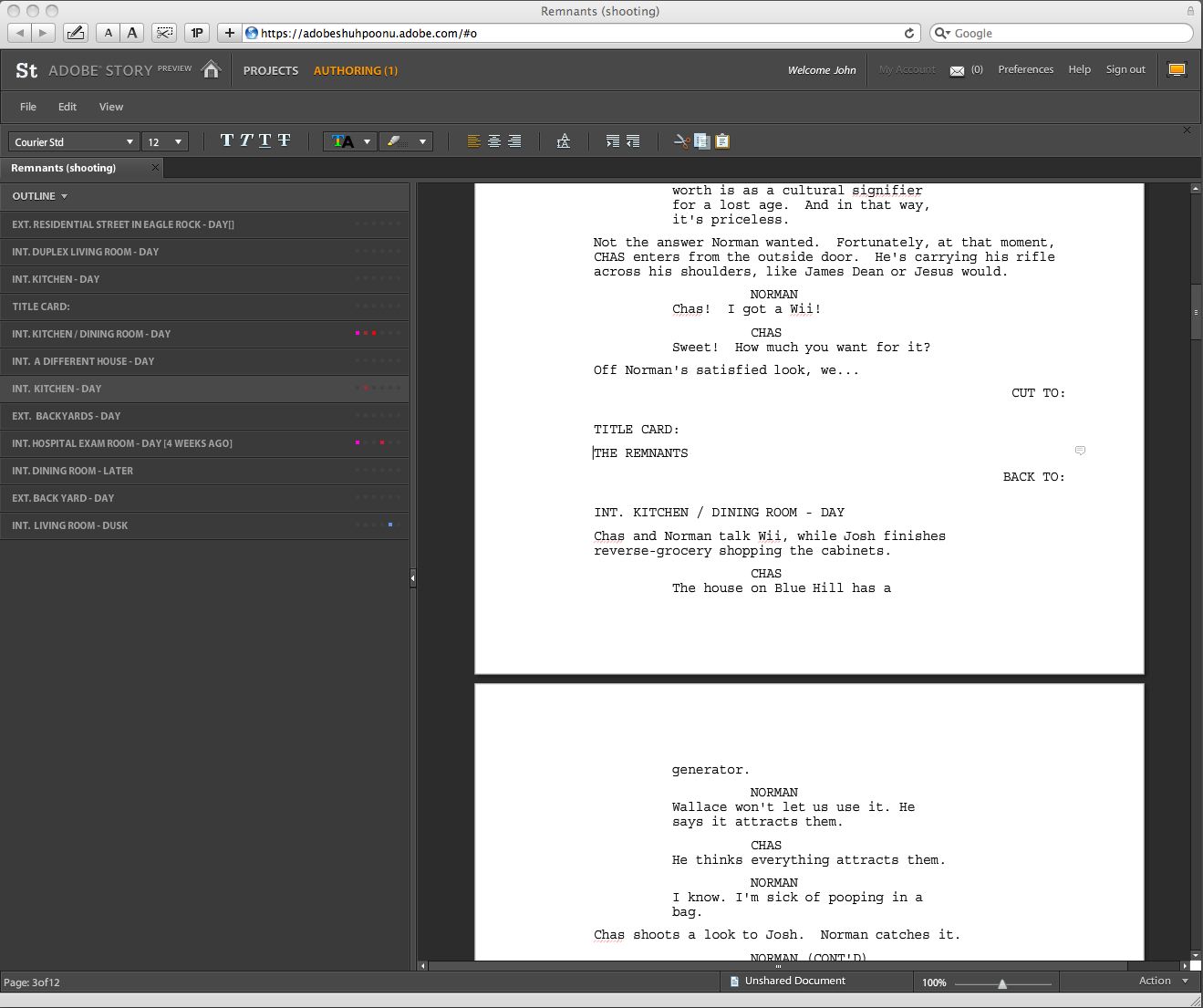
Reader Andrew [pointed me](http://twitter.com/abeeken/status/4170234549) to the preview version of [Adobe Story](https://www.adobe.com/products/creativesuite/cslive/story/), the new screenwriting application that’s designed to work with Adobe’s Creative Suite.

It’s Flash-based and runs in the browser (or via Air), but does a credible job duplicating most of what you’d expect from a traditional desktop application.

screenshot

Story is definitely a work-in-progress, so it’s not fair to compare it to the dominant players in the field. In its current form, it flubs some fundamentals like drag-and-drop and keeping blocks of dialogue together.

But while you wouldn’t use it for Actual Work yet, Story does some clever things that are worth calling out.

* Story tries to identify which characters are in a scene, and uses colored-coded dots to mark them in the outline.

* The highlighter is really a highlighter, changing the background of text.

* Full-screen looks good, with everything but the page itself nice and dark.

* Find and Replace is simply a toolbar in the same window.

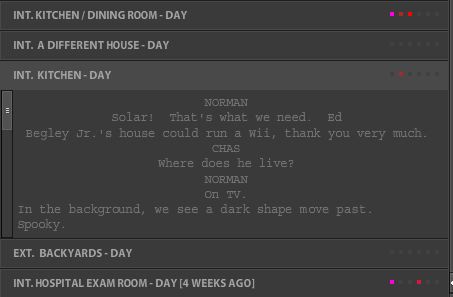
* Single-clicking a scene header in the outline expands it to a compressed, scrollable version of the scene, so you can check something without losing your place in the script. (Double-clicking a scene header jumps you to that scene.)

screenshot

I wish Story well. Competition is good, and a company like Adobe has the resources and experience to keep plugging at it. Yet I have a hard time envisioning it capturing a lot of ground.

Its text handling is strange, probably a result of its Flash origin. No doubt a lot of that can be remedied, but one of the consequences of platform-independence is that a web application is never going to act quite like a Windows one or a Mac one. With something as basic as text, I don’t want to have to consciously anticipate what’s going to happen if I try to select a word. Just work.

My other concerns are more philosophical. When the public preview of a screenwriting application lets dialogue spill across page breaks, I get nervous that its developers really don’t understand the format. Properly handling dialogue isn’t a feature; it’s a fundamental.

The preview version of Story does a good job importing and exporting. I didn’t test out the sharing and version-tracking features, but web-based software has a definite advantage here, and if Story is to make real inroads, it will probably be in this area. For writing teams, this can be very helpful.

I’ll be looking forward to seeing what Adobe does next with Story.

ADDED: Whenever I write about screenwriting software, the first questions are about what application I use. I alternate between Final Draft 8 and Screenwriter 6, with no strong preference between the two. I have also tried Celtx, Scrivener and Montage, but haven’t found them adequate for my work.

Title page trouble with Final Draft .pdfs

May 21, 2007 How-To, Rant, Screenwriting Software, Software

Reader Josh C wrote in with one solution to a problem that’s been frustrating me for months. When you want to save a script as a .pdf, Final Draft won’t always include the title page. It’s frustratingly inconsistent. The obvious workaround is to save the title page as a separate file, which is what I’ve often done. But then you end up emailing two documents, increasing the confusion on the other end.

Josh was using Final Draft version 6.0.6.0. It turns out, the issue is whether the “Title Page…” window is open or closed.

1. Save your screenplay as normal (as a .fdr)

2. With your saved screenplay still open, go to Document > Title Page. A new, blank Title Page opens.

3. Fill in the blanks, then just CLOSE THE TITLE PAGE. This is the part that I got hung up on forever. If you leave the title page open, then try to save as a PDF, it won’t work. The Title page WON’T attach itself to the PDF if the Title Page is still open when you try to Save as. Just close the Title Page. It saves automatically to your screenplay.

4. With your screenplay still open, go to File > Save As — then select Adobe Acrobat Document (*pdf) – or whatever your computer says. Save the new PDF file somewhere and open it up. The Title Page should be attached at the top of the screenplay where it should be 🙂

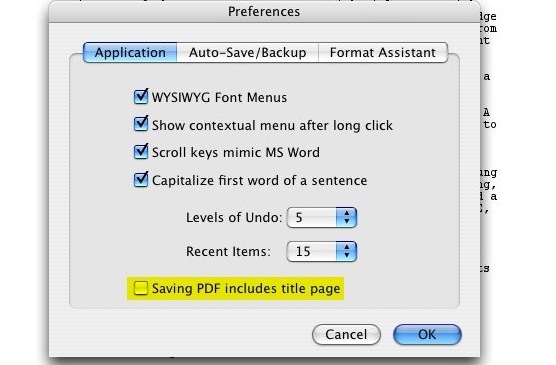
In my tests with 7.1.3, the .pdf will also include the title page even if that window is still openHowever, if you haven’t closed or saved the title page, it won’t be updated until you do. — provided you have a [certain checkbox checked](http://oslo.instantservice.com/iskb/SearchAnswer.cfm?NodeID=181153) in “Preferences.”

checkboxYes, I’ll admit that I didn’t read the manual with version 7 of Final Draft. But this is a pretty questionable place to put this checkbox. After all, sometimes you’ll want to include the title page, sometimes you won’t. Does it really make sense to have this be an application-wide preference, housed in a panel that has nothing to do with printing, saving or the specific document you’re working on? It’s pretty much the last place I’d think to look for it.

What’s more, at least on the Mac, Final Draft is using the built-in .pdf facility of OS X. It’s basically just printing to a file.You can test this by choosing a two-page layout in the Print dialog box. The next time you choose to Save as PDF, you’ll get facing pages. Since it seems to be using the standard print architecture, you’d think that choosing the “Print Title Page” option in the Print dialog box would have some effect. It doesn’t. And that’s why it’s frustrating.On the Mac, you always have the option of using the “Save as PDF” function built into the Print dialog box. But I’ve never had any luck getting that to include a title page. My guess is that Final Draft treats the title page as a separate document. When you print to a traditional printer, you’ll notice a one-page progress dialog flash for a second. I think Final Draft is kicking out the title page as a distinct job. It never incorporates it into the “real” script.

Whenever I complain about Final Draft, I get a nice note from the developers asking me to help out with the next version, and a few emails from companies working on competing applications. So let me make it clear where I stand. Despite its annoyances, I end up using Final Draft because what it gets right generally outweighs what it gets wrong. There’s certainly some inertia on my part, but given a better alternative, I’d switch in a heartbeat. The shipping versions of Screenwriter, Montage and Celtx aren’t better, particularly when it comes to revisions.

I’m hoping the upcoming Screenwriter 6 gives Final Draft some real competition, because that’s what’s lacking. When we were cutting The Nines, I realized that editing software has benefitted tremendously from the battle between Avid and Apple, with new features, better interfaces, and dramatically lower prices. I started out a Final Cut Pro man, while my editor was firmly Avid. We had the luxury of both being right. Both systems are terrific, and I think that’s largely because of the competition.

Macworld review of Montage

October 2, 2006 Software

Macworld has a [review](http://www.macworld.com/2006/10/reviews/montage1/index.php/?lsrc=mwrevrss) of Mariner Software’s [Montage](http://www.marinersoftware.com/products/montage/), which is pretty much right on the money. They give it two out of five mice, admiring its interface while pointing out that it doesn’t do nearly as much as it should: page locking, scene numbering and many other standard features are still on the drawing board. Which is fine for a beta, but not a shipping product.

I like the Montage folks, and have been in e-mail contact with them about an even more fundamental issue for me — the way it handles dialogue across page breaks. They’ve been responsive, and seem to genuinely want to make a great application. Version 2 — or even 1.5 — might be terrific. Right now, Montage is a program that looks finished but isn’t.

I’ve moved beyond hoping for a Final Draft killer — the next version of Screenwriter should do that, assuming it ever ships. But competition breeds innovation, so I’ll always be watching Montage, Celtx and the other upstarts. One of them might just change the game.

« Previous Page

Primary Sidebar

Newsletter

Inneresting Logo A Quote-Unquote Newsletter about Writing
Read Now

Explore

Projects

  • Aladdin (1)
  • Arlo Finch (27)
  • Big Fish (88)
  • Birdigo (2)
  • Charlie (39)
  • Charlie's Angels (16)
  • Chosen (2)
  • Corpse Bride (9)
  • Dead Projects (18)
  • Frankenweenie (10)
  • Go (29)
  • Karateka (4)
  • Monsterpocalypse (3)
  • One Hit Kill (6)
  • Ops (6)
  • Preacher (2)
  • Prince of Persia (13)
  • Shazam (6)
  • Snake People (6)
  • Tarzan (5)
  • The Nines (118)
  • The Remnants (12)
  • The Variant (22)

Apps

  • Bronson (14)
  • FDX Reader (11)
  • Fountain (32)
  • Highland (73)
  • Less IMDb (4)
  • Weekend Read (64)

Recommended Reading

  • First Person (87)
  • Geek Alert (151)
  • WGA (162)
  • Workspace (19)

Screenwriting Q&A

  • Adaptation (65)
  • Directors (90)
  • Education (49)
  • Film Industry (490)
  • Formatting (130)
  • Genres (89)
  • Glossary (6)
  • Pitches (29)
  • Producers (59)
  • Psych 101 (118)
  • Rights and Copyright (96)
  • So-Called Experts (47)
  • Story and Plot (170)
  • Television (165)
  • Treatments (21)
  • Words on the page (237)
  • Writing Process (177)

More screenwriting Q&A at screenwriting.io

© 2025 John August — All Rights Reserved.