• Skip to primary navigation
  • Skip to main content
  • Skip to primary sidebar

John August

  • Arlo Finch
  • Scriptnotes
  • Library
  • Store
  • About

How-To

How not to choose a movie title

May 12, 2008 How-To, Projects, Rant

I’ve written about the importance of [a good title](http://johnaugust.com/archives/2005/a-movie-by-any-other-name) before. A great script with a crappy title faces an uphill battle. That’s why I always make sure I have a title I like before I type “FADE IN,” even if I later change my mind. ((I never really had a title for that zombie western, which I should point out, never sold. Readers had [great suggestions](http://johnaugust.com/archives/2005/a-movie-by-any-other-name#comments), though.))

So yes, I’d pay for a great title. Today’s [LA Times article](http://www.latimes.com/business/la-fi-titles12-2008may12,0,6148790.story) about companies that consult on movie titles sounded promising, until…

> Last summer, Lockhart and Barrie tried to persuade Sony to change the title of “Hancock,” a big-budget action comedy starring Will Smith as an alcoholic superhero known as John Hancock. They told studio executives they thought the current title was vague and pitched alternatives such as “Heroes Never Die,” “Unlikely Hero” and “Less Than Hero.”

There’s spit-balling, and then there’s just spitting. I’d rather have an inscrutable one-word name than any of those crappy alternatives.

I helped out on that movie as it was transitioning from “Tonight, He Comes” to “Tonight He Comes” — the removal of the comma helped soften the double-entrendre. But by the wrap party, it was simply “Hancock,” which serves it well. ((One added advantage of a single-word title is that it requires no translation for international audiences. Except in Germany, where Go is called “Go! Sex, Drugs & Rave’N’Roll.” Shudder.))

By the way, the Josh Friedman who wrote the [LA Times article](http://johnaugust.com/archives/2005/a-movie-by-any-other-name#comments) is not the [Sarah-Connor-Chronicling neighbor](http://www.imdb.com/name/nm0295264/) and [erstwhile blogger](http://hucksblog.blogspot.com/).

How to Meet

April 15, 2008 Film Industry, How-To, QandA

questionmarkI’m at the stage where I’ll hopefully be meeting with managers, agents, and producers. As a writer/director, what should I expect from these initial meetings and do you have any advice, or pitfalls to avoid?

— Sam
Los Angeles

Meetings are a crucial part of a professional screenwriter’s job. Even when you’re not pitching a specific project, you’re basically pitching yourself as someone worth hiring in the future. So you’re right to be thinking about what you should say, do, and wear. (In fact, I’ve [already addressed](http://johnaugust.com/archives/2004/the-not-so-well-dressed-screenwriter) that last point.)

Let me briefly lay out the structure of every first meeting I’ve had in Hollywood.

The meeting is set for 10 a.m. You get there at 9:55. An assistant asks you if you’d like anything to drink. The proper answer is, “A water would be great.” ((You may also ask for a Diet Coke. These are the only beverages you can be reasonably assured will be on the premises, and not a hassle leading to frustration or extra work. Back in the day (say, 1999), you could also ask for a “Snapple-type beverage.” But no one drinks Snapple anymore.)) This phrasing makes it clear that her request has been heard and appreciated, and that you haven’t mistaken her for a waitress.

The assistant will bring you the beverage, then inform you that the agent/executive/producer is running a few minutes late. This is completely expected. Entertain yourself with your iPhone or copies of Variety laying nearby. If the assistant is nearby and doesn’t seem particularly busy with some other task, engage in conversation. There’s a pretty good chance this assistant will run Hollywood someday, so it never hurts to be friendly.

When the Big Man calls you in to his office, try to figure out which seat he likes to sit in. Generally, you’re safe sitting on the couch. If it’s a two-chair situation, you might as well ask, “Do you have a favorite chair?” Because if you sit in his spot, you’re just starting the meeting off on the wrong foot. ((Meeting with multiple executives is an extra-credit situation, and generally necessitates asking about who sits where.))

The first topic of conversation will be about one of four things:

* Something he read of yours that he liked
* A mutual acquaintance
* His office: either the view, or how he just moved in
* A movie that came out this past weekend. ((Only appropriate if the meeting is on Monday, and the movie did significantly better or worse than expected.))

This is a warm-up period, and is not scored.

While engaged in this conversation, listen for the word which signals the end of the period: “So.”

As in, “So, tell me about the kinds of things you write,” or “So, let me tell you a little about our company, and the movies we’re trying to make.” At this point, judging begins. If it’s mostly a listening exercise, be ready to restate his points in different words, preferably with insightful analogies to successful movies. ((Bonus points if you can include movies he’s worked on. Box-office disappointments are okay, particularly if there are praiseworthy aspects.))

If he’s asking you to talk, say three smart things. Then get him talking again.

EXEC

So, is that the kind of thing you mostly want to write, is thrillers?

YOU

Thanks. Yeah, I love thrillers. I mean, I love all genres, but what’s great about thrillers is you get to do the **character work setting up motivations,** you get the **puzzle aspect of plotting,** and **real stakes.** With comedies and dramas, you get one or two of those, but thrillers are the whole package.

EXEC

I hadn’t thought of it that way.

YOU

You take a movie like Collateral, and it can be funny and tight and dangerous.

EXEC

I worked on Collateral.

YOU

I love that movie. How did that come about? Was that a book?

This process will continue for ten to 20 minutes, at which point he may pull out a buck slip ((A buck slip is a piece of heavy paper cut down to roughly 4×10 inches, which is often attached to a script in lieu of a typed letter. I’m not sure they even exist in other industries.)) listing all of the company’s open writing assignments. (Or in the case of agent/managers, a list of studios and development companies.) After a little more discussion, he thanks you for coming in.

This is your signal to stand, shake his hand, and leave. Say goodbye to the assistant. Remember to ask if you need to validate.

If there’s any specific project you talked about, follow up the next day with an email. If you don’t have his email address, it’s fair to call the assistant and ask if you can email her (the assistant) something for the boss. You don’t need to send thank you notes and such.

When I first signed with an agent, he sent me out on 15 meetings. I was meeting junior executives at companies that had never made a movie. But it was smart of my agent to set those meetings, because it gave me a lot of practice — which I needed, because I was terrible. By the time I was taking meetings for Go, I was pretty unflappable, even in the face of egregious behavior.

My overall advice is to not freak out over any given meeting. Pretend it’s just having coffee with somebody who went to your same school. Unless you’re pitching a specific project, don’t approach it with any particular expectation, and it’s likely to go fine.

How to explain quantum mechanics

March 10, 2008 How-To, Words on the page

One of the more common challenges faced by a screenwriter is how to explain a difficult concept that’s important to your plot. For instance, in Jurassic Park, we need to understand how the dinosaurs came to be living on that island, so that when they start running amok, we’ll feel like we’re grounded in some sense of reality.

I haven’t read Michael Crichton’s novel for Jurassic Park, but if it’s anything like his others, I suspect he spent five or more pages detailing the cloning process in exhaustive detail. You can get away with that in a book. If a reader becomes bored, she can skim ahead a few paragraphs until the story begins again. But the movie viewer is hostage, ((More specifically, someone watching a movie in a theater is hostage. On video, there’s nothing to stop a viewer from zipping ahead during dull explanations.)) forced to endure whatever information is presented, whether interesting or not.

Since the boring bits of a movie are generally the first things to get trimmed out in an edit, these crucial explanatory moments are likely to get dropped unless they’re written extremely carefully, in the (often misguided) theory that no information is better than boring information. So let’s look at some Best Practices when explaining something in a script.

Keep it short. No, even shorter than that.
—-
As the writer, you may know exactly how the Thessalactan Grid enables transdimensional travel, and why there’s a 34-second delay before the Quantifier engages. I’m sure it’s fascinating and well-reasoned. But the audience doesn’t care. Or, more precisely, the audience doesn’t need to care, because all that really matters to them is how the hero is going to get off the space station before it blows up.

HERO

How does it work?

SCIENTIST WOMAN

It creates a well in time-space that bends…

HERO

WHICH BUTTON DO I PUSH?!

Give them a guide…
—-
While the cliché of a wise old man (think Obi-Wan or Gandalf) is rightly avoided, ((One of the appeals of the Captain Marvel mythology is that the first thing Billy Batson’s wizardly mentor does is die.)) there are smart ways to use a supporting character as explainer-of-things.

For starters, make sure the character has a function beyond exposition. The Day After Tomorrow was frustrating on many levels, but I liked that Dennis Quaid was both hero and explainer. (You could say the same about Jeff Goldblum in just about every movie.) A villain is another classic choice: since he knows what he’s trying to do, he’ll likely have a concise way of explaining it. Just avoid mustache-twirling, and “before I kill you, let me just explain…”

When possible, let the hero pursue the Answer Man, rather than vice-versa. Nothing screams exposition more than a character showing up simply to explain something. If getting an answer is an explicit goal for your hero, we at least have a sense of forward progress.

…or just let the characters figure it out for themselves
—-
No one teaches Spider-Man how to use his powers. A large chunk of the first movie is spent watching Peter Parker explore his strength and web-shooting prowess. Similarly — but less successfully — the hero of Jumper finds he’s able to teleport, and receives no training or guidance until quite late in the movie. ((The lack of any instructor or context-setting becomes a real problem once the villains are introduced. Poor Samuel L. Jackson is forced to announce his motivations, but they’re so nonsensical that we’re forced to conclude he’s either (a) lying or (b) bat-shit crazy.))

If characters need to learn something for themselves, try to build situations that are both organic and progressive: you want to build upon simple, relatable discoveries. A great recent example is the videogame Portal (from the Orange Box), in which the player has to learn how to control a physics-defying device. While there’s a disembodied voice who seems to be offering guidance, she’s actually just a comedic menace. The real learning comes from carefully-designed levels, each with a specific (but unstated) teaching objective. ((The game is worth it just for the developer commentary. And the cake.))
In screenplay terms, this means letting the characters experiment. The first Narnia movie would have played very differently if the children had landed in the snowy woods without any sense of how to get back; the quest to return home would have felt obligatory. By letting them cross back and forth, the movie silently sets up its rule system, and lets the story chart a different path.

Take away the questions
—-
Often, the best way to answer questions is to remove them from consideration. For instance, the make-believe science of precognition in Minority Report raised a huge number of causality issues, which you could easily spend the whole movie trying to address.

But it was meant to be a thriller, not a head-scratcher, so I added a scene in which a skeptic (Witwer) catches a glass ball just as it rolls off a table.

KNOTT

Why did you catch that?

WITWER

Because it was going to fall.

FLETCHER

You’re certain?

WITWER

Yes.

JAD

But it didn’t fall. You caught it.

Witwer smiles a little, starting to catch on.

JAD (CONT’D)

The fact that you prevented it from happening doesn’t change the fact that it was going to happen.

WITWER

It’s the same with the murders.

FLETCHER

The precogs are showing us what’s going to happen unless we stop it.

Like time travel, foreknowledge of the future is always going to involve paradoxes and gotchas. But by showing it as something visual and physical, we’ve preempted endless questions about the physics and ethics of their legal system. While we’ll learn more about how it works (by meeting the precogs), the ontological overhead has been reduced to a ball rolling across a table.

It’s like…
—-
Such similes and metaphors can be a screenwriter’s best friends. How do you explain a margin call? “It’s like you’ve been buying stock with a credit card, and suddenly you have to pay the bill.” How are you going to catch the subatomic weapon? “Picture a net, but made of magnetic waves.” Does a clone have a soul? “Absolutely. It’s an identical twin, just born later.” Or, “No. It’s like a bad photocopy.”

Roll tape
—-
Speaking of clones, in David Koepp’s script for Jurassic Park, he packaged all the how-we-did-it information in an animated film strip. In Dodgeball, the rules of the game are established in a black-and-white educational film about the history of the sport. And in Lost, the Dharma Initiative’s training films provide both crucial information (“keep entering the code”) and intriguing clues about what’s really going on.

Obviously, it’s not always possible or appropriate for your characters to stop what they’re doing to watch a film. But if it makes sense in context, it’s worth considering. Just keep it entertaining, and brief.

“Entertaining and brief” is good advice no matter which method you choose for presenting difficult information. Done artfully, the reader should never sense that he’s being told anything. It was just story. To that end, avoid scenes which could be summarized, “Hero learns…” That’s a tip-off that your character is listening rather seeking, observing rather than participating. “Discovering” is an action. So are “confronting,” “exploring,” and “testing.” Put your characters to work, and the audience will never realize they’re getting an explanation.

Title page trouble with Final Draft .pdfs

May 21, 2007 How-To, Rant, Screenwriting Software, Software

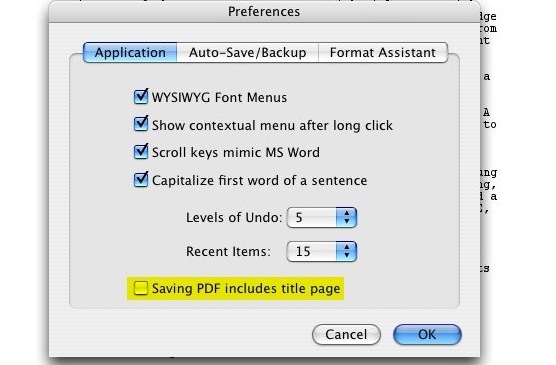
Reader Josh C wrote in with one solution to a problem that’s been frustrating me for months. When you want to save a script as a .pdf, Final Draft won’t always include the title page. It’s frustratingly inconsistent. The obvious workaround is to save the title page as a separate file, which is what I’ve often done. But then you end up emailing two documents, increasing the confusion on the other end.

Josh was using Final Draft version 6.0.6.0. It turns out, the issue is whether the “Title Page…” window is open or closed.

1. Save your screenplay as normal (as a .fdr)

2. With your saved screenplay still open, go to Document > Title Page. A new, blank Title Page opens.

3. Fill in the blanks, then just CLOSE THE TITLE PAGE. This is the part that I got hung up on forever. If you leave the title page open, then try to save as a PDF, it won’t work. The Title page WON’T attach itself to the PDF if the Title Page is still open when you try to Save as. Just close the Title Page. It saves automatically to your screenplay.

4. With your screenplay still open, go to File > Save As — then select Adobe Acrobat Document (*pdf) – or whatever your computer says. Save the new PDF file somewhere and open it up. The Title Page should be attached at the top of the screenplay where it should be 🙂

In my tests with 7.1.3, the .pdf will also include the title page even if that window is still openHowever, if you haven’t closed or saved the title page, it won’t be updated until you do. — provided you have a [certain checkbox checked](http://oslo.instantservice.com/iskb/SearchAnswer.cfm?NodeID=181153) in “Preferences.”

checkboxYes, I’ll admit that I didn’t read the manual with version 7 of Final Draft. But this is a pretty questionable place to put this checkbox. After all, sometimes you’ll want to include the title page, sometimes you won’t. Does it really make sense to have this be an application-wide preference, housed in a panel that has nothing to do with printing, saving or the specific document you’re working on? It’s pretty much the last place I’d think to look for it.

What’s more, at least on the Mac, Final Draft is using the built-in .pdf facility of OS X. It’s basically just printing to a file.You can test this by choosing a two-page layout in the Print dialog box. The next time you choose to Save as PDF, you’ll get facing pages. Since it seems to be using the standard print architecture, you’d think that choosing the “Print Title Page” option in the Print dialog box would have some effect. It doesn’t. And that’s why it’s frustrating.On the Mac, you always have the option of using the “Save as PDF” function built into the Print dialog box. But I’ve never had any luck getting that to include a title page. My guess is that Final Draft treats the title page as a separate document. When you print to a traditional printer, you’ll notice a one-page progress dialog flash for a second. I think Final Draft is kicking out the title page as a distinct job. It never incorporates it into the “real” script.

Whenever I complain about Final Draft, I get a nice note from the developers asking me to help out with the next version, and a few emails from companies working on competing applications. So let me make it clear where I stand. Despite its annoyances, I end up using Final Draft because what it gets right generally outweighs what it gets wrong. There’s certainly some inertia on my part, but given a better alternative, I’d switch in a heartbeat. The shipping versions of Screenwriter, Montage and Celtx aren’t better, particularly when it comes to revisions.

I’m hoping the upcoming Screenwriter 6 gives Final Draft some real competition, because that’s what’s lacking. When we were cutting The Nines, I realized that editing software has benefitted tremendously from the battle between Avid and Apple, with new features, better interfaces, and dramatically lower prices. I started out a Final Cut Pro man, while my editor was firmly Avid. We had the luxury of both being right. Both systems are terrific, and I think that’s largely because of the competition.

« Previous Page
Next Page »

Primary Sidebar

Newsletter

Inneresting Logo A Quote-Unquote Newsletter about Writing
Read Now

Explore

Projects

  • Aladdin (1)
  • Arlo Finch (27)
  • Big Fish (88)
  • Birdigo (2)
  • Charlie (39)
  • Charlie's Angels (16)
  • Chosen (2)
  • Corpse Bride (9)
  • Dead Projects (18)
  • Frankenweenie (10)
  • Go (29)
  • Karateka (4)
  • Monsterpocalypse (3)
  • One Hit Kill (6)
  • Ops (6)
  • Preacher (2)
  • Prince of Persia (13)
  • Shazam (6)
  • Snake People (6)
  • Tarzan (5)
  • The Nines (118)
  • The Remnants (12)
  • The Variant (22)

Apps

  • Bronson (14)
  • FDX Reader (11)
  • Fountain (32)
  • Highland (73)
  • Less IMDb (4)
  • Weekend Read (64)

Recommended Reading

  • First Person (87)
  • Geek Alert (151)
  • WGA (162)
  • Workspace (19)

Screenwriting Q&A

  • Adaptation (65)
  • Directors (90)
  • Education (49)
  • Film Industry (490)
  • Formatting (130)
  • Genres (89)
  • Glossary (6)
  • Pitches (29)
  • Producers (59)
  • Psych 101 (118)
  • Rights and Copyright (96)
  • So-Called Experts (47)
  • Story and Plot (170)
  • Television (165)
  • Treatments (21)
  • Words on the page (237)
  • Writing Process (177)

More screenwriting Q&A at screenwriting.io

© 2025 John August — All Rights Reserved.