• Skip to primary navigation
  • Skip to main content
  • Skip to primary sidebar

John August

  • Arlo Finch
  • Scriptnotes
  • Library
  • Store
  • About

John

Some early reflections on losing my mom

December 7, 2020 News

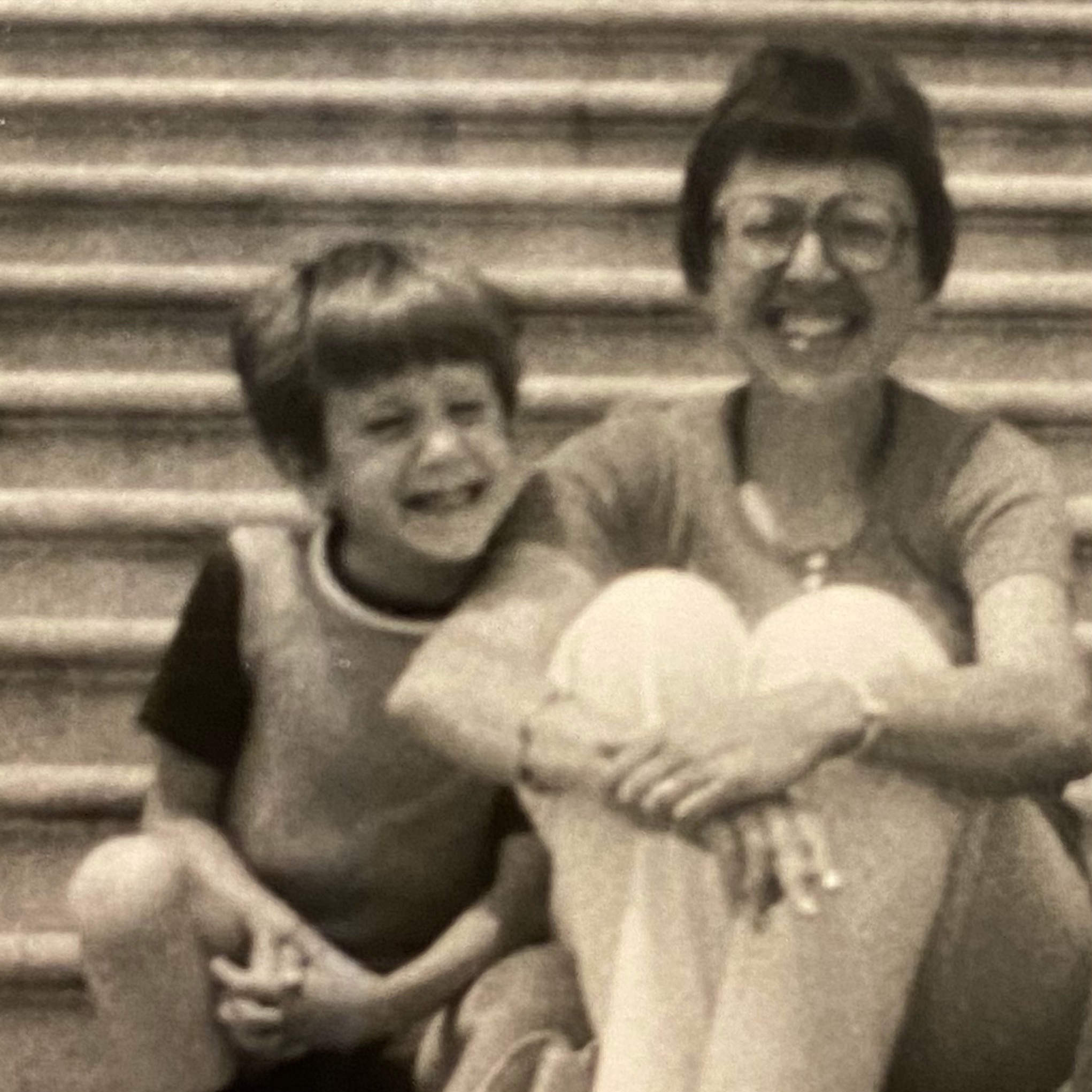
young john and mother on stepsMy mom died early Saturday morning. She was my first proofreader, biggest champion and fiercest Scrabble opponent. She won money on Jeopardy! and sang at Carnegie Hall. She was remarkable. I’ll love her always.

Like so many Americans in 2020, I didn’t get to be near my mom as she died. A stranger held an iPad while I blubbered about how much I loved her. I’m grateful to that nurse while always mindful that this didn’t have to happen.

My mom didn’t die of COVID, but within it. Routine appointments got pushed back. How long had her heart and kidneys been failing? We’ll never know. Statistically, she’s part of the “excess mortality” of this pandemic.

This summer, we drove 1,200 miles to Colorado to see her. This is as close as we could get.

john in mask pointing at second story balcony where mom sits

My mom was a hugger, and I didn’t get to hug her in the last year of her life. It sucks. To their credit, the strict protocols worked. No one in her senior living community got COVID-19.

Still, the pandemic did bring us closer. We FaceTimed every day at lunch. My mom was nosy in the nicest way. I got to know way too much about her fellow residents.

When I wrote the deathbed scene in Big Fish, I was drawing from the memory of losing my father in college. It was the fantasy version of the conversation I wished I’d had with a man I struggled to understand.

I had an extra 30 years to know my mom. There was no great mystery, regret or unfinished business. We were good.

Still, my mom was the last person who still saw me as her little boy. The last one who was proud of me for simply existing. That’s the loss I feel most today.

As a dad, a husband, and a 50-year-old orphan, I urge you to make sure the people you love know it. Don’t assume there will be time after the pandemic. There will always be something else.
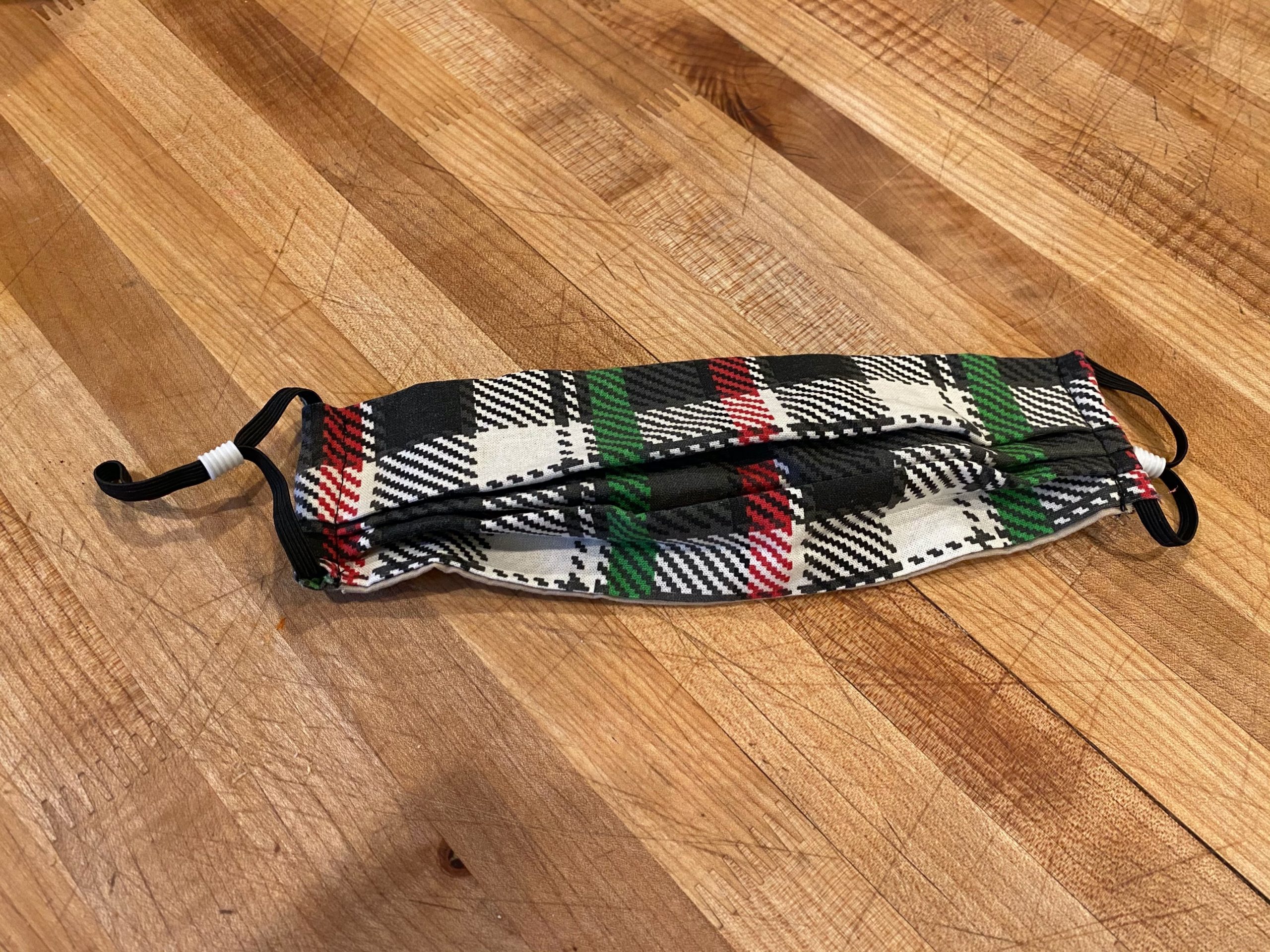
red and green plaid face mask

This mask is one I sewed for my mom last week because I knew she’d want something Christmas-y.

Highland gets a new Novel template

December 3, 2020 Apps, Highland

Although Highland 2 was originally developed for screenwriting, many novelists use it for books. In fact, I wrote all three [*Arlo Finch*](https://johnaugust.com/arlo-finch) novels entirely in Highland.

Michael Chabon, the Pulitzer Prize-winning author of The Amazing Adventures of Kavalier & Clay, Wonder Boys and many other acclaimed novels, has been writing in Highland for years.

Like most authors, he uses the Manuscript template for submitting his books. But he recently wrote in with a request:

> I’d like a kind of “typeset literary novel” template to put the text into when reading to revise. Somehow it makes my judgment harsher.

Highland 2 already had a Novel template, but Chabon wanted something that more closely matched the layout and styling of a printed book in galley format. We were happy to oblige.

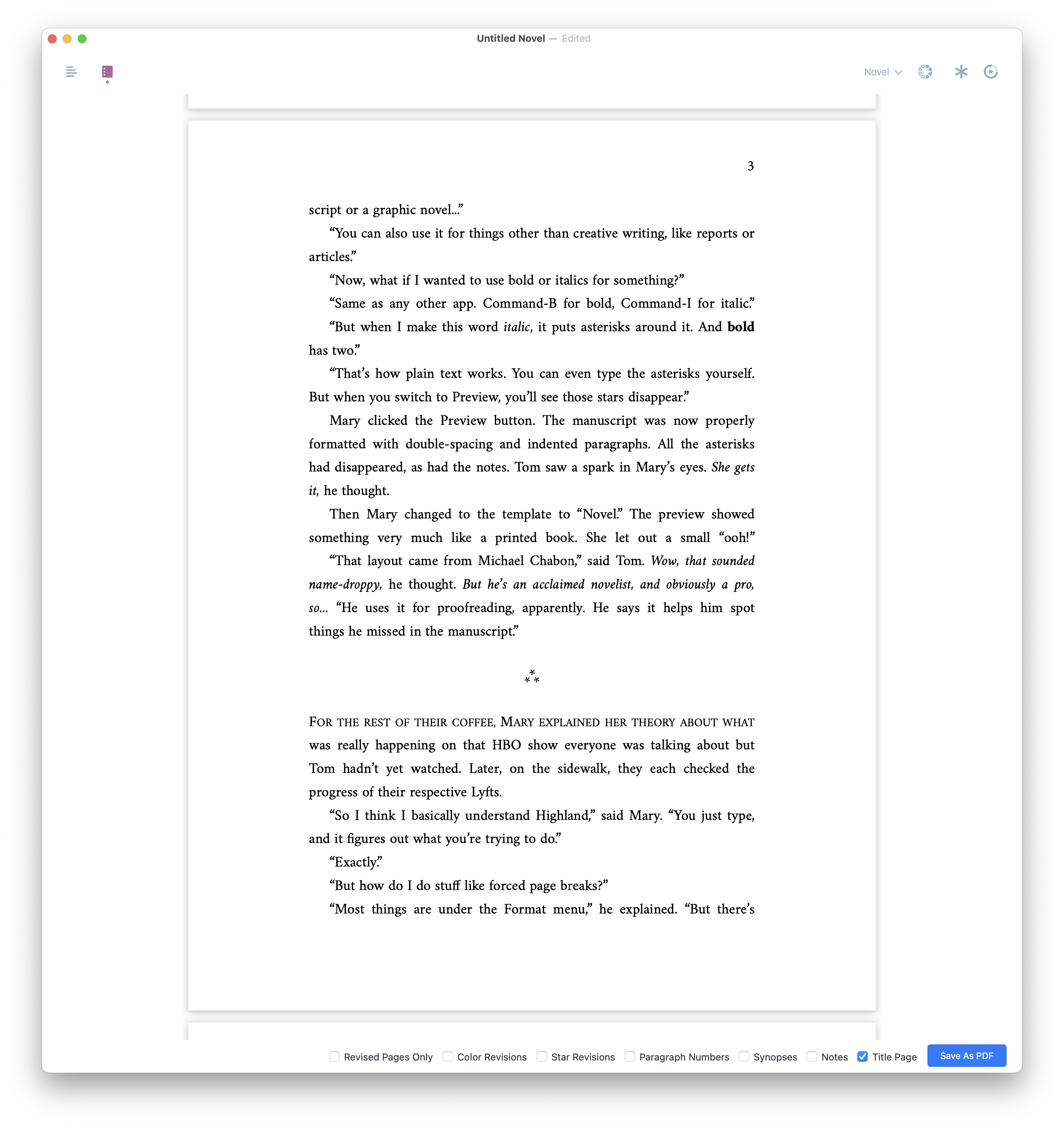
Highland 2.9.3 features an all-new Novel template to match Chabon’s specifications:

– Full justification
– Small caps for the first line in a section
– Custom three-asterisk dividers (which replace – – -)
– Choice of five typefaces (Amiri, Tex Gyre Schola, Baskerville, Cormaront Garamond and Times New Roman)

Here’s a preview in Amiri, an Old Style serif typeface:

highland screenshot 2

Highland 2 works great under all recent versions of macOS (including Big Sur), and runs natively on the new M1 Macs. You can find it on the [Mac App Store](https://apps.apple.com/us/app/highland-2/id1171820258?mt=12).

Highland 2 is very fast on the new Macs

November 25, 2020 Apps, Highland

[Highland 2.9](https://quoteunquoteapps.com/highland-2/) runs natively on Apple’s speedy new M1 processor, the chip in its latest Macs.

Naturally, we wanted to see how much faster it runs on the new hardware. The challenge is that Highland 2 is already very, very fast. It’s hard to find an operation that takes long enough to measure with a stopwatch.

So we went back to an earlier challenge, looking at how long it takes to open Tolstoy’s *War and Peace*. Weighing in at more than 500,000 words, this [plain text document](http://www.gutenberg.org/ebooks/2600) is 4,132 pages long when formatted. When developing Highland 2, we used it as a test case because it’s literally 20 times longer than the average feature length screenplay. We figured if Highland could handle such a massive file, then it could handle any screenplay we threw at it.

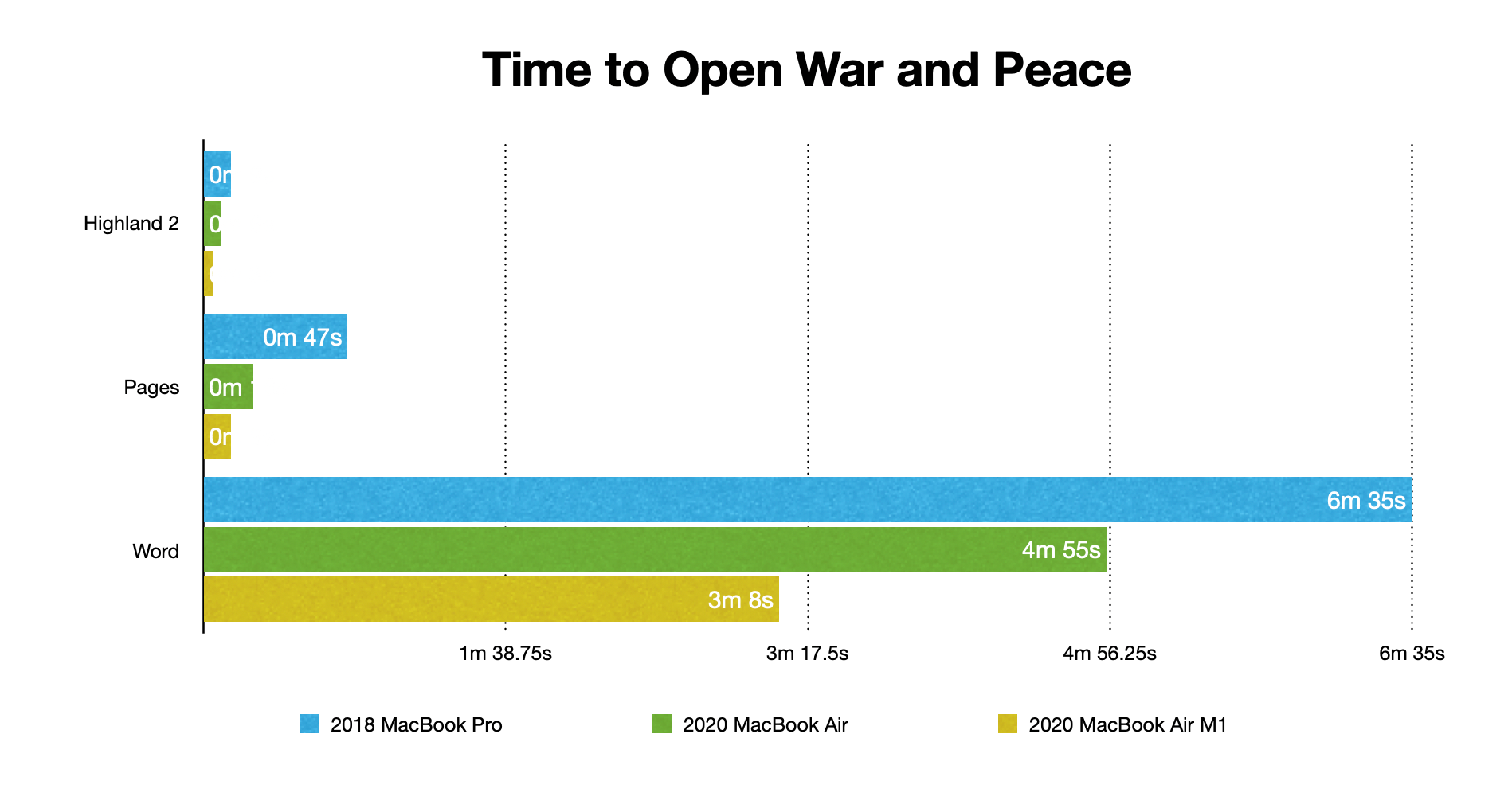
In our [2018 test](https://johnaugust.com/2018/how-and-why-to-write-a-novel-in-highland-2), we compared Highland 2’s performance against other word processors. Microsoft Word struggled, taking more than six minutes to open the file. Apple’s Pages fared better, at 47 seconds. Highland 2 opened it in just 9 seconds.

Computers have gotten faster, so we decided to evaluate performance on both an early 2020 Intel MacBook Air and the new M1 MacBook Air. We measured how long it took to open *War and Peace* and scroll to the bottom (to be certain it’s fully loaded).

| | 2018 MacBook Pro | 2020 MacBook Air | 2020 MacBook Air M1 |
|————|—————–:|—————–:|——————–:|
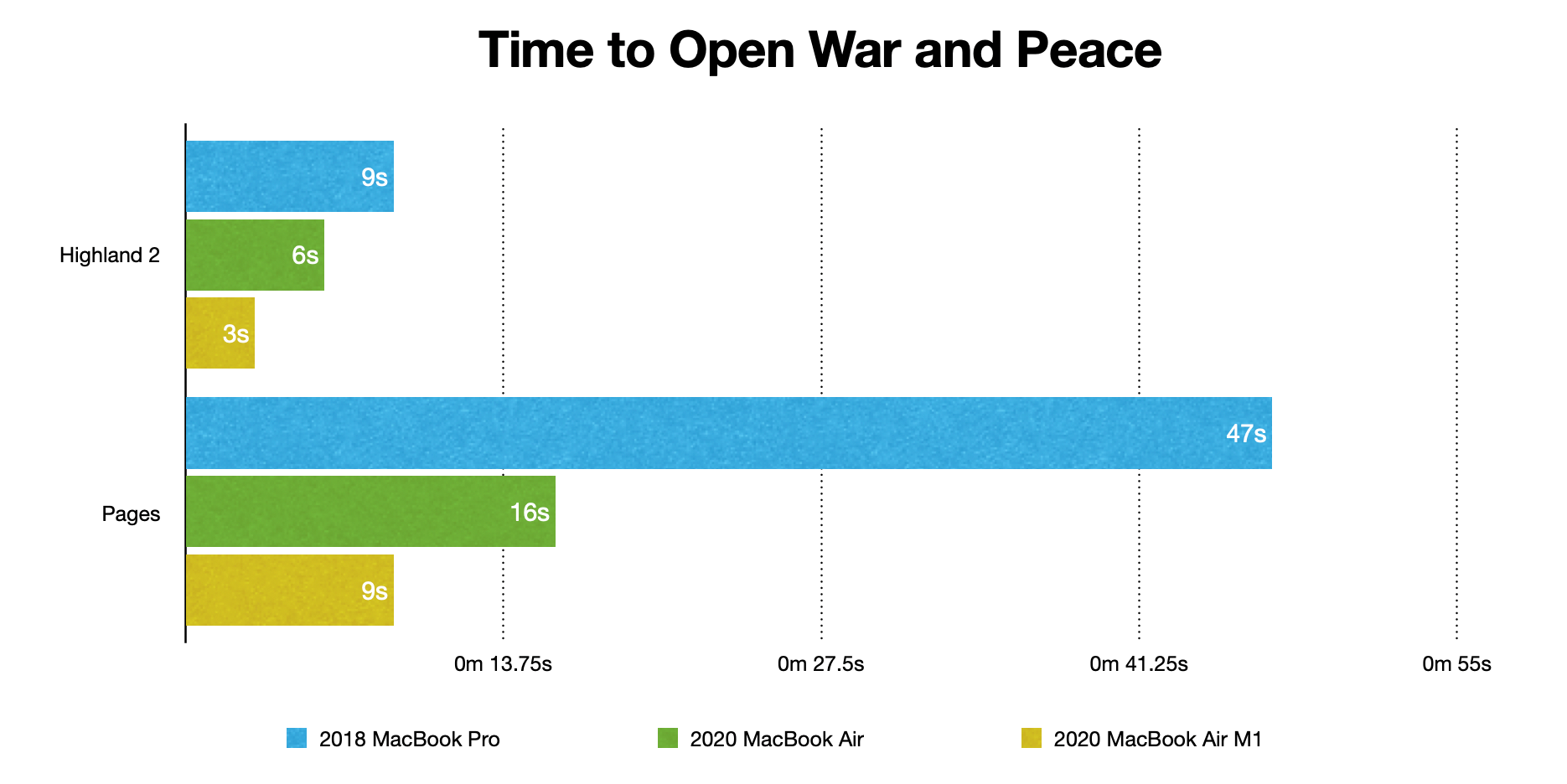
| Highland 2 | 9s | 6s | 3s |
| Pages | 47s | 16s | 9s |
| Word | 6m 35s | 4m 55s | 3m 8s |

This chart shows the results more clearly (shorter bars are better).

chart comaring speeds

Getting rid of Word makes the improvements to Highland and Pages more apparent.

highland vs pages

Three seconds is honestly a bit conservative for Highland 2. As you can see in the video, we’re stopping the timer when we reach the bottom of the document, but it’s clearly already loaded.

Three takeaways:

– The new Macs are faster for all three apps.
– Word continues to be laughably slow for very long documents.
– If you’re writing a sequel to *War and Peace,* Highland 2 is still your best bet. And it remains a fantastic choice for screenplays.

You can find Highland 2 on the [Mac App Store](https://apps.apple.com/us/app/highland-2/id1171820258?mt=12).

Getting the Razer Tartarus Pro keyboard to work with macOS Catalina and beyond

November 7, 2020 Geek Alert, How-To, Tools

As I’ve [written before](https://johnaugust.com/2004/my-new-keyboard-setup), I use this [weird keyboard](https://safetype.com/index.php?) which has helped greatly with my carpal tunnel issues.

While this odd keyboard is great for normal typing, certain key combinations are unwieldy. So for the past decade I’ve used an external gaming keypad to the left of my keyboard with custom macros set up for some common commands:

– Select All
– Undo
– Copy
– Cut
– Paste
– Paste and Match Style
– Pasteboard History (which is part of Better Touch Tool)

When my beloved Logitech keypad crapped out, I switched to the well-reviewed [Razer Tartarus Pro](https://www.razer.com/gaming-keypads/razer-tartarus-pro/RZ07-03110100-R3U1). It’s nicely built! Unfortunately, it doesn’t offer drivers for the current macOS.

After a lot of googling, I’ve cobbled together a solution. So in the interest of sharing what I’ve learned — and remembering how I got this to work in the first place — let me walk through the steps.

Note that this doesn’t do half of what a proper driver could accomplish, particularly for gaming. So please, Razer, make one! But if you want to use a gaming pad like the Tartarus Pro for keyboard shortcuts, this does the trick.

## How to make the Tartarus Pro work on macOS Catalina

It’s important to understand that macOS sees the Tartarus Pro as a plain old keyboard. So if you plug it in and hit the 08 key, you’ll see it type a ‘w’.

Luckily, there’s software that can recognize that and do something useful instead.

[Better Touch Tool](https://folivora.ai) is best known for getting random mice and trackpads to work, but it does a nice job on keyboards as well. (I’m using the 3.5 Alpha version.)

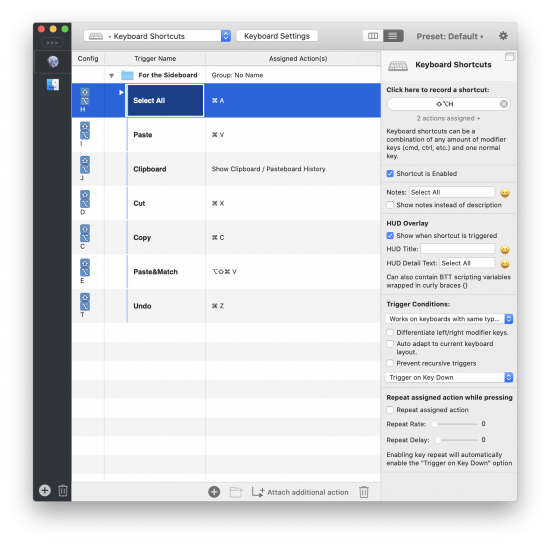
better touch tool setup

Let’s look at the Select All shortcut. You’ll notice the “Assigned Action” is ⌘A. Now direct your attention to the righthand sidebar. That’s where all the real work happens.

1) For the moment, ignore the “Click here to record a shortcut” section. We’ll come back to that.

2) You want the shortcut Enabled, so check the box.

3) You should put a note in this field for clarity.

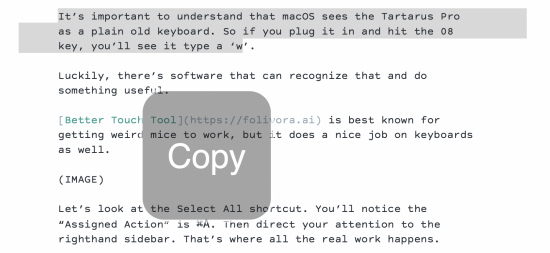
4) The HUD overlay is surprisingly helpful. It shows what’s happening, like that you just hit “copy.” I find the Title text to be too large, so I use the Subtitle instead.

HUD display shows Copy

5) For Trigger Conditions, you want to choose “Works on keyboards with the same type as used for recording.” Yes, this is a ridiculously long label.

6) You want it to Trigger on Key Down.

7) You don’t want it to repeat.

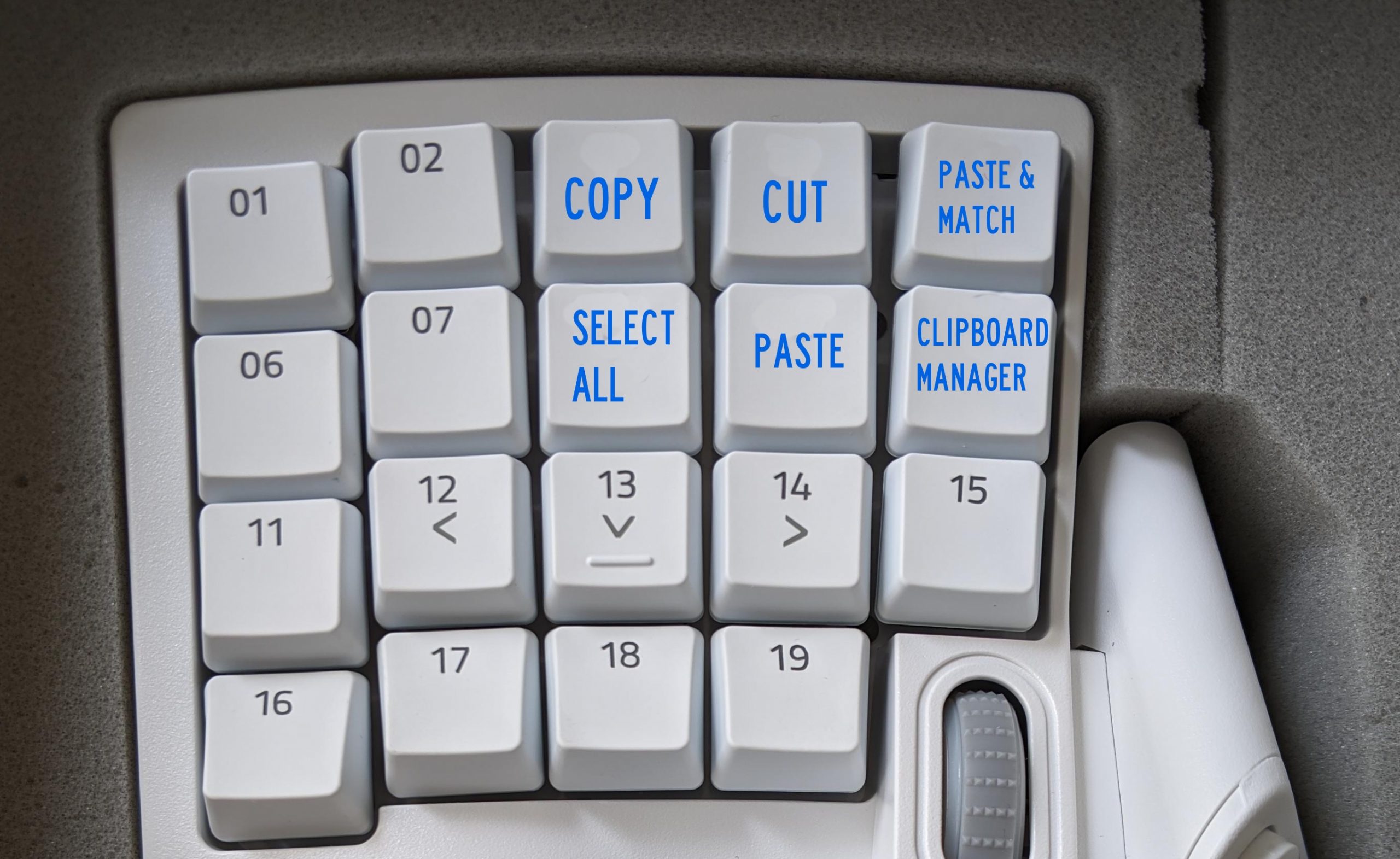
You’ll do these steps for each key on the gaming keypad you want to remap. Here’s my setup.

keyboard photo

I also set key 20, the spacebar, to Undo.

In theory, you’re done! For a few weeks, this worked great. And then it started having issues. When encountering password fields, my normal keyboard would start triggering keyboard shortcuts. I had to restart Better Touch Tool multiple times per day.

Basically, the app kept getting my normal weird keyboard confused with my special weird gaming keypad. I needed to call in the big guns.

## Enter Karabiner

I’d long heard of [Karabiner Elements](https://karabiner-elements.pqrs.org), a public domain app that can remap any key and do [really impressive things](https://brettterpstra.com/2017/06/15/a-hyper-key-with-karabiner-elements-full-instructions/). But it’s intimidating as hell.

Here’s what I wanted Karabiner to do: remap the keys of the Tartarus Pro to seldom-used keystrokes so I could then set those as triggers for Better Touch Tool.

Looking through their user forums, I couldn’t find any perfect matches for this use case, but luckily @bradcurtis had built a [set of custom mappings](https://ke-complex-modifications.pqrs.org/?q=tartarus) (a “complex modification” in Karabiner speak) for a similar purpose.

Installing them is odd. Here’s how you do it.

1. Install Karabiner-Elements. You’ll have to give it a ton of permissions in System Preferences.

2. In Karabiner-Elements Preferences, choose Complex Modications and then Add Rule.

3. On the next screen, choose “Import More Rules from the internet.”

4. Either search for “Tartarus” or follow [this link](https://ke-complex-modifications.pqrs.org/?q=tartarus)

5. Choose the Import button. It’ll ask you whether you want to open the link in Karabiner-Elements. You do.

6. Click the button to “Enable All”

Karabiner setup

If you have the Tartarus v2 like @bradcurtis, you’re done! All of the keys should be mapped to new, less-common keystrokes. But if you have the Tartarus Pro like I do, you need to modify the settings you just imported to change the product ID. This is where it gets frustratingly user-hostile, because it requires you to modify a JSON file in an external editor.

7. Navigate to ~/.config/karabiner/karabiner.json — the easiest way to do this is by choosing Go > Go to Folder… in the Finder.

8. Open this file in a plain text editor (I use [TextMate](https://macromates.com)).

9. Find and replace 555 (the product ID for the v2) with 580 (the product ID for the Pro). ((If you’re looking for a different product ID, open the Event Viewer in Karabiner-Elements and choose Devices.))

10. Save this file and restart Karabiner-Elements.

After doing this, and mapping these new keystrokes to Better Touch Tool, I’m back up to full speed. ((I added one additonal modification, converting key 20 (which is coded as “spacebar”) to Left_Shift-Left_Option-s.))

Again, almost no one on Earth will never need or want to do any of this. But if you’re the one person who needs this solution, I hope it helps. Please pay it forward by documenting something you’ve discovered.

« Previous Page
Next Page »

Primary Sidebar

Newsletter

Inneresting Logo A Quote-Unquote Newsletter about Writing
Read Now

Explore

Projects

  • Aladdin (1)
  • Arlo Finch (27)
  • Big Fish (88)
  • Birdigo (2)
  • Charlie (39)
  • Charlie's Angels (16)
  • Chosen (2)
  • Corpse Bride (9)
  • Dead Projects (18)
  • Frankenweenie (10)
  • Go (29)
  • Karateka (4)
  • Monsterpocalypse (3)
  • One Hit Kill (6)
  • Ops (6)
  • Preacher (2)
  • Prince of Persia (13)
  • Shazam (6)
  • Snake People (6)
  • Tarzan (5)
  • The Nines (118)
  • The Remnants (12)
  • The Variant (22)

Apps

  • Bronson (14)
  • FDX Reader (11)
  • Fountain (32)
  • Highland (74)
  • Less IMDb (4)
  • Weekend Read (64)

Recommended Reading

  • First Person (87)
  • Geek Alert (151)
  • WGA (162)
  • Workspace (19)

Screenwriting Q&A

  • Adaptation (65)
  • Directors (90)
  • Education (49)
  • Film Industry (489)
  • Formatting (128)
  • Genres (89)
  • Glossary (6)
  • Pitches (29)
  • Producers (59)
  • Psych 101 (118)
  • Rights and Copyright (96)
  • So-Called Experts (47)
  • Story and Plot (170)
  • Television (165)
  • Treatments (21)
  • Words on the page (237)
  • Writing Process (177)

More screenwriting Q&A at screenwriting.io

© 2026 John August — All Rights Reserved.