• Skip to primary navigation
  • Skip to main content
  • Skip to primary sidebar

John August

  • Arlo Finch
  • Scriptnotes
  • Library
  • Store
  • About

John

PDF to FDX

November 19, 2013 Follow Up, Screenwriting Software

In an [earlier post](http://johnaugust.com/2013/how-to-convert-a-pdf-to-final-draft), I listed three ways to import a PDF into Final Draft:

1. Retype it.
2. Copy and Paste and Reformat every line.
3. Use Highland.

On a Mac, Highland was by far the best choice. It was much faster and much more accurate.

Joel Levin at Final Draft emailed me to recommend an alternate workflow that’s listed on the [Final Draft site](http://kb.finaldraft.com/article.aspx?cid=1001&aid=519):

> If you have a recent version of the Adobe Acrobat Reader you can go to File > Save As > Text and save the document as a text file.

> Import this text file into Final Draft (File > Open) as a script but you may need to do some reformatting.

I just tried it, and will update my earlier post. Here’s a screencast:

The short version is that for the file I tested, this method was better than copy-and-paste — but only slightly. Elements were more likely to be recognized correctly, but line breaks and spacing glitches were daunting. The script also swelled from 114 to 343 pages.

I wondered if it was just something strange about that one file, so I tried the same method on a bunch of the PDFs in the [Library](http://johnaugust.com/library). Some of them turned out better than others, but all of them were significantly messed up.

So while it’s generally an improvement over copy-and-paste, you’d still need to spend quite a bit of time getting a useful script out of this workflow.

This actually isn’t Final Draft’s fault — their app is doing a commendable job on the fairly janky text file Adobe Reader is creating.

Nor is it Adobe’s fault — they built a general-purpose PDF app that doesn’t know anything about screenplays. It’s like complaining that a hammer is a terrible screwdriver.

Highland is a specialized tool for doing exactly this kind of conversion, which is why it works so much better. My previous recommendation still stands: if you need to convert a PDF to Final Draft, your best bet is to use [Highland](http://highland.quoteunquoteapps.com/screencast-pdf-fdx) on a Mac.

If you can’t use Highland (e.g. you’re on a PC, and can’t bribe someone with a Mac), this Final Draft workflow is better than copy-and-paste. My thanks to Joel for pointing this out.
Making The Midnight Coterie of Sinister Intruders

November 18, 2013 Directors, Television

Saturday Night Live’s Alex Buono details how they shot one of my favorite bits this year, the Wes Anderson-ian parody trailer for “The Midnight Coterie of Sinister Intruders.” Good ideas [only get you so far](http://www.alex-buono.com/how-we-did-it-snl-the-midnight-coterie-of-sinister-intruders/):

> Wes Anderson is one of the most idiosyncratic filmmakers of our time; his style is so unique that you might think it would be easy to satirize. But here’s the problem: turns out everyone has a different opinion about what MOST distinguishes Wes Anderson’s style. Is it the limited color palette? Flat space camera moves? Symmetrical compositions? Snap-zooms? Twee, hand-crafted art direction? Slow-motion walking shots? Clearly it’s all of those things and more, but within the limited context of a trailer, which are the most important signatures to include? And within a subculture as film-literate as the writers and producers of SNL, we were surrounded by astute Wes Anderson connoisseurs. Suddenly this spot had morphed from something I was dying to shoot into something I was terrified to shoot!

It’s a great example of how an idea that starts with the writing (in this case by John Solomon, Rob Klein, Chris Kelly and Sarah Schneider) has to be matched by execution at every step. I always urge screenwriters to read American Cinematographer for how-they-did-it details. Buono’s recap provides a nice snapshot of how challenging it really is, particularly when you’re facing a hard deadline.

> If I haven’t adequately expressed how long and complicated this shoot had become, let me headline it: I was on stage at 10am Friday morning with Rhys (director) and Justus McLarty (producer) along with Andrea (art director) to walk through/tweak the sets as they were being painted. The animation unit started their day at 3pm and (somehow) had a finished shot by 3am. Meanwhile our night exterior crew arrived at 2pm, our stage crew arrived at 5pm and we all finally wrapped at 7am. Saturday morning. As in: the day of the show.

The final result is worth it:

How to convert a PDF to Final Draft

November 15, 2013 Formatting, Fountain, Geek Alert, Highland, How-To, Scriptcast, Software

Screenwriters often find themselves with PDF of a screenplay when what they actually need a Final Draft (.fdx) file that they can edit.

Some common scenarios:

* Your hard drive crashed, and the only copy of your screenplay is an old PDF you sent to a friend.
* You’ve been hired to rewrite a project, but the producers only have a PDF of the script.
* The script only exists on paper. Now it’s been scanned to a PDF — but that still doesn’t get you a script you can edit.

However it happens, it happens a lot. Among my working screenwriter friends, it’s one of the questions I get most.

There are basically three ways to convert from a PDF to Final Draft:

1. Retype it.
2. Copy and Paste and Reformat every line.
3. Use Highland.

**Update:** The folks at Final Draft emailed me to suggest an additional workflow, which I’ll detail after the section on copy-and-paste.

###Retyping it

This is the worst option, but back in the days of paper scripts, it was the only option. It’s as awful as it sounds. If you do it yourself, it’s exhausting. If you pay someone to do it, it’s expensive.

Retyping inevitably introduces mistakes. Spellcheck will catch some typos, but words will get omitted.

The only scenario in which I can envision retyping a script is if it’s so bad you really do want to rewrite it scene by scene. But in these cases, I think you’re better off putting the old script aside and starting at page one.

###Copy and Paste and Reformat every line

PDFs come in two basic types. Some PDFs are essentially photos of pages. You see the text, but it’s really an image. Other PDFs include the text itself. In Acrobat or Preview, you can select the text.

Most PDFs these days have selectable text, so there’s a good chance you’ll be able to copy the text out. If you paste it into Final Draft, you’ll end up with a mess that will take quite a bit of work (and time) to sort out. But it’s doable.

Here’s a [screencast](http://youtu.be/dElQe8_xf9E) to show you this workflow:

As you can see, reformatting a script this way sucks. It’s better than retyping, but there are many ways things can go wrong. Final Draft is not well-suited to this kind of brute force. You will learn to despise the Reformat box.

But if you only have a PC, this may be your best option, because the next solution only exists on the Mac.

###Use Adobe Reader to save as text, then open in Final Draft

After I posted this entry, the folks Final Draft pointed me to an alternate workflow. Here’s what they [recommend](http://kb.finaldraft.com/article.aspx?cid=1001&aid=519):

> If you have a recent version of the Adobe Acrobat Reader you can go to File > Save As > Text and save the document as a text file.

> Import this text file into Final Draft (File > Open) as a script but you may need to do some reformatting.

Here’s a [screencast](https://www.youtube.com/watch?v=opOsTknLZJ4):

In my testing, it’s only a little better than copy-and-paste. Elements were more likely to be recognized correctly, but line breaks and spacing glitches were daunting. The script also swelled from 114 to 343 pages. I had similar results with all the PDFs I tried.

So while it’s generally an improvement over copy-and-paste, you’d still need to spend quite a bit of time getting a useful script out of this workflow

###Use Highland

If you have a Mac, or a friend who has a Mac, this is your best choice. Hell, if you have a mortal enemy who has a Mac, it’s worth kissing up to him for the five minutes this will take.

[Highland](http://highland.quoteunquoteapps.com/screencast-pdf-fdx) is a paid app in the Mac App Store. It’s actually a full-on screenwriting app, but its ability to melt down PDFs was its original claim to fame, and is still unrivaled.

With Highland, you just drag in the PDF. Highland sucks out the text and does all the reformating. From there, you can edit it right there in Highland, or export it to Final Draft.

Here’s a [screencast](http://youtu.be/4ECADQtAvUg) showing the process:

Can Highland convert every PDF to Final Draft? No.

If a PDF is really just a stack of images, there’s no text to suck out. You may come across these kinds of PDFs when dealing with scanned paper scripts. However, many screenwriters report success running PDFs through optical character recognition software like [Prizmo 2](https://itunes.apple.com/us/app/prizmo-2-scanning-ocr-speech/id546392952?mt=12) first. That’s certainly an option.

PDFs created by Fade In don’t convert well. It’s because of the odd PDF-building code Fade In uses. It’s not something Highland is going to be able to fix.

### Built to be used

My company created Highland because I needed it. While it’s not a huge moneymaker, ((Highland revenues could probably support a single coder with a love of ramen noodles and penchant for tent living.)) it serves a crucial need for screenwriters.

We used to offer a free demo version of Highland, but it confused users more than it helped. (Support emails like, “How do I get rid of the watermark that says ‘Highland Demo?'”)

Also, the demo version was always lagging behind. We update Highland frequently, often twice a month. Maintaining both the paid and demo versions was slowing down development, and the feature sets kept getting out of sync. It’s not easy or rewarding to build deliberately crippled versions of your apps.

So rather than a demo version, I’m planning more screencasts like these to show features and workflows. In the meantime, if you find yourself with a PDF to convert, head over to the Mac App Store and [grab Highland](http://highland.quoteunquoteapps.com/screencast-pdf-fdx). For $30, it will save you untold hours of frustration.

Puppet person needed

November 14, 2013 Geek Alert, Projects

For an upcoming project, I’m looking to hire a puppet designer.

My producer and I are talking with several name-brand puppetry houses, but since I’ve often had great luck finding talented folk among my readership, ((This blog is how I found Ryan Nelson (my Director of Digital Things), Nima Yousefi (our coder), Stu Maschwitz (Fountain) and Alan Dague-Greene (Courier Prime).)) I thought I’d put out the call. You might be the right person, or know the right person.

For this live-action film project, I need a puppet that interacts with human characters. It’s not a hand-in-foam puppet, but something more like a marionette. Imagine Pinnochio without his strings.

My hunch is that it’s a rod puppet, and we’d be painting out the rods in post. But it might be a marionette (think Team America). It might be a combination of real puppet and CG and stop-motion. Regardless of technique, the goal is to make something that feels very real and grounded in its environment.

I don’t want a puppet-y puppet. I want a 15-inch tall character.

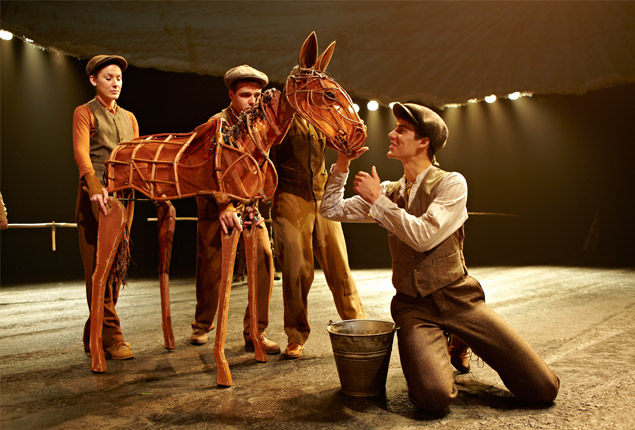
If you’ve seen the stage version of War Horse, that’s another good example of what I’m going for. Imagine Joey, but with the puppeteers digitally removed.

war horse

I’m hoping to shoot this project in LA, and would prefer to work with a local designer. But I’ll consider folks from all over. My ideal collaborator would have sketches, reels and references that convince me we could make something really cool together.

If you think you might be right person, email me at ask@johnaugust.com. If you think you might know the right person, you can also tweet me a link @johnaugust.

« Previous Page
Next Page »

Primary Sidebar

Newsletter

Inneresting Logo A Quote-Unquote Newsletter about Writing
Read Now

Explore

Projects

  • Aladdin (1)
  • Arlo Finch (27)
  • Big Fish (88)
  • Birdigo (2)
  • Charlie (39)
  • Charlie's Angels (16)
  • Chosen (2)
  • Corpse Bride (9)
  • Dead Projects (18)
  • Frankenweenie (10)
  • Go (29)
  • Karateka (4)
  • Monsterpocalypse (3)
  • One Hit Kill (6)
  • Ops (6)
  • Preacher (2)
  • Prince of Persia (13)
  • Shazam (6)
  • Snake People (6)
  • Tarzan (5)
  • The Nines (118)
  • The Remnants (12)
  • The Variant (22)

Apps

  • Bronson (14)
  • FDX Reader (11)
  • Fountain (32)
  • Highland (75)
  • Less IMDb (4)
  • Weekend Read (64)

Recommended Reading

  • First Person (87)
  • Geek Alert (151)
  • WGA (162)
  • Workspace (19)

Screenwriting Q&A

  • Adaptation (65)
  • Directors (90)
  • Education (49)
  • Film Industry (489)
  • Formatting (128)
  • Genres (89)
  • Glossary (6)
  • Pitches (29)
  • Producers (59)
  • Psych 101 (118)
  • Rights and Copyright (96)
  • So-Called Experts (47)
  • Story and Plot (170)
  • Television (165)
  • Treatments (21)
  • Words on the page (237)
  • Writing Process (177)

More screenwriting Q&A at screenwriting.io

© 2026 John August — All Rights Reserved.