• Skip to primary navigation
  • Skip to main content
  • Skip to primary sidebar

John August

  • Arlo Finch
  • Scriptnotes
  • Library
  • Store
  • About

John

Old Projects

April 10, 2014 Big Fish, Dead Projects, Go, Projects, Television

Maybe I’m hyper-aware because yesterday was the 15th anniversary of Go, but I’m encountering all sorts of references to past projects this week.

In THR’s interview with Susanne Daniels, she cites my first series:

There was this very good pilot that Dick Wolf did for me when I was at WB, which was called D.C. I distinctly remember he called me after he had sent me the pilot and asked me what I thought of it. The very first thing I said was, “Why didn’t you shoot this one particular scene that was in the script that I loved?”

Fourteen years later, my heart still flutters to learn she thought it was very good!

People and projects circle back into your life. I’m not crazy about the idea of power rankings, but The Wire’s recap on the cast of Go illustrates just how special that group continues to be. I keep up with a surprising number of those actors, and write them into everything I possibly can.

Yesterday in the halls at Disney, I bumped into Ricky Strauss, who was integral to getting both Go and Big Fish happening at Columbia. He told a colleague, “John wrote Fantasy Island for us.”

Wait, of everything I wrote, you single out Fantasy Island?

In every screenwriter’s career, there are so many scripts that never become part of your filmography. But they still matter. People remember them.

And some projects never die. A few weeks ago, I got a call about a rewrite on a project. As I spoke with the executive, I dug through my hard drive to find my notes from the last time I pitched on the movie.

My notes were dated October 6, 1996.

They are still trying to make the movie.
Michael Arndt on setting a story in motion

April 4, 2014 Story and Plot, Writing Process

In this animated lesson, Michael Arndt explains some of the things he learned while working on the screenplay for Toy Story 3.

When I saw this video, I immediately wondered what it was from. It’s clearly professionally made, so why is it on some random guy’s YouTube account?

I emailed Michael Arndt, who wrote back that it was originally a bonus feature on the [Blu-ray for Toy Story 3](http://www.amazon.com/gp/product/B004RKXW0E/ref=as_li_ss_tl?ie=UTF8&camp=1789&creative=390957&creativeASIN=B004RKXW0E&linkCode=as2&tag=johnaugustcom-20). He gave me his blessing to link to it.

> I’m aware the model I set up here applies imperfectly to TS3 itself. (It applies much more cleanly [for example] to TOOTSIE, which I consider one of the best comedy first acts of all time.) The broader point is that the emotional fuel for your first act break is largely set up in your inciting incident — and that is something that does apply to TS3.

Disney and/or Pixar own the copyright on the video, so they could pull it down. But I hope they won’t. This kind of lesson celebrates what’s made their films so successful, and deserves wider exposure.

Creative Hours

April 3, 2014 Writing Process

Mason Currey’s book [Daily Rituals: How Artists Work](http://www.amazon.com/gp/product/B009Y4I4OM/ref=as_li_ss_tl?ie=UTF8&camp=1789&creative=390957&creativeASIN=B009Y4I4OM&linkCode=as2&tag=johnaugustcom-20) tracks how some of history’s most notable writers, composers and thinkers spent their waking hours:

> I wanted to show how grand creative visions translate to small daily increments; how one’s working habits influence the work itself, and vice versa.

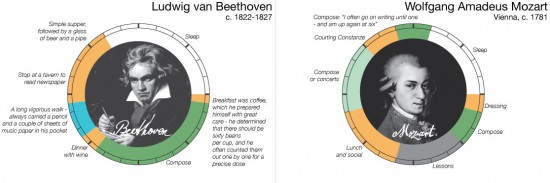
RJ Andrews turned Currey’s data into infographics, because that’s what we do in 2014. [How he did it](http://infowetrust.com/2014/03/26/creative-routines/):

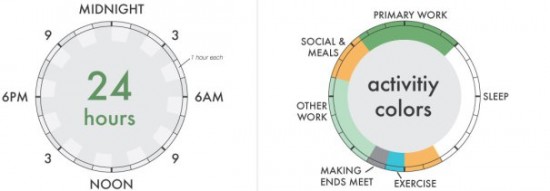
> Representing each day as a continuous 24 hour cycle invokes the ever spinning wheel of time, and more simply the face of a clock with midnight placed in the “12 o’clock” position and noon at ”6 o’clock.” Colors mark major categories of activity – work, sleep, exercise, etc.

chart

Compare Beethoven to Mozart:

beethoven and mozart

More than anything, Currey’s book and Andrews’s graphics demonstrate there’s no one “right” way to do creative work. Fetishizing one writer’s routine is pointless. What matters is getting the work done.

Folders, tags, and keeping things tidy

March 25, 2014 Apps, Weekend Read

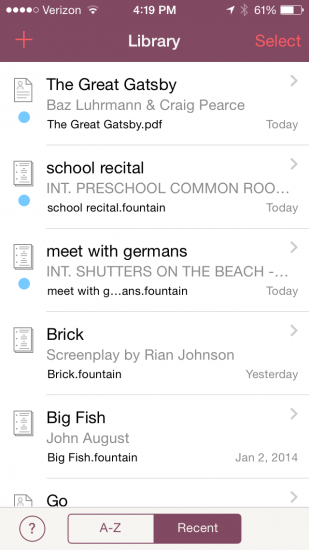
library viewYesterday, two users separately asked for folders in [Weekend Read](https://itunes.apple.com/us/app/weekend-read/id502725173?mt=8).

It’s something we’re considering, but it’s a significant UI challenge, so I thought I’d talk through some of the issues in blog form.

In Weekend Read, one of the main views is called the Library. Here you see a list of all the scripts and other files you’ve imported.

These files are “inside” Weekend Read on your iPhone, both conceptually and programmatically. That means that if you’re offline, the files are still there. If you modify the original file in Dropbox, the version in Weekend Read is unchanged. If you delete the app, you’ve deleted these files. Most users seem to intuitively understand this setup.

The challenge comes when a user wants to keep 10, 20 or 50 scripts in his Library. We offer the ability to sort the list (Recent or A-Z), but there’s no way to keep the Library organized. It can be hard to find what you want.

###Enter folders

On the desktop, folders have been a useful way to group and label things, so it’s natural to think of them for iOS.

For Weekend Read, a user might have a To Read folder and an Archive folder. Or she might have all the scripts of a certain show in one folder. An actor might keep audition sides separate from other scripts.

On the desktop, you drag-and-drop a file into a folder. Unfortunately, that behavior doesn’t have a great parallel in iOS. Tapping-and-holding on a scrolling list might mean you just want to scroll it.

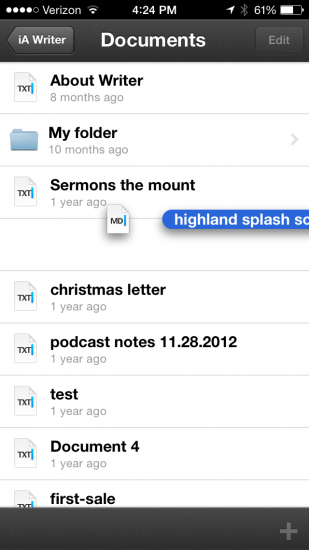
iA WriteriA Writer pulls it off pretty well, though. Tap-and-hold sucks the icon up from its slot in the list view. You can then drag it to an existing folder, or create a new folder by dropping it on another file. (Much like how app folders are made on the home screen in iOS.) To get a file out of a folder, you drag it to a button where the back arrow would be.

The more common solution you see in iOS is using Select to choose items from the list view, then offering the choice of moving them into a folder (or making a new one). This follows the tradition of Photos, and feels like the Apple Way. GoodReader and Byword both do it this way.

(Sidebar: Like Rene Ritchie, I wish Apple would follow the path of Photos and create [something like Files.app](http://www.imore.com/ios-7-and-my-continued-unrequited-desire-filesapp) to serve as a repository. It would greatly simplify interoperability between Weekend Read and apps that create Fountain files.)

Once you have files in folders, you have to figure out the right way to navigate through them. On the iPhone, we’ve come to accept that tapping on a folder moves you one screen to the right, where we show you the contents of that folder.

For Weekend Read, that mostly makes sense, but we’d have to put a back arrow where we current have the + to add a file. Not awful, but logically it might be nice to hit that plus and mean, *import a file into this folder.*

Further decisions:

* Does deleting a folder delete all the files inside it?
* How do you rename a folder?
* Can you nest folders?

###The Single Folder Solution

At our meeting today, Nima wondered if we could get by with just one folder called Archive. This tracks well with how people use Gmail, and might be enough for many users.

Essentially, everything you see in your Library would be stuff you’re reading now. Stuff in your Archive would be out of sight — still on your phone, but not cluttering your view. That’s not unlike the experience with Kindle, where you can always download something you’ve deleted off the device. It’s organizing by getting rid of things.

From a UI perspective, we’d probably make Archive a choice next to Delete when you swipe right-to-left. (And in the Archive, an equivalent choice would move it back to the Library.)

###Tagging

With folders, a file can only be in one place at a time. A script can be in the To Read folder or the Hannibal folder, but not both.

With tags, that script can be in both categories simultaneously. Evernote and Vesper both use tags extensively, and recent versions of Mac OS have encouraged tagging over folders.

In Weekend Read, we’d presumably allow users to tag files the same way we rename them, by tapping-and-holding on the file. One could also tag by Select-ing a group of files and applying the same tag to all of them.

Once tagged, we’d provide filtered views that only show matching files. (But how? Possibly by tapping on the Library title.)

There’s a lot to love about tagging, but in my heart of hearts, I just don’t see people embracing it. It feels like a power-user feature, and overkill for what we’re trying to do.

###Search

Regardless of which — if any — of these options we choose, one thing we will look at adding is a search field. On both Mac and iOS, I’ve gotten increasingly comfortable with just searching for what I want rather than trying to find it.

As it stands now, I’m leaning towards the one-folder solution, but I’m eager to hear more feedback from users and other folks interested in UI. [Weekend Read](https://itunes.apple.com/us/app/weekend-read/id502725173?mt=8) is free in the App Store. You can find me on Twitter [@johnaugust](https://twitter.com/johnaugust).

« Previous Page
Next Page »

Primary Sidebar

Newsletter

Inneresting Logo A Quote-Unquote Newsletter about Writing
Read Now

Explore

Projects

  • Aladdin (1)
  • Arlo Finch (27)
  • Big Fish (88)
  • Birdigo (2)
  • Charlie (39)
  • Charlie's Angels (16)
  • Chosen (2)
  • Corpse Bride (9)
  • Dead Projects (18)
  • Frankenweenie (10)
  • Go (29)
  • Karateka (4)
  • Monsterpocalypse (3)
  • One Hit Kill (6)
  • Ops (6)
  • Preacher (2)
  • Prince of Persia (13)
  • Shazam (6)
  • Snake People (6)
  • Tarzan (5)
  • The Nines (118)
  • The Remnants (12)
  • The Variant (22)

Apps

  • Bronson (14)
  • FDX Reader (11)
  • Fountain (32)
  • Highland (75)
  • Less IMDb (4)
  • Weekend Read (64)

Recommended Reading

  • First Person (87)
  • Geek Alert (151)
  • WGA (162)
  • Workspace (19)

Screenwriting Q&A

  • Adaptation (65)
  • Directors (90)
  • Education (49)
  • Film Industry (489)
  • Formatting (128)
  • Genres (89)
  • Glossary (6)
  • Pitches (29)
  • Producers (59)
  • Psych 101 (118)
  • Rights and Copyright (96)
  • So-Called Experts (47)
  • Story and Plot (170)
  • Television (165)
  • Treatments (21)
  • Words on the page (237)
  • Writing Process (177)

More screenwriting Q&A at screenwriting.io

© 2026 John August — All Rights Reserved.