• Skip to primary navigation
  • Skip to main content
  • Skip to primary sidebar

John August

  • Arlo Finch
  • Scriptnotes
  • Library
  • Store
  • About

John

Opening a script from in Mail in Weekend Read

March 22, 2014 Apps, Weekend Read

One of the most common uses of [Weekend Read](https://itunes.apple.com/us/app/weekend-read/id502725173?mt=8) is to open a script someone has emailed you.

Here is the “right” way to do it:

1. Go to Mail.
2. Find the email with the file attached.
3. Tap and hold on the file, then choose “Open in Wknd Read.”

The trouble is, it’s entirely reasonable to go to Weekend Read first. We let you import a file from Dropbox or a clipboard URL. Why don’t we let you import from Mail?

Because we can’t. Apps are sandboxed, and there’s simply no way for Weekend Read to reach into Mail and see what files are there to be imported. ((GoodReader skirts around this by asking for your email login information and checking the mail server itself. That’s more responsibility than I felt comfortable having as an app developer.))

Yet it’s a normal, natural instinct for a user to want Weekend Read to work this way.

So for Weekend Read 1.0.2, I asked Ryan and Nima to add a Mail option that would simply switch the user over to Mail. Basically, “Oh, you want to import a file from Mail? Here, let me take you to Mail.”

But you can’t even do that. Apple provides a URL scheme for creating a new message in Mail, but not to simply switch to the inbox.
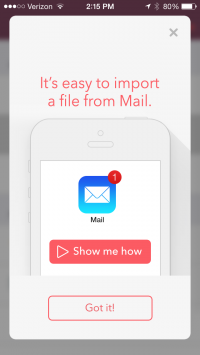
iPhone screenshot

Faced with these limitations, we still wanted to make adding a file from Mail as pleasant as possible. I asked Ryan Nelson to come up with a new animation that would show exactly how to add a file. I’m really happy with the result.

Now, whenever the user chooses Email from the list of import options, she is presented with a card acknowledging what she’s trying to do: “It’s easy to import a file from Mail.”

If she clicks on the “Show me how” button, she gets a looping animation that walks her through the process.

It’s entirely possible that a user will forget how to add a file from Mail and click on it again. That’s okay. The experience is consistent and predictable. If you’ve forgotten how to get to a file in Mail, you can learn again in 12 seconds.

Here’s the animation Ryan made:

Screenshots can show you what something looks like; animation can show you how something works.

But they can also be really annoying. When Facebook’s Paper app launched, it was criticized for its intrusive hand-holding. But I think this is a different case. Here, the animation only plays when you specifically ask for it. You want to know how to do it? Okay, let me show you.

If you want to see what the animation looks like in context, [Weekend Read](https://itunes.apple.com/us/app/weekend-read/id502725173?mt=8) is free in the App Store.

ETA: As I was writing this, a new release of Weekend Read (1.0.3) went live in the App Store, which addresses a minor display bug.
On Rotation

March 18, 2014 Apps, FDX Reader, Weekend Read

Weekend Read’s [support site](http://quoteunquoteapps.com/weekendread/support) encourages users to send in feature requests in addition to the usual bug reports. We try to answer every inquiry.

This week, we responded to a plea for landscape mode in Weekend Read by explaining that while it’s not out of the question, we had already tried landscape mode for the iPhone, and found it unsatisfactory.

The user disagreed — and threatened a negative review — arguing we should let consumers decide whether they want to rotate scripts to read them in landscape mode.

This got me thinking about landscape mode on the iPhone, and the apps that support it. As I started going through the apps on my first few screens, I realized that landscape on the iPhone is far from universal.

| **Portrait-Only** | **Both Rotations** |
|——————-|——————–|
| Settings | Messages |
| App Store | Contacts |
| iTunes | Camera |
| Vesper | Maps |
| Launch Center | Photos |
| Phone | Skitch |
| Clock | Snapseed |
| Instacast | iA Writer |
| Trailers | Instapaper |
| Letterpress | Kindle |
| Vine | iBooks |
| Instagram | GoodReader |
| IMDb | |
| Reeder | |
| Poster | |
| Facebook | |
| Twitter | |
| Podcasts | |
| Facebook Paper | |
| Glassboard | |

Notably, many of Apple’s own apps eschew landscape mode. Just as notably, many reading-style apps support landscape mode. So it’s certainly worth looking at the pros and cons of adding landscape support to the iPhone.

PRO: Lots of other reader apps allow landscape.

CON: We’re different than most reader apps. In Weekend Read, margins matter a lot for dialogue and transitions. We can’t just set every block left and move on. We would need to extensively test which margins look right for which font size. An extra complication is that we’d need to do it for both the smaller iPhone 4 series and the larger iPhone 5s.

PRO: We did landscape mode in the iPhone version of FDX Reader.

CON: Supporting landscape in FDX Reader was a pain in the ass. New developer tools make it somewhat easier, but Weekend Read is a much more complex app than FDX Reader, with many more views.

PRO: With the much-rumored larger iPhones, people might use them more like iPad minis, which are often in landscape mode.

CON: There aren’t bigger-screen iPhones yet.

CON: All new graphics, all new headaches. From the user perspective, it seems like allowing landscape rotation should be as simple as flipping a switch. And in fact, it sort of is in in Xcode. But when you flip that switch, you find that almost everything needs to be rethought and rebuilt, because it was designed for vertical orientation.

PRO: Users could choose even larger fonts. By sacrificing vertical space, we could let the user have letters nearly an inch tall.

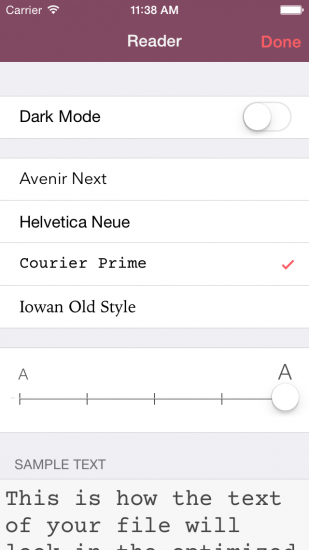
CON: The text options screen is actually a good example of what would need to be rebuilt. Here’s the screen in portrait mode:

iphone WR portrait

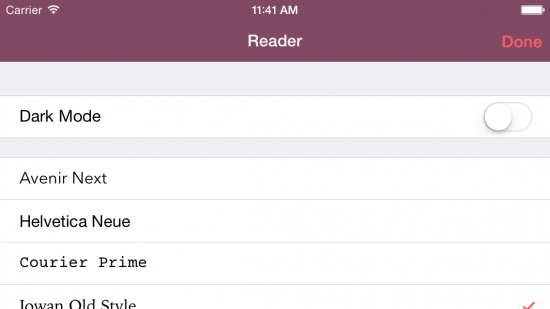
The sample text lets you see in real time what the font will look like. Here’s that same screen in landscape:

landscape WR

We’d have to substantially rethink this view.

CON: The gestures are built for portrait. On Weekend Read, you can swipe right to get back to the Library. You can swipe left to show the Page Jumper. But in landscape, your thumbs are in the wrong place. It’s not a deal-killer, but it’s a worse experience.

CON: Twice the views to debug. Twice as many things to break.

CON: Very few people are asking for landscape mode. By far the majority of requests are for an iPad version. Allowing landscape rotation on the iPhone would push the iPad version back at least another two weeks.

Ultimately, every choice comes with a cost. Adding landscape to the iPhone isn’t impossible, but it means not doing something else, and right now the many “something elses” are worth a lot more.

You can find Weekend Read [in the App Store](https://itunes.apple.com/us/app/weekend-read/id502725173?mt=8).

How modern English got that way

March 17, 2014 Words on the page

David Shariatmadari looks at several of the reasons English has shifted, both in [spelling and pronunciation](http://www.theguardian.com/commentisfree/2014/mar/11/pronunciation-errors-english-language):

> A dark “l”, in linguistic jargon, is one pronounced with the back of the tongue raised. In English, it is found after vowels, as in the words full or pole. This tongue raising can go so far that the “l” ends up sounding like a “w”. People frown on this in non-standard dialects such as cockney (“the ol’ bill”). But the “l” in folk, talk and walk used to be pronounced. Now almost everyone uses a “w” instead- we effectively say fowk, tawk and wawk. This process is called velarisation.

Other times, sounds swap around and change the word dramatically:

> Wasp used to be waps; bird used to be brid and horse used to be hros. Remember this when the next time you hear someone complaining about aks for ask or nucular for nuclear, or even perscription. It’s called metathesis, and it’s a very common, perfectly natural process.

I found the whole article inneresting.

Highland 1.6 uses the force

March 14, 2014 Apps, Highland, Weekend Read

highland iconHot on the heels of the [Weekend Read update](https://itunes.apple.com/us/app/weekend-read/id502725173?mt=8), we have a new [Highland](https://itunes.apple.com/us/app/highland/id499329572?mt=12) in the Mac App Store today.

Highland 1.6 features all the improvements to PDF-melting from Weekend Read, including better support for PDFs created with Fade In and Celtx.

There are also a slew of little bug fixes, with more coming. I use Highland for all my daily screenwriting, so whenever I encounter an issue, Nima tackles it immediately.

### The force is strong with this one

Highland is the first app to support the basically-official Fountain 1.1 spec, which adds several new features:

– Forced character elements
– Lowercase character extensions
– Forced action elements
– Lyrics

The ability to force a **Character** element is helpful for names that require lower-case letters (i.e. McDONALD), and for non-Roman languages, where a character might be named something like 黒澤.

To force a Character element, precede a line with the “at” symbol: @

@McCLANE 
Yippie ki-yay! I got my lowercase C back!

                    McCLANE

Yippie ki-yay! I got my lowercase C back!

The parser will remove the @ and interpret McCLANE as Character, preserving its mixed case. We picked @ because everyone is already accustomed to thinking of @name referring to a person.

**Character extensions**, those notations like (on the radio) which live on the same line as a Character element, are no longer required to be uppercase:

Sometimes you really want two lines of **Action**, with no blank line between them. You’re going to for a style — but Fountain doesn’t know that. So instead you get:

BOOM

BOOM BOOM. Closer.

In Fountain 1.0, we allowed the user to force Action elements with two trailing spaces.

BOOM{two spaces}

BOOM BOOM. Closer.

This has turned out to be problematic in practice. The spaces are invisible, and can be introduced by accident as you write. Highland and Slugline users got confused. Hell, I got confused, and I co-created the syntax.

In the end, we’d like more transparency and less invisibility. Using spaces to force Action is now deprecated.

Instead, you can force Action by preceding a line with an exclamation point:

!BOOM
BOOM BOOM. Closer.

The parser removes the ! and interprets BOOM as Action.

BOOM  

BOOM BOOM. Closer.

Highland has had **Lyrics** for a while now. Nothing has changed.

For screenplays, we use the same basic margins as dialogue, but set the text in italics. For stageplays, we move the lyrics to the left margin and set them uppercase.

You create a Lyric by starting with a tilde ~.

~Willy Wonka! Willy Wonka! The amazing chocolatier!

~Willy Wonka! Willy Wonka! Everybody give a cheer!

Lyrics are always forced. There is no “automatic” way to get them.

###What’s next

[Fountain](http://fountain.io) is an open-source project, and continues to evolve. Right now we’re discussing:

* Flagged changes (the equivalent of asterisks in the margins)
* “Logical pages” independent of device or font
* Multi-cam formatting
* Better title pages

Some of these are deferred issues (multi-cam), while others are just things we got wrong (title pages). As with Lyrics, we’ll likely use Highland to experiment with some of these ideas before they become official parts of the spec.

An upcoming build of Weekend Read will feature the new Fountain 1.1 elements, but you can get started with them in Highland today. [Enjoy](https://itunes.apple.com/us/app/highland/id499329572?mt=12).

« Previous Page
Next Page »

Primary Sidebar

Newsletter

Inneresting Logo A Quote-Unquote Newsletter about Writing
Read Now

Explore

Projects

  • Aladdin (1)
  • Arlo Finch (27)
  • Big Fish (88)
  • Birdigo (2)
  • Charlie (39)
  • Charlie's Angels (16)
  • Chosen (2)
  • Corpse Bride (9)
  • Dead Projects (18)
  • Frankenweenie (10)
  • Go (29)
  • Karateka (4)
  • Monsterpocalypse (3)
  • One Hit Kill (6)
  • Ops (6)
  • Preacher (2)
  • Prince of Persia (13)
  • Shazam (6)
  • Snake People (6)
  • Tarzan (5)
  • The Nines (118)
  • The Remnants (12)
  • The Variant (22)

Apps

  • Bronson (14)
  • FDX Reader (11)
  • Fountain (32)
  • Highland (75)
  • Less IMDb (4)
  • Weekend Read (64)

Recommended Reading

  • First Person (87)
  • Geek Alert (151)
  • WGA (162)
  • Workspace (19)

Screenwriting Q&A

  • Adaptation (65)
  • Directors (90)
  • Education (49)
  • Film Industry (489)
  • Formatting (128)
  • Genres (89)
  • Glossary (6)
  • Pitches (29)
  • Producers (59)
  • Psych 101 (118)
  • Rights and Copyright (96)
  • So-Called Experts (47)
  • Story and Plot (170)
  • Television (165)
  • Treatments (21)
  • Words on the page (237)
  • Writing Process (177)

More screenwriting Q&A at screenwriting.io

© 2026 John August — All Rights Reserved.