• Skip to primary navigation
  • Skip to main content
  • Skip to primary sidebar

John August

  • Arlo Finch
  • Scriptnotes
  • Library
  • Store
  • About

John

HERE, on DVD on iTunes

July 17, 2012 Rave

Braden King’s HERE, a movie I’ve loved since I read it at the Sundance Labs, is [available on video](http://us1.campaign-archive1.com/?u=a545028bf8fd3df76754ff708&id=900d149344&e=c4de1ab0de) starting today.

It’s a two-hander about a map-maker and a photographer traveling though Armenia — which sounds impossibly tiny and indie — but what I like most about the finished film is how unapologetically spacious it feels. It’s not just the landscapes; King very consciously finds a spot for the viewer in each scene. You’re on the roadtrip as much as either of the lead characters.

It won’t be everyone’s cup of vodka, but [the trailer](http://www.herefilm.info/?utm_source=Truckstop+Media+e-List&utm_campaign=900d149344-HERE_IFC_01_0403124_3_2012&utm_medium=email) gives a good sense of what it feels like.

Also: Ben Foster should be in more movies.
Falling in love with plain text

July 16, 2012 Highland, Screenwriting Software, Tools

Stu Maschwitz explains how blogging led him to get over his need for as-you-type formatting and [embrace plain text](http://prolost.com/blog/2012/7/16/gradually-falling-in-love-with-plain-text.html):

> I’d often find myself battling that little WYSIWYG text window. I’d press Return after some quoted text and it would create another quoted paragraph. I’d press the “quote” button to un-quote the current paragraph, and an extra line would be inserted. I’d try to delete it and now there was no separation between the paragraphs. I’d press “Publish” and the extra line would be back.

> I’d eventually go into the post HTML and try to remove the offending line break, crossing my fingers that I wasn’t destroying something else in the process. After all this, I’d be afraid to touch the WYSIWYG editor again. A typo or broken link would have to be pretty important for me to risk touching this house of HTML cards I’d created.

For his blog, the solution was [Markdown](http://daringfireball.net/projects/markdown/). For screenwriting, the solution ultimately became [Fountain](http://fountain.io), our joint spec for writing screenplays in any old text editor.

Tools like Markdown and Fountain don’t replace dedicated apps, which can do sophisticated things that would otherwise be very difficult. But too often we’re trying to do too much too soon.

If you’re fighting to get Final Draft to recognize a parenthetical, you’re no longer writing. You’re formatting. You’re a poet picking fonts. You’re a novelist worrying about hyphenation.

Plain text keeps you from worrying about the wrong things at the wrong time.

Let’s just say we were #51

July 13, 2012 The Nines

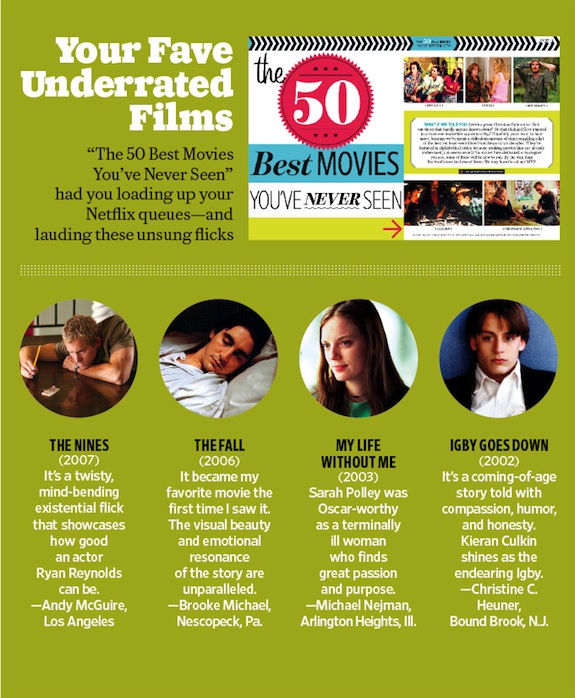
EW recently ran a feature on the [50 Best Movies You’ve Never Seen](http://www.ew.com/ew/gallery/0,,20483133_20609091_21180862,00.html#21180862).

First off: Kinda presumptuous, you guys — how are you to know which movies I haven’t seen? Are you keeping track of my Netflix history?

Oh — *you are*. That’s what that click-to-accept thing meant.

Okay. Well. That indie movie I sort of fast-forwarded through, only stopping when I saw bare skin, that was research for a movie on sad people.

Anyway, I was a little disappointed you left off The Nines, because it certainly meets the criteria of being highly praised and little-seen.

Fortunately, your readers wrote in and got you to pay attention:

ew nines blurb

And while you rightly praise the much-more-famous-now Ryan Reynolds, let’s not overlook Emmy-winner and Oscar-nominee Melissa McCarthy, along with Oscar-winner Octavia Spencer. Plus Oscar winner Jim Rash — sure, it was for writing, but it counts.

This movie has all of these people, plus Elle Fanning and telepathic koalas! (spoiler.)

So if you’ve never seen it, what more can I do to convince you?

We’re [streaming on Netflix](http://movies.netflix.com/WiMovie/The_Nines/70066350?locale=en-US) this month.

If you’re a Amazon Prime member, you can even [watch it for free](http://www.amazon.com/gp/product/B0012F23TS/ref=as_li_ss_tl?ie=UTF8&tag=johnaugustcom-20&linkCode=as2&camp=1789&creative=390957&creativeASIN=B0012F23TS).

For international readers, we’re [in iTunes](http://itunes.apple.com/us/movie/the-nines/id274169170) almost everywhere.

My dream is that the next time EW does this kind of list, they’ll omit The Nines simply because too many people have seen it.

My Mac Pro problem

July 13, 2012 Geek Alert

My main computer is a Mac Pro tower, hooked up to a 30″ Apple monitor. From the outside, the machine looks exactly like one you could buy in the Apple Store today, but it’s actually six years old.

It feels fast enough, largely because I swapped in an SSD and upgraded my video card. I use it for most of my writing, plus the podcast and video work, and I haven’t felt any pressure to get a new machine.

But now that time has come: [tests confirm](http://arstechnica.com/apple/2012/07/confirmed-mountain-lion-sends-some-64-bit-macs-gently-into-that-good-night/) that this rig won’t be able to run Mountain Lion when it ships later this month. ((Sure: you can make a distinction between “able” and “permitted.” There’s a chance that someone will come out with a clever hack that will enable Mountain Lion to be installed on my old machine. But then I’m risking crashes and bugginess, which is a considerable trade-off.))

Six years is a long time for any computer. I’d happily replace it with a new Mac Pro tower, except the ones they’re currently selling are so [shamefully behind the curve](http://www.macworld.com/article/1167386/meet_the_new_mac_pro_about_the_same_as_the_old_mac_pro.html) that Tim Cook had to break with Apple tradition and promise that [better ones are coming](http://www.macworld.com/article/1167247/cook_apple_planning_professional_mac_for_2013.html) in 2013.

So in six to eighteen months, I’ll buy one of these new ones. The question is, what do I do in the meantime?

Some scenarios I’ve considered:

1. Do nothing. Just keep running Lion. I’d give up some of the new features, but most apps should continue to work. One challenge is that a lot of the new software we’re developing is aimed at Mountain Lion, so I’d have to do that work on my little MacBook Air. And the new computers might come at the end of 2013, and they might not have been worth the wait. There’s an opportunity cost to doing nothing that is real but hard to calculate.

2. Use my MacBook Air as my main machine. I love this little computer, but its puny graphics card wouldn’t be able to handle my big screen, and I’m not willing to give that up. ((Also, I’ve played Diablo 3 on my Air, and it just about melts. But the inability to play Diablo 3 could be argued as an argument *for* the Air.)) Also, I’m running four hard drives in my tower, so I’d have to figure out an external solution for these.

3. Buy a used-but-newer Mac Pro. The transition would be simple — just shove my drives into the new chassis. But used Mac Pros are not cheap ($1000+), and in six months I’d have two old towers to get rid of.

4. Buy the current Mac Pro. Sure, they’re not the computers I’d hope they’d be, but they’re certainly faster than what I’m running now. This was [Marco Arment’s solution](http://www.marco.org/2012/06/15/back-to-the-mac), and he’s a smart guy. But I’d no doubt feel stuck with this if the next Mac Pros are the generational leap in performance many believe they will be.

5. Get a Mac Mini. According to speed tests, the fastest version of Mac Mini is actually faster than my current tower. But it’s also pretty expensive ($1500) for something I only hope to hold onto for six months.

6. Get a Retina Macbook Pro. It’s the fastest machine Apple sells, and the hi-res monitor would be good for proofing graphics. But it’s a lot of money ($2200+) for something I don’t plan to keep, and it feels odd to have two laptops.

A new scenario that we discussed at lunch is a variation on #6. I would take Ryan Nelson’s recent-edition MacBook Pro and buy him the Retina version.

Why it’s a good idea:

– It puts the hi-res screen in the hands of the graphics guy who actually needs it.
– His MacBook is powerful enough to run my big monitor. (With a $99 adapter.)
– I should be able to replace his hard drive with my tower’s SSD, so it’s a fairly painless transition.

Why it’s a bad idea:

– Using a laptop as a desktop computer is arguably the worst of both worlds. Everything about a laptop is designed to maximize battery life.
– I still have the hard drive problem. One possibility: Keeping the tower around as a headless server and just pull files off that as needed.
– Ryan gets a cool new computer and I get his leftovers. Boo.

For now, this is feeling like the best plan. As a company, we’d already discussed the need for at least one Retina Mac between me, Nima and Ryan. But I’m still open for other solutions as they come up.

« Previous Page
Next Page »

Primary Sidebar

Newsletter

Inneresting Logo A Quote-Unquote Newsletter about Writing
Read Now

Explore

Projects

  • Aladdin (1)
  • Arlo Finch (27)
  • Big Fish (88)
  • Birdigo (2)
  • Charlie (39)
  • Charlie's Angels (16)
  • Chosen (2)
  • Corpse Bride (9)
  • Dead Projects (18)
  • Frankenweenie (10)
  • Go (29)
  • Karateka (4)
  • Monsterpocalypse (3)
  • One Hit Kill (6)
  • Ops (6)
  • Preacher (2)
  • Prince of Persia (13)
  • Shazam (6)
  • Snake People (6)
  • Tarzan (5)
  • The Nines (118)
  • The Remnants (12)
  • The Variant (22)

Apps

  • Bronson (14)
  • FDX Reader (11)
  • Fountain (32)
  • Highland (75)
  • Less IMDb (4)
  • Weekend Read (64)

Recommended Reading

  • First Person (87)
  • Geek Alert (151)
  • WGA (162)
  • Workspace (19)

Screenwriting Q&A

  • Adaptation (65)
  • Directors (90)
  • Education (49)
  • Film Industry (489)
  • Formatting (128)
  • Genres (89)
  • Glossary (6)
  • Pitches (29)
  • Producers (59)
  • Psych 101 (118)
  • Rights and Copyright (96)
  • So-Called Experts (47)
  • Story and Plot (170)
  • Television (165)
  • Treatments (21)
  • Words on the page (237)
  • Writing Process (177)

More screenwriting Q&A at screenwriting.io

© 2026 John August — All Rights Reserved.