• Skip to primary navigation
  • Skip to main content
  • Skip to primary sidebar

John August

  • Arlo Finch
  • Scriptnotes
  • Library
  • Store
  • About

Apps

Falling in love with plain text

July 16, 2012 Highland, Screenwriting Software, Tools

Stu Maschwitz explains how blogging led him to get over his need for as-you-type formatting and [embrace plain text](http://prolost.com/blog/2012/7/16/gradually-falling-in-love-with-plain-text.html):

> I’d often find myself battling that little WYSIWYG text window. I’d press Return after some quoted text and it would create another quoted paragraph. I’d press the “quote” button to un-quote the current paragraph, and an extra line would be inserted. I’d try to delete it and now there was no separation between the paragraphs. I’d press “Publish” and the extra line would be back.

> I’d eventually go into the post HTML and try to remove the offending line break, crossing my fingers that I wasn’t destroying something else in the process. After all this, I’d be afraid to touch the WYSIWYG editor again. A typo or broken link would have to be pretty important for me to risk touching this house of HTML cards I’d created.

For his blog, the solution was [Markdown](http://daringfireball.net/projects/markdown/). For screenwriting, the solution ultimately became [Fountain](http://fountain.io), our joint spec for writing screenplays in any old text editor.

Tools like Markdown and Fountain don’t replace dedicated apps, which can do sophisticated things that would otherwise be very difficult. But too often we’re trying to do too much too soon.

If you’re fighting to get Final Draft to recognize a parenthetical, you’re no longer writing. You’re formatting. You’re a poet picking fonts. You’re a novelist worrying about hyphenation.

Plain text keeps you from worrying about the wrong things at the wrong time.
Phil Coulson and the failure of IMDb

July 9, 2012 Less IMDb, Rant

If you click over to my [IMDb profile](http://www.imdb.com/name/nm0041864/), you’ll see two new projects: “Phil Coulson: Agent of Shield” and “Coulson’s Day Off.” I’m listed under the writer section, having contributed characters.

Only I didn’t. At all.

I’d never heard of these shorts until I saw them on my profile page. Yes, I worked on the original Iron Man, but I’m not a credited writer and didn’t have any input whatsoever on the character played by Clark Gregg in the franchise.

I’m fairly certain the director simply attached my name — along with Joss Whedon, Fergus & Otsby, Marcum & Holloway — to attract attention to his Marvel fan film. And now that I’m blogging about it, he probably will get some attention.

He’ll also probably get a scary letter from Marvel legal.

Maybe I should feel bad about that — but I really don’t. Fuck him. He’s drafting off my name (and Whedon’s much bigger name) by misrepresenting my involvement in his short film.

If he wanted me to see his movie, he could have sent me a link. Lord knows I’m [accessible](http://twitter.com/johnaugust). I often plug stuff I like. But he didn’t give me that chance. So, as I said, fuck ‘im.

Now, it’s possible that the director himself didn’t link my name to this. ((Click through his other credits and you’ll see the same pattern.)) IMDb credits can be edited by just about anyone, so someone else could have done it.

Which is why I’m saving the bulk of my opprobrium for IMDb.

C’mon, IMDb. Why do you have to suck so much?
—–

My team can make a [browser plug-in](http://quoteunquoteapps.com/less-imdb) that makes your layout less terrible, but we can’t fix your data. That’s on you. You have to do better.

Here’s a simple way you can start: I’m a registered user, so why doesn’t your system kick out an email to confirm a change like this? I know I didn’t work on this. It should never have showed up on the page.

I have a movie coming out, and I’m starting to do publicity. All is takes is one lazy journalist looking at IMDb to assume I’ve been reduced to doing crappy superhero knock-offs.

True, one idiotic fan film isn’t going to hurt my reputation much, but what happens when I’m listed for acting in a porn film, or producing a inflammatory religious documentary? To me, that’s a lot worse than [revealing an actress’s age](http://www.huffingtonpost.com/2012/01/07/huong-hoang-actress-suing-imdb-amazon_n_1191236.html).

Because there’s no real competition, we’ve come to rely on IMDb. That’s a mistake, but there is not yet a viable replacement. ((On The Talk Show, we speculated that Apple might come out with their own Siri-integrated solution for film credits.))

For now, I could use some reader help — and if you have a few minutes, it’s a useful exercise for seeing how the current IMDb system can be gamed so easily.

1. If you have an IMDb login, head over to [my page](http://www.imdb.com/name/nm0041864/) and click the Edit Page button. (Less IMDb has to be turned off to access it.)
2. In the Filmography > Writing Credits section, choose Correct/Delete.
3. Click Continue.
4. On the next screen, choose Delete for the two Phil Coulson credits.
5. Click “Check these updates.”
6. You’ll get an error message asking you to state why these credits should be deleted. I leave this to your creativity.
7. Click “Recheck these updates.”
8. Click “Submit these updates.”

And you’re done! Maybe! There’s nothing to indicate whether a change is really in the works. Some updates show up quickly, but the auto-generated email lists 7-10 days as normal.

Which says a lot about how seriously IMDb is taking its mission.

**Update:**

Eight hours after posting this — and three days after first filing the credit notice — IMDb has excised the two Phil Coulson shorts from my profile. Thanks to everyone who submitted on my behalf.

I suspect some higher-up at IMDb paid attention, because the other writers who had been listed (including Whedon) are also now unlinked. But the same director is still drafting on credits for other filmmakers. IMDb has corrected one mistake, but not their system.

Highland and the Kindle are friends

July 3, 2012 Apps, Challenge, Geek Alert, Highland

Ben Godar uses Highland to read screenplays on his Kindle by [converting PDFs](http://www.bengodar.com/2012/07/john-augusts-highland-and-kindle-are.html):

> Once you drag the PDF into Highland, it will convert it into Fountain – recognizing all the screenplay elements. Export as a Fountain file, then save as plain text. From there, you can get the file onto your Kindle by e-mailing it to your Kindle address, upload using a program like Calibre, etc.

Fountain files are really just text files. You can change the .fountain extension to .txt and Kindle will happily read them.

> The file still won’t look *exactly* like a screenplay on your Kindle. Everything will be left justified. But the line breaks will stay the same, character names will be capitalized… all in all, it will look like a screenplay.

Ben’s solution works, but I’d love to see a little more screenplay formatting. If any clever readers feel like some geekery this holiday weekend, here’s my challenge to you:

**Build a converter that takes a Fountain file and formats it nicely for the Kindle.**

In addition to text files, Kindle understands RTF and HTML/CSS, so one of those might be a good option.

If you make something interesting, email or tweet me a link. I will be delighted to hype anything cool that comes of it.

Highland adds Quick Look previews

June 25, 2012 Apps, Highland

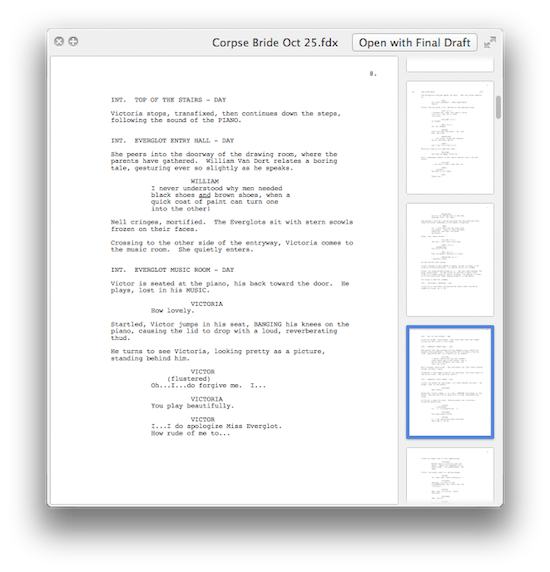
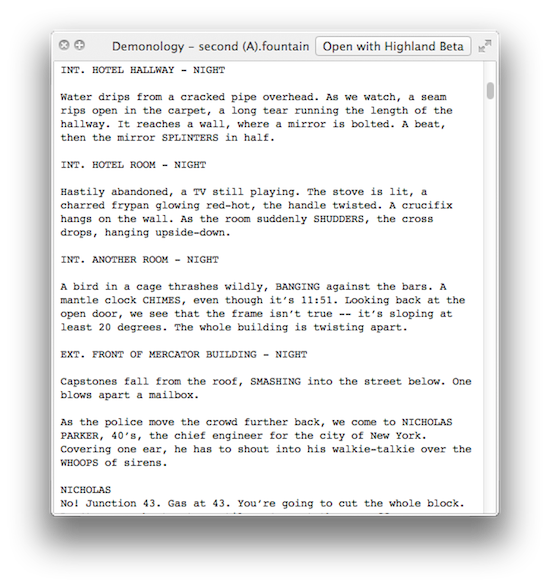
Speaking of Highland, my favorite new feature in the [Highland beta](http://quoteunquoteapps.com/highland) is Quick Look previews.

Do you ever find yourself staring at a folder of scripts, confused which draft is which? You open the files one at a time, skimming through them to find what you’re looking for.

Stop. Just select a file and press the spacebar. Up pops a preview of the script.

highland quick look

You can even up-arrow and down-arrow through all the files in the folder.

“Well sure,” you say. “That works great for your fancy new Fountain files, but who has folders full of those?”

Here’s the thing: Highland’s previews **even work with Final Draft (.fdx) files.**

final draft quick look

For whatever reason, Final Draft itself doesn’t support Quick Look. Highland does. So now you can Quick Look those files.

It works even if Highland isn’t running. Even if Final Draft isn’t installed. It’s just an extra little bonus because you deserve nice things.

« Previous Page
Next Page »

Primary Sidebar

Newsletter

Inneresting Logo A Quote-Unquote Newsletter about Writing
Read Now

Explore

Projects

  • Aladdin (1)
  • Arlo Finch (27)
  • Big Fish (88)
  • Birdigo (2)
  • Charlie (39)
  • Charlie's Angels (16)
  • Chosen (2)
  • Corpse Bride (9)
  • Dead Projects (18)
  • Frankenweenie (10)
  • Go (29)
  • Karateka (4)
  • Monsterpocalypse (3)
  • One Hit Kill (6)
  • Ops (6)
  • Preacher (2)
  • Prince of Persia (13)
  • Shazam (6)
  • Snake People (6)
  • Tarzan (5)
  • The Nines (118)
  • The Remnants (12)
  • The Variant (22)

Apps

  • Bronson (14)
  • FDX Reader (11)
  • Fountain (32)
  • Highland (75)
  • Less IMDb (4)
  • Weekend Read (64)

Recommended Reading

  • First Person (87)
  • Geek Alert (151)
  • WGA (162)
  • Workspace (19)

Screenwriting Q&A

  • Adaptation (65)
  • Directors (90)
  • Education (49)
  • Film Industry (489)
  • Formatting (128)
  • Genres (89)
  • Glossary (6)
  • Pitches (29)
  • Producers (59)
  • Psych 101 (118)
  • Rights and Copyright (96)
  • So-Called Experts (47)
  • Story and Plot (170)
  • Television (165)
  • Treatments (21)
  • Words on the page (237)
  • Writing Process (177)

More screenwriting Q&A at screenwriting.io

© 2026 John August — All Rights Reserved.