• Skip to primary navigation
  • Skip to main content
  • Skip to primary sidebar

John August

  • Arlo Finch
  • Scriptnotes
  • Library
  • Store
  • About

Apps

Less IMDb needs a new home

May 13, 2016 Apps, Less IMDb

iconLess IMDb, our browser extension for making IMDb less cluttered and more useful, was the very first app we made. ((Is a browser extension an app? Debatable. There’s code and logic, and it has to be installed in an app-like way. But compared to Highland or Weekend Read, it’s not nearly as sophisticated. It falls into the murky area between web and app design, which is part of why it was a great first project for us.))

Here’s what I wrote [back in 2010](http://johnaugust.com/2010/less-imd):

> They’ve made it more difficult to do the one thing I come to IMDb to do: look at credits. New sections for photos, videos and trivia (star signs!) push credit lists below the fold, forcing you to scroll.

> Rather than complain about it, Ryan and I decided to fix it.

And it worked!

In the early days of browser extensions, Less IMDb became very popular because it did exactly one thing well: rearrange layouts to get rid of the cruft, letting you focus on the stuff you’re more likely to actually want.

Six years later, the little yellow tab remains in the upper-right corner of my IMDb windows, silently re-jiggering things. Remarkably, despite all the changes of technology, the extension still works.

Mostly.

Except on Firefox and Chrome.

And even on Safari, layouts will occasionally break spectacularly. IMDb pages aren’t static; you never quite know what you’re going to get. When IMDb reskins entire sections to promote a big summer movie, our little extension gets confused.

Getting Less IMDb back into fighting shape across multiple browsers will take a savvy web person 10 to 30 hours, and it’s just not a priority for us. We’ll be launching [Highland 2](http://quoteunquoteapps.com/highland-2-beta/) soon enough, and that occupies every brain cell of design and coding talent.

But reworking Less IMDb might be a great project for someone else, which is why today we’re releasing all of the source code for it with an MIT license. You can download it here:

[Less IMDb source code](http://qapps.s3.amazonaws.com/LessIMDb.zip)

Everyone is welcome to use this code to make their own version of the extension. And if one of those versions is great, we’ll even give you the name if you’d like it. (You can find us on Twitter: [@qapps](https://twitter.com/qapps?lang=en).)

I’m really happy we made Less IMDb. It set a great tone and mission for our company: making useful things we wished existed.

I hope someone takes up the charge and can give Less IMDb the love and attention it needs to go another six years.

Bronson Watermarker gets a minor update

March 1, 2016 Apps, Bronson, Highland, Weekend Read

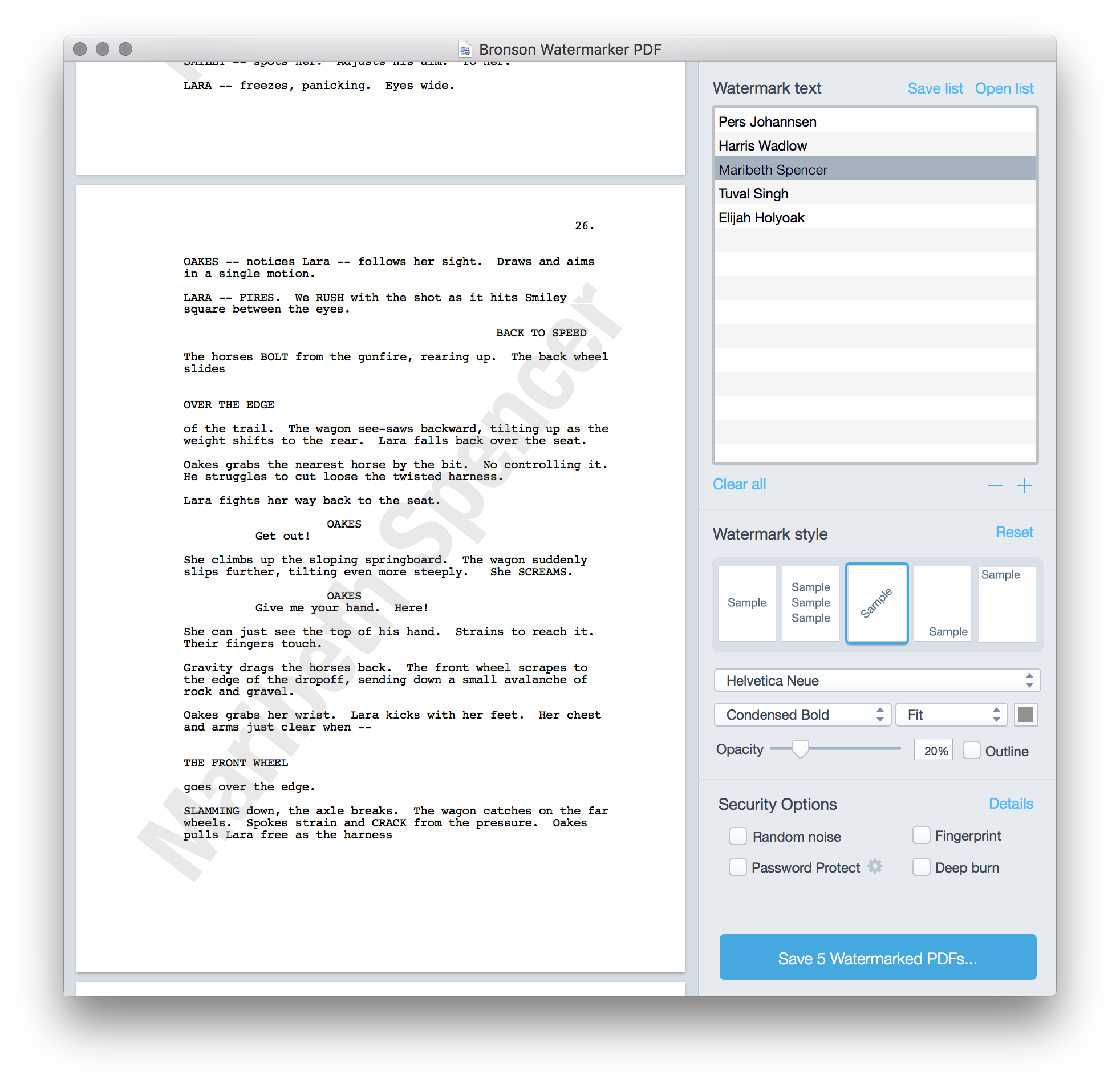
[Bronson Watermarker](https://quoteunquoteapps.com/bronson/), our app for quickly personalizing PDFs, has an update in the Mac App Store. Version 2.0.4 fixes a drawing bug.
screenshot
I don’t mention the app as much as [Highland](https://quoteunquoteapps.com/highland-2/) or [Weekend Read](https://quoteunquoteapps.com/weekendread/), but Bronson has become the go-to app for a lot of productions in Hollywood. If you’ve received a watermarked script in the past few years, there’s a very good chance it was created with Bronson.

Bronson is available in the [Mac App Store](https://itunes.apple.com/us/app/bronson-watermarker-pdf/id881629098?mt=12).

Weekend Read can read scripts aloud

January 28, 2016 Apps, Fountain, Weekend Read

[Weekend Read](https://itunes.apple.com/us/app/weekend-read/id502725173?mt=8), our app for reading screenplays on the iPhone and iPad, can also read them aloud. Here’s how to do it.

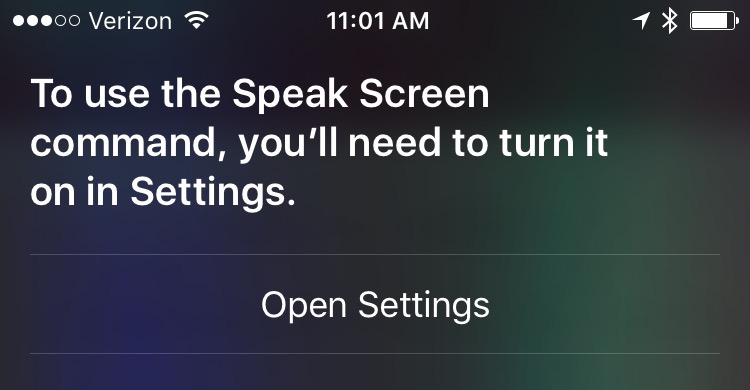
Ask Siri to “speak screen.” If you don’t already have Speech turned on, Siri will offer a link to the proper settings page:

siri setting

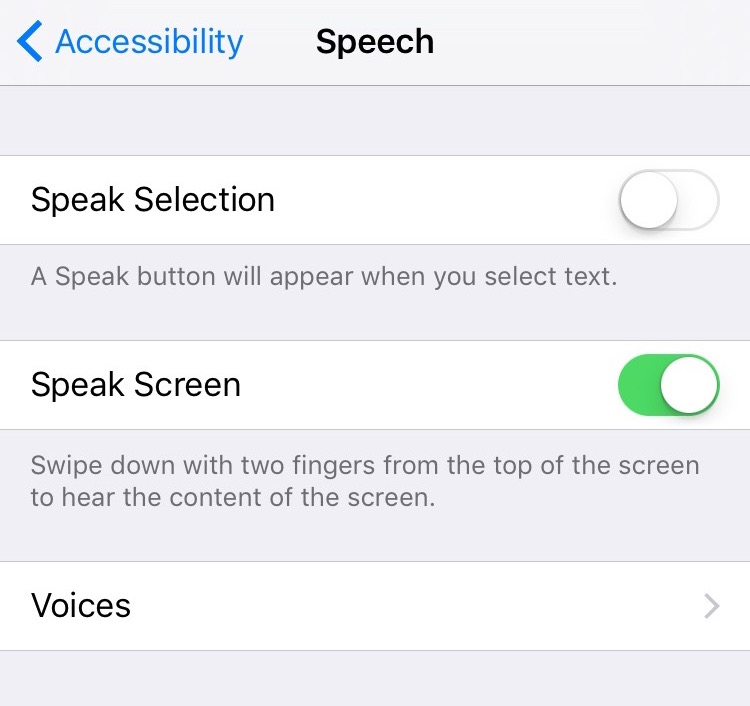
Tap Open Settings, then switch on Speak Screen.

speech settings

While you’re here, you can also choose a speaking voice in the Voices menu.

Then go back to Weekend Read and open a script.

To have it start reading aloud, swipe down from the top of the screen with two fingers, or just ask Siri to “speak screen.”

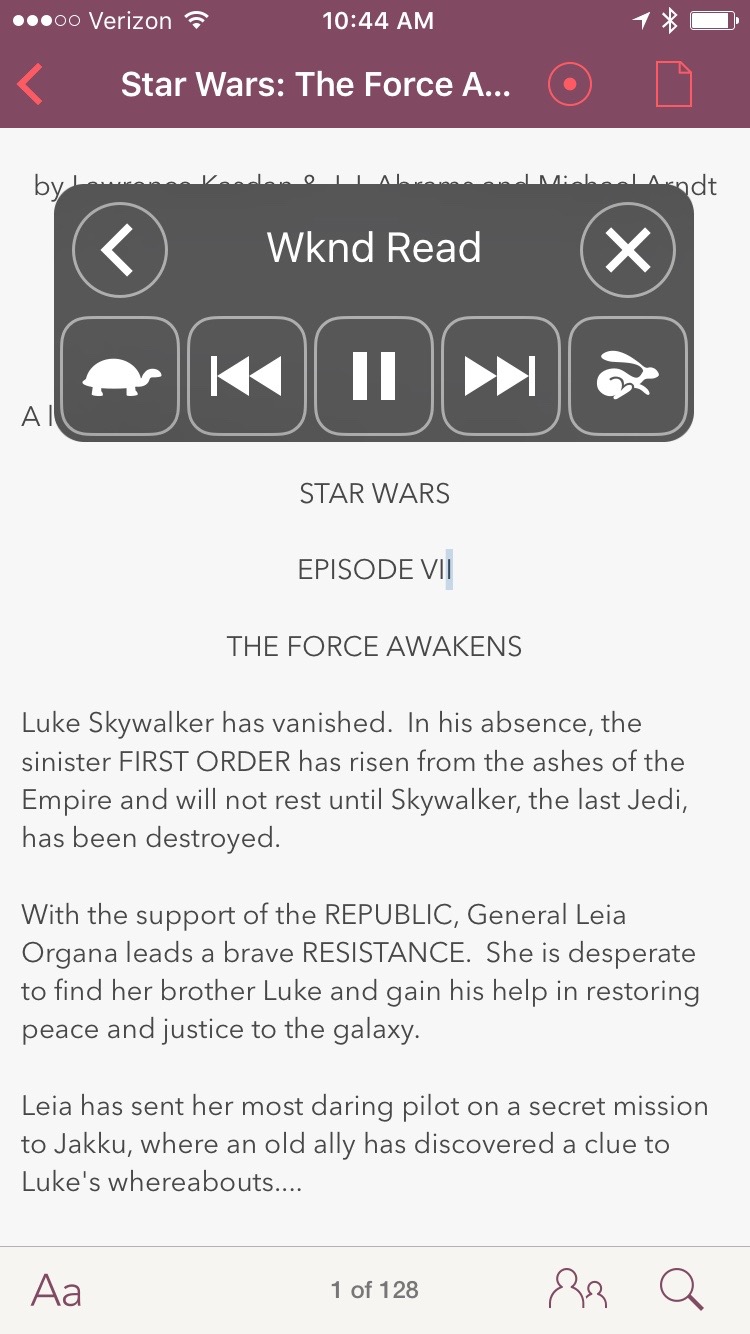
A set of controls appears, allowing you jump forward and back paragraphs, and adjust the reading speed.

speech HUD

Once you start it speaking, you can even change apps and it will keep going.

How did we do it? Honestly, we didn’t have to do a lot.

Almost all of this is built-in functionality provided by Apple’s Accessibility features. Behind the scenes, Weekend Read converts everything to Fountain, a plain-text format that feeds right into the system. By keeping it simple (and not cheating with view controllers) it just works.

For an upcoming version of Weekend Read, we’re working on small improvements such as “Mary says” and automatic expansion of abbreviations like “INT” and “V.O.”

You can find Weekend Read in the [App Store](https://itunes.apple.com/us/app/weekend-read/id502725173?mt=8).

My writing setup, 2016

January 27, 2016 Apps, Highland, Software, Tools, Workspace

In 2011, I wrote a post detailing my [writing setup](http://johnaugust.com/2011/my-daily-writing-routine). Over the past five years several things have changed, so I thought I’d give it an update.

Where applicable, I’ll include links. (Amazon links include my referral code, so you’ll help keep me stocked with pens.)

I work in an office built over my garage. My assistant Stuart works downstairs. Twice a week the rest of my staff (Nima and Dustin) comes in to work on app stuff and other projects. This year, we finally added a giant whiteboard. It’s been a godsend for planning and visual thinking.

I’m “in the office” from 8:30 a.m. to 6 p.m., but I wander in and out of the house pretty freely.

I do a fair amount of my morning work — emails, listening to cuts of Scriptnotes — while walking on the treadmill. I MacGyvered an old film festival lanyard to hold my iPad, and use an Apple bluetooth keyboard. I find I can think coherently up to about 3.2 miles per hour. (Beyond that speed, it’s genuine cardio and I can only listen to podcasts and such.)

When I’m really writing — that is, buckling down on a specific draft of a specific movie — I do a lot of writing sprints. It’s one hour of focused writing with no distractions. If I do three of these a day, that’s a lot of pages written.

## Getting away

When I start a new screenplay, I generally go away for a few days. I find that barricading myself in a new hotel in a new city helps me break the back of a story. I hand-write pages, trying to plow through as much as possible; my record is 21 pages in a day. Writing by hand keeps me from editing and second-guessing. At the start, it’s crucial to generate a critical mass of pages.

Every morning, I send what I’ve written to my assistant to type up. The [Scannable](https://itunes.apple.com/us/app/evernote-scannable/id883338188?mt=8) app is great for this.

I find I can generally get 40 decent pages out of a good barricading session. I won’t paste the scenes together until I’m more than halfway through a script.

## Hardware

When writing by hand, I like a white, lined, letter-sized writing pad with a very stiff back. It should barely bend. I’ve been using some generic Staples brand.

My preferred pen is the [black Pilot G2](http://www.amazon.com/gp/product/B001GAOTSW/ref=as_li_tl?ie=UTF8&camp=1789&creative=390957&creativeASIN=B001GAOTSW&linkCode=as2&tag=johnaugustcom-20&linkId=E3J46BX6H7ZXIPHR) (0.7mm size). It’s cheap; it writes consistently; I never worry about losing one. For proofreading, a colored felt-tip pen is key. I like the [Papermate Flairs](http://www.amazon.com/gp/product/B000BMBU4W/ref=as_li_tl?ie=UTF8&camp=1789&creative=390957&creativeASIN=B000BMBU4W&linkCode=as2&tag=johnaugustcom-20&linkId=6BJZQUXW7IRJTBKC). Again, cheap and losable.

I alternate between index cards and whiteboards for mapping out stories. If you’re going to be working in television, get comfortable with the whiteboard, because you’re going to be spending a lot of time staring at one.

My main computer is a 27-inch iMac. I love it.

Overall, I print very little these days. Almost everything is PDFs. But last year we replaced our decade-old laser printer with the [Brother HL5470DW](http://www.amazon.com/gp/product/B0081TYO72/ref=as_li_tl?ie=UTF8&camp=1789&creative=390957&creativeASIN=B0081TYO72&linkCode=as2&tag=johnaugustcom-20&linkId=YBPKB6L6HVOWUBX5). It’s crazy how cheap and fast it is, and it uses a lot less power.

Stuart uses the [DYMO LabelWriter 4XL thermal label printer](http://www.amazon.com/gp/product/B002M1LGJ4/ref=as_li_tl?ie=UTF8&camp=1789&creative=390957&creativeASIN=B002M1LGJ4&linkCode=as2&tag=johnaugustcom-20&linkId=RFIH3OEBW6LM4BO7) for packages. It ends up being faster, better and cheaper than using laser printer labels.

Years ago, I had horrible carpal-tunnel problems, so I changed my setup significantly. I use the SafeType keyboard and an [Evoluent vertical mouse](http://www.evoluent.com/). The keyboard is great, but command-key combos are a bear with it, so I’ve mapped a [Logitech G13 gamepad](http://gaming.logitech.com/en-us/product/g13-advanced-gameboard) to handle most of them. My desk raises so I can use it standing up. I try to be on my feet at least half the day.

For travel and kitchen duty, I have a 13-inch Macbook Pro. It’s good, but the screen is always getting overwhelmed with windows.

I used to talk on the phone a lot more, and found the [Plantronics S12 headset](http://www.plantronics.com/us/product/s12) essential. I still use it, but phone conversations are not nearly as important as they were just a few years ago.

We generally record Scriptnotes over Skype. I’m using the [Shure SM7B microphone](http://www.amazon.com/gp/product/B0002E4Z8M/ref=as_li_tl?ie=UTF8&camp=1789&creative=390957&creativeASIN=B0002E4Z8M&linkCode=as2&tag=johnaugustcom-20&linkId=XIZGNF2ZHO3F6XXJ) and [Sony MDR-7506 headphones](http://pro.sony.com/bbsc/ssr/product-MDR7506/). This combo has worked well enough for me, but everyone has different opinions and preferences.

For recording in the field, I use the [Zoom H5 four-track recorder](http://www.amazon.com/gp/product/B00KCXMBES/ref=as_li_tl?ie=UTF8&camp=1789&creative=390957&creativeASIN=B00KCXMBES&linkCode=as2&tag=johnaugustcom-20&linkId=MJYTCILEP242UXXB). I love it.

When recording in the office with multiple guests, I use the [Mackie 802VLZ4 8-channel mixer](http://www.amazon.com/gp/product/B00EDHWLFI/ref=as_li_tl?ie=UTF8&camp=1789&creative=390957&creativeASIN=B00EDHWLFI&linkCode=as2&tag=johnaugustcom-20&linkId=FSELAXNN4EMUR3KG) with a bunch of XLR mics and send the output directly into my MacBook with [this cable](http://www.amazon.com/gp/product/B00B6WZGHS/ref=as_li_tl?ie=UTF8&camp=1789&creative=390957&creativeASIN=B00B6WZGHS&linkCode=as2&tag=johnaugustcom-20&linkId=UJPYTSNUAT6BPKS7).

After years of not using Time Machine, I just set up a one terabyte [Samsung T1 Portable SSD](http://www.amazon.com/gp/product/B00RWXVRW8/ref=as_li_tl?ie=UTF8&camp=1789&creative=390957&creativeASIN=B00RWXVRW8&linkCode=as2&tag=johnaugustcom-20&linkId=5V55JTFPXFEMNZCT) to use as a backup drive. (If you get it, follow the advice in the “Most Helpful” Amazon review to remove the extraneous software Samsung installs.)

## Software

I do all of my writing in the [Highland beta](https://quoteunquoteapps.com/highland-2-beta/). Highland was originally just for screenwriting, but version 2 adds robust Markdown support, so now it’s the only app I need for writing anything — including this blog post.

[Slack](http://slack.com) is absolutely transformative. Our team doesn’t use email anymore. Everything is in Slack, sorted in channels.

[Dropbox](http://dropbox.com) still seems like magic. In addition to storing my active projects, I keep a folder named Pending in the Dropbox with an alias on the desktop. Anything that would normally clutter up the desktop, I throw in Pending.

I still use [Evernote](http://evernote.com), but mostly for household things like the grocery list. Random links go to [Pinboard](http://pinboard.in) instead. (On iOS, I use the [Pinner](https://itunes.apple.com/us/app/pinner-for-pinboard/id591613202?mt=8) app.)

I’ve used a lot of GTD productivity apps over the years, including [OmniFocus](http://www.omnigroup.com/products/omnifocus/) and [Things](http://culturedcode.com/things/). For the past few months, I’ve been using [2Do](http://www.2doapp.com), which works very well on both Mac and iOS.

For outlining and show notes, I love [WorkFlowy](https://workflowy.com). Because it’s web-based, we can all edit the same document.

I use both Mail and [Airmail](http://airmailapp.com), with some addresses going to Sparrow instead. ((Google discontinued Sparrow, but the Mac app still works for now.)) I use Google Calendar with [Fantastical 2](https://flexibits.com/fantastical).

I do all my RSS-reading on the iPad, using [Reeder](http://reederapp.com/ipad/).

## What I’d change

I’m pretty happy with my setup, but there’s definitely room for improvement.

My mail setup is a mess. The right combination of rules would probably allow me to sort out the wheat from the chaff, but I haven’t invested the energy. Plus, getting it to work properly in iOS would be a big challenge. Increasingly, the iPhone is where I’m doing email triage.

I’d like to push more of my email over to Slack, where it would be a better fit. An example is my D&D group. It’s six writers, so anytime there’s a conversation, it’s a chain of 20 emails, and you can never tell who is responding to what. In Slack, that thread would make a lot more sense.

Overall, the best thing that could happen to email would be to get rid of it.

« Previous Page
Next Page »

Primary Sidebar

Newsletter

Inneresting Logo A Quote-Unquote Newsletter about Writing
Read Now

Explore

Projects

  • Aladdin (1)
  • Arlo Finch (27)
  • Big Fish (88)
  • Birdigo (2)
  • Charlie (39)
  • Charlie's Angels (16)
  • Chosen (2)
  • Corpse Bride (9)
  • Dead Projects (18)
  • Frankenweenie (10)
  • Go (29)
  • Karateka (4)
  • Monsterpocalypse (3)
  • One Hit Kill (6)
  • Ops (6)
  • Preacher (2)
  • Prince of Persia (13)
  • Shazam (6)
  • Snake People (6)
  • Tarzan (5)
  • The Nines (118)
  • The Remnants (12)
  • The Variant (22)

Apps

  • Bronson (14)
  • FDX Reader (11)
  • Fountain (32)
  • Highland (74)
  • Less IMDb (4)
  • Weekend Read (64)

Recommended Reading

  • First Person (87)
  • Geek Alert (151)
  • WGA (162)
  • Workspace (19)

Screenwriting Q&A

  • Adaptation (65)
  • Directors (90)
  • Education (49)
  • Film Industry (489)
  • Formatting (128)
  • Genres (89)
  • Glossary (6)
  • Pitches (29)
  • Producers (59)
  • Psych 101 (118)
  • Rights and Copyright (96)
  • So-Called Experts (47)
  • Story and Plot (170)
  • Television (165)
  • Treatments (21)
  • Words on the page (237)
  • Writing Process (177)

More screenwriting Q&A at screenwriting.io

© 2026 John August — All Rights Reserved.