• Skip to primary navigation
  • Skip to main content
  • Skip to primary sidebar

John August

  • Arlo Finch
  • Scriptnotes
  • Library
  • Store
  • About

Archives for 2006

It’s Always Sunny in Philadelphia

September 15, 2006 Geek Alert, Los Angeles, Television

Probably my favorite comedy after The Office is FX’s It’s Always Sunny in Philadelphia. I developed a meta-appreciation for it this season, when I realized it’s shot at the Herald-Examiner building in downtown Los Angeles, using some of the same sets we used for The Movie.

Last I heard, there was talk of converting the Herald-Examiner building into condos, so who knows what they would do for a third season. If there is a third season.

iTunes has free featurette about the show, focusing on the logistical nightmare of shooting all of Danny DeVito’s scenes for the season in just 20 days. They had to write all ten scripts ahead of time, then found themselves shooting pieces from up to four episodes per day.

In watching the behind-the-scenes footage, I was surprised to see how puny the main cameras are for the show. They’re using Panasonic DVX-100A’s, long a staple of no-budget indie filmmaking. (We used it for b-roll.) It’s pretty ballsy to use it for a real TV show, where you’re spending millions of dollars and recording on a mini-DV tape.

Does anyone actually use long division?

September 13, 2006 Rant

I was working on a scene today in which an adult admitted to a grade-schooler that in the real world, you’ll never need to use long division. It’s just something they force on kids to keep them from getting cocky after multiplication.

I nixed the joke because it felt kinda Full House. But it got me wondering if it was true. I doubt I use long division more than twice a year. Most of those times, it’s for want of a calculator, and halfway through the process, I realize I didn’t need an exact answer and should have just estimated.

Thus my question: Does anyone use long division on a regular basis?

Addition, subtraction, multiplication — they answer fundamental daily questions about how much, how often and how fast. Division is all about apportioning, figuring out how to split things up, which in the real world almost always involves some qualitative if not emotional decision-making. It’s all well and good to say that each child should get seven M&M’s, but since Ezekiel can’t eat chocolate, should he get an extra Jolly Rancher?

For the record, I’m not saying they should stop teaching long division. Not quite. Not without some study to show it won’t completely screw up later math education — which to my recollection, never involved long division.

Maybe I’m wrong, and there’s a non-teacher subset of the work force that actually uses long division. If so, write in. I’m curious to see who these Remainders are.

ControllerMate and automatic fingers

September 5, 2006 Geek Alert

geek alertI recently upgraded to a Mac Pro, which I justified to myself thusly:
1. I’m doing effects for The Movie, and Motion runs much faster on it. (In truth, I only did one effect in the final cut.)
2. My G5 was actually slower than my laptop.
3. As a writer, I needed a quieter computer.
4. I deserve to throw some of my Hollywood money around.

The new computer is great, and almost all of my software works perfectly on it. Unfortunately, I’ve had some hiccups with my input devices.

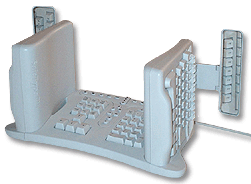
keyboardAs I’ve [blogged about](http://johnaugust.com/archives/2004/my-new-keyboard-setup), I have a strange keyboard. It looks impossible to use, but I’m actually much faster typing on it than a traditional keyboard, with the added bonus that my arms don’t go numb in the middle of the night.
The Mac Pro isn’t thrilled with my keyboard, which connects through a serial-to-ADB dongle. On restarts, the computer asks me to confirm the keyboard layout, suspicious that I’ve swapped in a Klingon model. Nevertheless, it produces the correct letters every time.

While my odd keyboard is great for typing, it’s singularly awful for key commands, like Copy, Paste and Undo. While one’s fingers can always find the right keys to form words, there’s something different about multi-key combinations. It just doesn’t happen consistently.

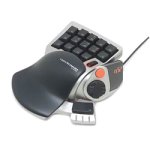
nostromo keypadThat’s why I’ve been using a little gaming keypad, the Nostromo N52 by Belkin. Using the software that came with it, I set up keys for Copy, Paste and all the useful shortcuts one is likely to use. With my right hand on the mouse, and my left on the Nostromo, I’m an editing machine.

But the software for the Nostromo refuses to work with the Mac Pro.

At first, I wondered if I could live without it. I thought my fingers would stop reaching for the non-functioning keypad, but they wouldn’t. Thinking I was copying something, I’d be left with a single lower-case g, which is how the computer decided to interpret the chatter from the orphaned device.

Belkin hasn’t upgraded the drivers in years, so I’m not holding my breath that there will suddenly be a new version for Intel Macs like mine. One guy has taken it upon himself to create his own drivers, but it looks like even he’s given up.

Fortunately, there’s a program called [ControllerMate](http://orderedbytes.com/controllermate/) which can handle the Nostromo. For $15, it’s almost as good as free, and can do a lot of things that the Belkin software couldn’t. Like confound the hell out of me.

ControllerMate has an elaborate flow-chart-style programming language which looks great but is almost impenetrable. How do you assign a keystroke to a button? It’s as easy as…

1. Pick the controller from the list.
2. Double-click it to open the available controller buttons.
3. Press the actual button on the device to indicate which virtual button it corresponds to.
4. Drag the virtual button to the programming area.
5. But first, you might want to make a new programming page. Or a group. Why? You won’t know until you need it.
6. Now, pull down the menu to outputs, and select “Keystroke” or “Single Key.” What’s the difference? I couldn’t tell you, except that Single Key seems to work and Keystroke locked up my machine in a beeping loop.
7. Open the virtual keyboard palette and drag the desired key to the well, then add any modifier keys.
8. Then drag the whole thing to the programming area, and attach it to the virtual button.
9. Test to see if it works.

Repeat for all of the other keys. Uggh.

To be fair, there’s a benefit to all this abstraction. You can create some pretty elaborate logic by nesting groups and pages, so that hitting one key while another key is pressed performs a special function. But it’s a lot of work to get to Copy and Paste.

My fingers are just happy to be back on autopilot. Just in the course of writing and posting this blog, they’ll have reached for the Nostromo fifteen times. Which is fifteen times less I’ve had to curse under my breath.

Helicopter day

August 29, 2006 Los Angeles, Projects, The Nines

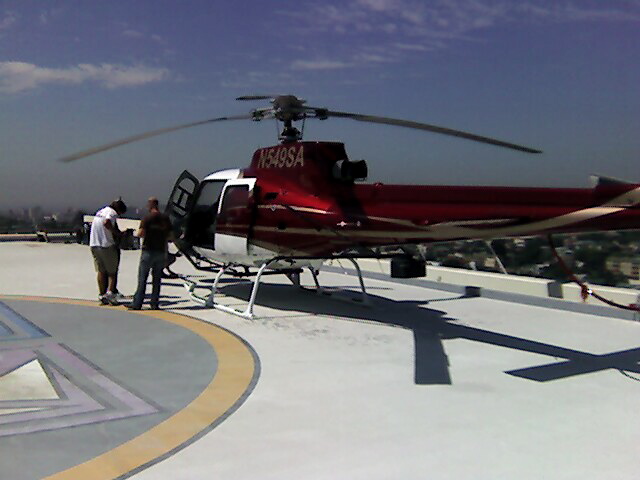
helicopterToday was the first and only day of aerial photography for The Movie. We [rented a helicopter](http://www.hangar1project.com/), a [Wescam](http://www.wescam.com) mount, a pilot, an operator, a camera and burned two thousand feet of film. Minute for minute, it was the most expensive part of the entire production.

How was it, you ask?

Pretty effin’ cool.

I’d been in helicopters before — once in Hawaii, once in Estonia. But there’s something amazing about flying over a city you’ve lived in for decade. Look! There’s my old apartment. There’s my agent’s office. There’s Aaron Spelling’s mansion. (It’s the big white W.)

Spelling MansionThese shots are from my Treo. I could kick myself for not bringing my little videocamera along for the ride, but I guess I’ll be seeing the 35mm version soon enough.

The shots we needed for the movie were pretty specific, and took a fair amount of planning to get right. [Google Earth](http://earth.google.com) was a huge help. We could literally fly through the shots before we did them, showing the pilot what we were going for. (In fact, for the screenings so far, we’ve simply been using footage captured from the screen.)

(Click on the photos to see larger versions. More after the jump.) [Read more…] about Helicopter day

« Previous Page
Next Page »

Primary Sidebar

Newsletter

Inneresting Logo A Quote-Unquote Newsletter about Writing
Read Now

Explore

Projects

  • Aladdin (1)
  • Arlo Finch (27)
  • Big Fish (88)
  • Birdigo (2)
  • Charlie (39)
  • Charlie's Angels (16)
  • Chosen (2)
  • Corpse Bride (9)
  • Dead Projects (18)
  • Frankenweenie (10)
  • Go (29)
  • Karateka (4)
  • Monsterpocalypse (3)
  • One Hit Kill (6)
  • Ops (6)
  • Preacher (2)
  • Prince of Persia (13)
  • Shazam (6)
  • Snake People (6)
  • Tarzan (5)
  • The Nines (118)
  • The Remnants (12)
  • The Variant (22)

Apps

  • Bronson (14)
  • FDX Reader (11)
  • Fountain (32)
  • Highland (73)
  • Less IMDb (4)
  • Weekend Read (64)

Recommended Reading

  • First Person (87)
  • Geek Alert (151)
  • WGA (162)
  • Workspace (19)

Screenwriting Q&A

  • Adaptation (65)
  • Directors (90)
  • Education (49)
  • Film Industry (489)
  • Formatting (128)
  • Genres (89)
  • Glossary (6)
  • Pitches (29)
  • Producers (59)
  • Psych 101 (118)
  • Rights and Copyright (96)
  • So-Called Experts (47)
  • Story and Plot (170)
  • Television (165)
  • Treatments (21)
  • Words on the page (237)
  • Writing Process (177)

More screenwriting Q&A at screenwriting.io

© 2026 John August — All Rights Reserved.