ControllerMate and automatic fingers
I recently upgraded to a Mac Pro, which I justified to myself thusly:
- I’m doing effects for The Movie, and Motion runs much faster on it. (In truth, I only did one effect in the final cut.)
- My G5 was actually slower than my laptop.
- As a writer, I needed a quieter computer.
- I deserve to throw some of my Hollywood money around.
The new computer is great, and almost all of my software works perfectly on it. Unfortunately, I’ve had some hiccups with my input devices.
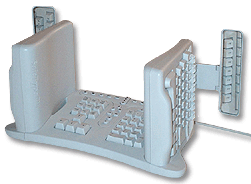
As I’ve blogged about, I have a strange keyboard. It looks impossible to use, but I’m actually much faster typing on it than a traditional keyboard, with the added bonus that my arms don’t go numb in the middle of the night.
The Mac Pro isn’t thrilled with my keyboard, which connects through a serial-to-ADB dongle. On restarts, the computer asks me to confirm the keyboard layout, suspicious that I’ve swapped in a Klingon model. Nevertheless, it produces the correct letters every time.
While my odd keyboard is great for typing, it’s singularly awful for key commands, like Copy, Paste and Undo. While one’s fingers can always find the right keys to form words, there’s something different about multi-key combinations. It just doesn’t happen consistently.
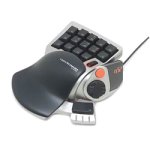
That’s why I’ve been using a little gaming keypad, the Nostromo N52 by Belkin. Using the software that came with it, I set up keys for Copy, Paste and all the useful shortcuts one is likely to use. With my right hand on the mouse, and my left on the Nostromo, I’m an editing machine.
But the software for the Nostromo refuses to work with the Mac Pro.
At first, I wondered if I could live without it. I thought my fingers would stop reaching for the non-functioning keypad, but they wouldn’t. Thinking I was copying something, I’d be left with a single lower-case g, which is how the computer decided to interpret the chatter from the orphaned device.
Belkin hasn’t upgraded the drivers in years, so I’m not holding my breath that there will suddenly be a new version for Intel Macs like mine. One guy has taken it upon himself to create his own drivers, but it looks like even he’s given up.
Fortunately, there’s a program called ControllerMate which can handle the Nostromo. For $15, it’s almost as good as free, and can do a lot of things that the Belkin software couldn’t. Like confound the hell out of me.
ControllerMate has an elaborate flow-chart-style programming language which looks great but is almost impenetrable. How do you assign a keystroke to a button? It’s as easy as…
- Pick the controller from the list.
- Double-click it to open the available controller buttons.
- Press the actual button on the device to indicate which virtual button it corresponds to.
- Drag the virtual button to the programming area.
- But first, you might want to make a new programming page. Or a group. Why? You won’t know until you need it.
- Now, pull down the menu to outputs, and select “Keystroke” or “Single Key.” What’s the difference? I couldn’t tell you, except that Single Key seems to work and Keystroke locked up my machine in a beeping loop.
- Open the virtual keyboard palette and drag the desired key to the well, then add any modifier keys.
- Then drag the whole thing to the programming area, and attach it to the virtual button.
- Test to see if it works.
Repeat for all of the other keys. Uggh.
To be fair, there’s a benefit to all this abstraction. You can create some pretty elaborate logic by nesting groups and pages, so that hitting one key while another key is pressed performs a special function. But it’s a lot of work to get to Copy and Paste.
My fingers are just happy to be back on autopilot. Just in the course of writing and posting this blog, they’ll have reached for the Nostromo fifteen times. Which is fifteen times less I’ve had to curse under my breath.


September 5th, 2006 at 2:26 pm
Fascinating keyboard!
Random words of advice for Mac Pro owners- check with Apple on whether or not you received one of the faulty, recalled batteries. Into our 4th month of owning this beautiful machine, the random shutdowns began (at 100% power). We swapped our battery and so far, so good, but I am advising all Mac Pro cohorts to look into this issue with their own.
I’ve heard that the film software flies on this baby, however, I’m working in all the cs2 graphics programs (i’m a designer) and they don’t operate as quickly as our g5. I think cs3 will, hopefully, better handle the Intel chip.
Did you get the funky black one? Good luck with it
September 5th, 2006 at 3:29 pm
John:
Welcome to the world of MacBook Pro. Allow me to be the first to say…
…what the fuck is THAT thing?
Seriously.
Granted, I’m a dedicated user of split keyboards, but that weird boxy mofo is, well…wow.
September 5th, 2006 at 4:57 pm
Craig, I think John bought a Mac Pro, not a Macbook Pro. Congrats on the new Mac John, the Mac Pro looks really nice.
Regarding the really strange keyboard you’re using, it would be interesting to know how many words per minute you are able to type with it. Is the difference to a regular keyboard really that big?
September 5th, 2006 at 5:19 pm
It’s called the Nostromo. I’d buy it just for the name. Awesome.
I “edited” an hour-long “documentary” (it was a few of us arsing around in Newquay last year) on a PowerBook G4. That stretched the machine to its very limits. I’d love to see how much of a difference there’d be with a dual-core Macintel.
September 5th, 2006 at 5:43 pm
I own both a Mac Pro (at the office) and a MacBook Pro (for home and travel). The new nomenclature is confusing.
As far as the keyboard, I’ve gotten 80 to 90 wpm pretty consistently.
http://labs.jphantom.com/wpm/
September 5th, 2006 at 6:44 pm
Ha ha! My friend and I predicted about 5 years ago that they’d have keyboards like this as the next step. It looks frickin great!
R
September 5th, 2006 at 8:17 pm
“How do I turn the computer ‘off’, you say? Well, that’s easy! I happen to have a circa-1990 Nintendo controller! A-B-A-B Up-down select+start gets it done every time!”
heheheh….:)
September 5th, 2006 at 10:26 pm
I use the Nostromo Gamepad for Autocad, which relies heavily on commands. Great minds think alike. That’s all I need to say!
September 6th, 2006 at 1:18 am
Now I must compete!
I’m at 111 WPM on my wife’s crappy flat keyboard. Tomorrow…I aim for 120 with the split keyboard. Wish me luck.
This is soooo much better than writing…
September 6th, 2006 at 2:22 am
Geek alert? Holy shit, you’re not joking.
September 6th, 2006 at 4:33 am
That keyboard is seriously strange looking. I have trouble with the ones that are just split in the middle.
I wanted to go a Nostromo, just because it looked so darn cool.
September 6th, 2006 at 8:45 am
Man, you haven’t really used a keyboard until you’ve used a spherical… It’s a ball about the size of your head, with keys at ergonomic, instinctual-placement positions. And forget that “qwerty” crap (which was invented to slow secretaries down, so they wouldn’t jam up their typewriters), the keys are arranged in order of most common usage.
Of course my latest keyboard is hidden in the armrests of a Lay-Z-Boy. The portable version fits in both pockets of a stylish leather jacket, allowing me to compose witty remarks on people’s blogs whilst waiting for this stupid emo teen to hurry up and make my double quarter pounder with bacon.
I was a vegetarian once… For nearly six Goddamn years! Not one of these fish and chicken eating vegetarians, or those, gravy isn’t meat vegetarians. I was the real deal! I stayed away from red food dye to save all those little cochineal beetles! I used Fujicolour film that wasn’t gelatine based! I was hardcore! But now? I’m just standing in line at McDonalds, hoping that typing out these comments doesn’t look like I’m playing with myself, so I can continue to kill myself with delicious fat.
September 6th, 2006 at 10:33 am
Take a week off and learn vim 7.0.
http://macvim.org
Your fingers will never need to leave the keyboard again. Write the entire screenplay in your text editor, then import it into Final Draft.
rd
September 6th, 2006 at 11:18 am
Do they have something similar for pianists?
September 6th, 2006 at 11:32 am
The real question is whether or not John sprung for that impressive 30 inch Cinema Display!
September 6th, 2006 at 11:44 am
How the hell would I hunt and peck on that thing?
September 6th, 2006 at 12:12 pm
What the f*ck is that!?
That looks like something built for three people to operate at once. What way is up? I am imagining you on some sort of gimble while you write, twirling in a constant motion while bashing away at the keys. I’m sure I’ll see this next season of Fear Factor, as some hillbilly dope attempts to write his name while chewing a horse’s nut and reverse bungee jumping on fire.
You Hollywood folk, I swear.
September 6th, 2006 at 1:57 pm
Yes, I got the 30 inch monitor. And it’s super-godly.
September 6th, 2006 at 3:20 pm
John, any thoughts on the MacBook Pro? My Dell laptop died after an on/off relationship that lasted 5 years and I am considering getting a MacBook Pro. I am particularly interested in how FCP runs on it.
September 6th, 2006 at 3:27 pm
Craig types 111 words per minute? My once proud 88 now seems so lowly…
September 6th, 2006 at 3:52 pm
Hey John, What made you choose the Apple 30″ over the Dell 30″? Aesthetics? (aesthetics being a totally valid answer IMHO.) Just curious.
September 6th, 2006 at 5:36 pm
Actually, I hit 120 today with my split keyboard (including 2 mistakes). Suck it!
September 7th, 2006 at 5:32 am
Craig - 121 with four mistakes!
All my friends have realized my inner nerd, when I delightedly passed the WPM test around to them. “See, guys? It counts your words per minute! You can find out how fast you type!!”
“…So?”
That website is like crack.
September 7th, 2006 at 8:57 am
QWERTY wasn’t designed to slow anyone down. That’s an old urban legend. It was designed to prevent the keys from jamming, yes, but not by making people type more slowly. It was by spacing out the most commonly used keys so the typebars wouldn’t get in each others’ way.
September 7th, 2006 at 9:13 am
Blimey.
That’s all I can say. Blimey
I’m embarassed now.
Next time I’ll be writing my meesly 72 wpm I’ll cover my thick-as-a-brick Acer laptop with a brown paper bag. Especially when I type away in my… my… my… shyly Microsoft Word.
There, I said it. I’m the low-point of the screenwriting art. I’m that basement kid from that Ursula Le Guin’s story — what was it called again, Ofelas, Ogilvy, Omeini, O something — my misery serves as an antipode to your awesomness.
That is, untill I save some money and buy myself some new stuff.
September 7th, 2006 at 9:15 am
I’m not sure that “shyly” was supposed to be italicized. Oh well…
September 7th, 2006 at 10:21 am
Whooo! 121WPM with no mistakes on my first try! How exciting! And here I thought I was still floating around the 80WPM swamp.
September 7th, 2006 at 10:24 pm
you hollywood people are strange, you can’t even use a normal freakin! keyboard!
i am jealous of your macbook pro and and mac pro. and VERY envious of the 30 inch monitor.
September 11th, 2006 at 6:51 pm
is that really a picture of your keyboard?! That space age NASA thing??
…do you have seven arms?
September 12th, 2006 at 9:09 pm
Hey John,
I remember a while ago you said something about wanting to do podcasts under a geek post and well I found a pretty cool site that is free if you want to try it out. Its called http://www.wildvoice.com the only problem is they dont have mac recording software, but if you already have software then you should try it out. It would be pretty cool.
September 14th, 2006 at 7:21 am
John,
In the hope of saving you (and any intel Mac users) a potential headache if you print to a Canon imageRunner with a multi PDL board…
The “PS Helper” that comes conjoined with the PS driver seems to crash the intel Mac. Delete it and you’ll have your Mac back. The PPD will work fine.
Peace — Jess
September 14th, 2006 at 1:21 pm
Just discovered this link (via andreaharner.com) for the coolest chair ever made…
http://poetictech.com/aura/index.html
That might trump your keyboard in the “weirdest thing ever” category.
September 16th, 2006 at 8:32 pm
Oh my! How in the world do you type on that thing? I’m fascinated — I must get me to the nearest computer store and try one out.
Are you sure it isn’t a Klingon model?
January 2nd, 2007 at 1:21 am
I used the game pad for photoshop, dreamweaver and flash and it rocked, until i got a MacBook Pro and it didn’t work other then controller mate… kinda a disaster compared to the software that came with it.
BUt i still use it in windows for gaming and will eventually spend a whole day reprogramming it in controllermate.