• Skip to primary navigation
  • Skip to main content
  • Skip to primary sidebar

John August

  • Arlo Finch
  • Scriptnotes
  • Library
  • Store
  • About

John

Hiring a UI designer

July 8, 2014 News

Our tiny company is getting a little bigger. We’re hiring a full-time UI designer for [Quote-Unquote Apps](http://quoteunquoteapps.com).

This is a new position, one that combines art and science (design beautiful things…that actually work). Responsibilities will include:

* Designing art (icons, graphics) and animations for our current and future apps.
* Building and testing interfaces for apps and websites.
* Shared responsibility for support email. (Everyone in the office chips in.)

We make apps for Mac and iOS, including [Highland](http://quoteunquoteapps.com/highland/), [Weekend Read](http://quoteunquoteapps.com/weekendread/) and [Bronson Watermarker PDF](http://quoteunquoteapps.com/bronson/). We have several new apps in development, and will likely make stuff for iWatches, AppleTVs and other future gadgets. We need someone to help us build cool things.

I’ve hired enough people to know that the job ultimately shifts based the special skills each person brings. But we have a good sense of what we Require and Desire.

Required:

**Great taste.** We need someone who can make beautiful, thoughtful art and experiences. We should to be able to have a conversation about any app and discuss where it succeeds, where it fails, and how to improve it. It’s one thing to know what it says in the HIG; it’s another to understand where the trends are headed.

**Expertise.** This person will ultimately be responsible for building interfaces, both as prototypes and in Xcode. They’ll need to be comfortable wiring up little bits that work with storyboards and auto layout.

You can’t learn taste, but you can learn Xcode. What’s important is that this person needs to genuinely love working under the hood, wrestling with constraints and timing and UIScrollViews. Candidates need to be able to muck around with code to figure out why the status bar isn’t displaying properly after rotation.

Prototypes can be a great way of exploring design options, so it’s likely we’d be using something like Origami or framer.js to create mock-ups. We have no musts when it comes to prototypes. Whatever works, works.

We’re not requiring that a candidate have a certain number of years experience working as a paid designer. In fact, it’s more likely we’ll find someone who has been doing something else but Just Happens To Be Great at this.

Our lead coder, Nima Yousefi, was getting his masters in biology. But he’d rather make apps.

We’re looking for someone who’d rather make apps. ((Or, someone who has already made apps. We’re happy to bring someone in who already has her own apps in the App Store.))

Our Desired list is deliberately broad. No one will tick all these boxes, but we’ve found making apps in 2014 ends up incorporating a lot of seemingly-disparate skills:

* Web experience in HTML/CSS/Javascript. Many of the apps we’re working on have a web component.
* Editing skills (Avid, Final Cut Pro). The App Store will soon be allowing demo videos, and we intend to create them.
* Animation and VFX chops (After Effects, Motion or more-sophisticated apps).
* Photoshop/Sketch/Illustrator skills. Beyond icon and logo design, we spend hours tweaking App Store screenshots.
* Copywriting. Sometimes, half the job is figuring out the right word for a UI element, or how to phrase a warning.
* A/B Testing. We haven’t done a lot of it, but upcoming apps will require it.
* Broader coding experience. Nima remains our lead engineer, but there’s always too much to do, and a second set of eyes is great.

A good candidate for this position would be able to talk about most of the following with ease:

– Great opening title sequences of the last year.
– The design challenges of moving to larger iPhones.
– Accessibility, and apps that do it right.
– Are short URLs even worth it?
– Google’s Material.
– iOS keyboard extensions, and what’s possible.
– Localization.
– iBeacons.
– Books you’ve bought just for the cover.

We work together in the Los Angeles office twice a week, keeping in touch other days over Slack and Google Hangout. Candidates don’t need to live in LA to apply, but they need to be able and willing to move here if they get the job. ((We’ll consider international applicants, but visas may be a challenge.))

Salary is commensurate with experience — enough to live in Los Angeles — and there’s health insurance. It’s certainly not Google money, but it’s more than most people are likely to make writing their own apps, with the stability of a small team and guaranteed income.

Here’s the process for applying:

1. Email digital@johnaugust.com. Tell us about yourself. Include links to your work. If you have apps, send some promo codes.
2. We’ll be accepting emails through midnight on Thursday, July 17th.
3. We’ll start interviewing selected candidates via Skype shortly after that.

If you think you’re the right person for this job, apply. Or if you know a great candidate, send them a link.

It’s a great job for the right person. I have a hunch we’ll find someone amazing.
Puppet update

July 7, 2014 Follow Up

Last November, I put out the call that I was looking for an [experienced puppet designer](http://johnaugust.com/2013/puppet-person-needed) for a new project. I got dozens of emails and recommendations, and had several great conversations with designers and directors suggesting techniques and pitfalls.

In March, I met with a great LA puppet shop to begin serious discussions about working together on it. They suggested a terrific illustrator to help create designs for the main character, a non-human creature with very unusual attributes. After a few sessions, we arrived something we loved…

…but it was un-puppetable.

That’s not entirely true, of course. With modern technology — green-screens, motion control, clever robotics — there’s almost nothing that can’t be done with a puppet. But when we looked at all the post-production that would be required to make the character feel like it was interacting with real-world environments and actors, it became clear that a fully-CG character would be a much better fit for this project.

The biggest issue ended up being the character’s [walk cycle](http://en.wikipedia.org/wiki/Walk_cycle), which would have been a monstrous challenge for puppeteers. I had nightmare visions of needing to paint out six guys in the background of every shot.

Once I accepted that this character would be virtual, I questioned why I was so insistent on human actors and physical sets. After all, what was special about the project was this main character, who would be drawn in after the fact.

If we’re animating him, why not animate everything?

So that’s what we’re doing now. We’re creating the rough animatic and figuring out next steps. It’s absolutely the right choice for this project, even if it wasn’t the original intention.

But I still love puppets. The process of meeting with puppet-folk has left me eager to find the right project for them. It will likely be something in which their puppet-ness is innate to the concept — *of course* that’s a puppet; they couldn’t be anything else.

Of the many people I spoke with during this project’s puppet incarnation, one of the most helpful was director Toben Seymour. His (http://www.seymour.tv/filter/Reel/Herman-Dune-Short-Edit) is a great example of why puppets continue to be awesome.

Internationalizing Bronson

July 3, 2014 Apps, Bronson, Highland, International, Weekend Read

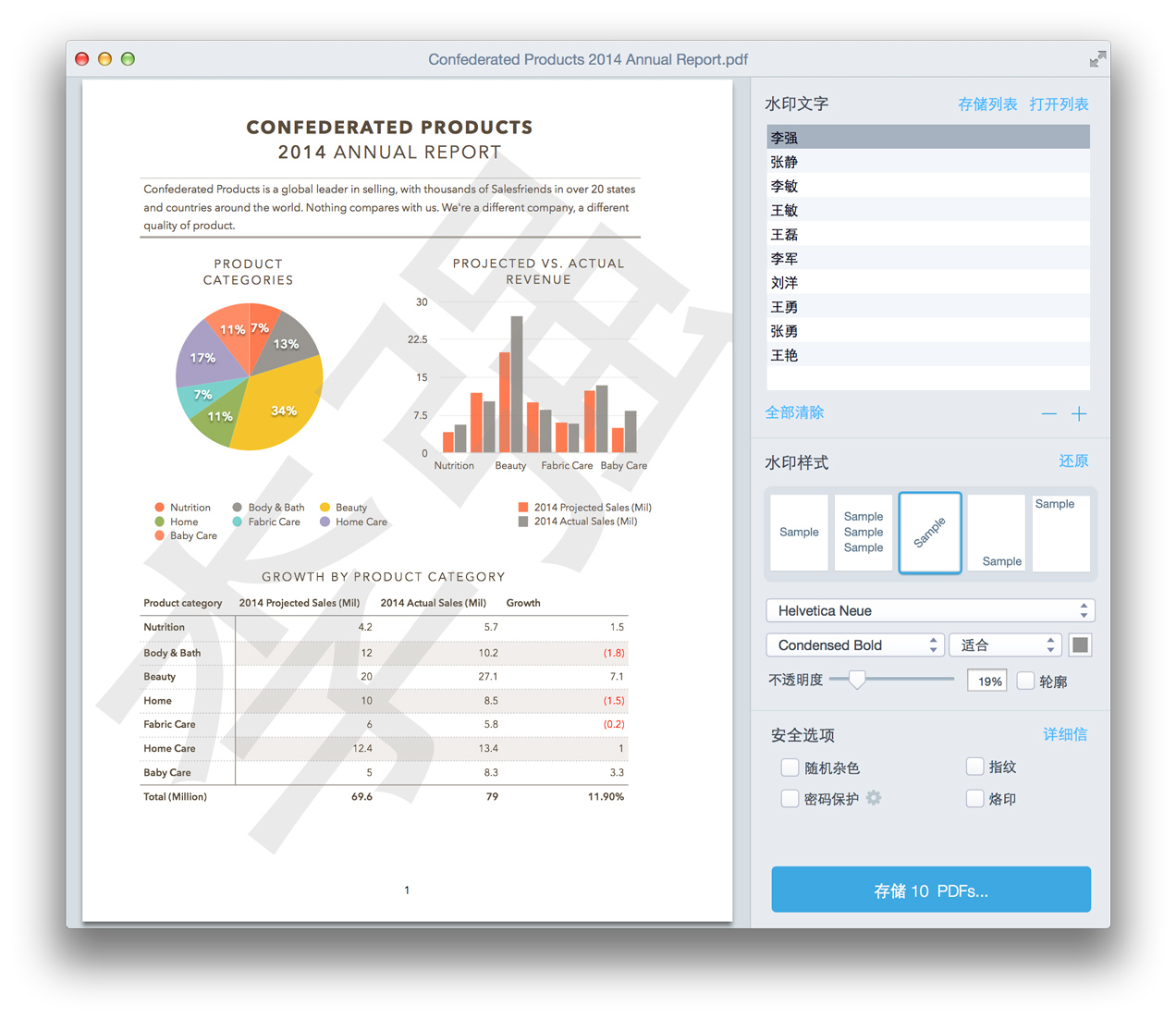
[Bronson Watermarker PDF](http://quoteunquoteapps.com/bronson/), our app for watermarking and password-protecting screenplays and other documents, has an update in the App Store that adds native support for German, Russian and Chinese.

It looks so cool in Chinese:

screenshot

This was our first effort at internationalizing an app. We chose Bronson because it’s the simplest overall: one window, a few menus. We’ll be taking what we learned and applying it to [Highland](https://itunes.apple.com/us/app/highland/id499329572?mt=12) and [Weekend Read](https://itunes.apple.com/us/app/weekend-read/id502725173?mt=8) down the road.

We hired [Applingua](http://applingua.com) to do our translations, and I’d happily use them again. The process is pretty straightforward: export all the text strings in your app and ship the file. The company translates each string in order, so they’ll fit back into the proper slots when you drop the translated file in the app bundle.

Why these three languages? Based on our download numbers, these were the regions that were already buying our apps the most. ((Because you’ll ask, here are our top 20 countries, in order: US, UK, Canada, Russia, Germany, China, Brazil, Mexico, Australia, India, Turkey, Singapore, France, Spain, Thailand, Hong Kong, Chile, Italy, Columbia, Peru.)) Translating the app into these languages helps the most existing customers, and (hopefully) attracts new ones. We’ll be keeping an eye on download numbers to see if it was worth it.

These were also good test languages for us, because they forced us to reconsider what our interface would look like if some of the text labels became vastly longer or shorter than they were in English. We found that we needed to reposition some elements to make sure strings never got truncated.

Internationalizing Bronson took about a week. The process was fairly smooth, but there were things we hadn’t considered at the start:

* “Watermark” is an odd term that doesn’t necessarily have a matching word in other languages. We relied on the translators to figure out what made sense.
* In English, the button at the bottom might read, “Save 1 Watermarked PDF” or “Save 3 Watermarked PDFs.” We insert the numeral into the string and pluralize as necessary. But in other languages, the word order and pluralization can be very different. We ultimately decided to keep the English usage of PDF(s), with the assumption that these file types are so ubiquitous that users are unlikely to be confused.
* We asked Applingua to translate our Mac App Store product description, but then realized that we also needed them to translate our screenshots, which have text on them.
* Even keywords need to be localized so that when a German user searches for Wasserzeichen in the Mac App Store, Bronson shows up.

If you want to test out what an app looks like in different languages, here’s how to do it:

1. Open System Preferences and choose Language & Region.
2. Click the + below the list box and choose a new language.
3. Drag that language to the top of the list.

The next time you launch the app, it will use the localized language bundle if it exists.

With this new build, we’ve [lowered the price to $19.99](https://itunes.apple.com/us/app/bronson-watermarker-pdf/id881629098?mt=12). We sold remarkably well when we launched at $14.99, but the full $29.99 price seemed to be higher than the market would bear.

We’re also offering site licenses for companies. One of our favorite animation studios was our first site license, and it was great to be able to provide them a custom version. If you’re interested, drop us a note through the [Bronson support page](http://quoteunquoteapps.com/bronson/support).

If you haven’t checked out Bronson yet, look for it [on the App Store](https://itunes.apple.com/us/app/bronson-watermarker-pdf/id881629098?mt=12). And if you already have Bronson, we could really use some reviews. Each new version pushes old reviews off the landing page.

Audio illusions, and the importance of set-up

July 3, 2014 Psych 101, Words on the page

Your brain is smarter than you think. Here’s an example from [Philadelphia’s Franklin Institute](https://soundcloud.com/whyy-the-pulse/an-audio-illusion):

In this audio illusion, something that seems incomprehensible makes sense once your brain is conditioned for it. Prior information shapes our understanding of the present.

In screenwriting — or any form of storytelling — we call this set-up. A reader’s understanding of a given moment is hugely dependent on what you’ve already established. That’s why the first few pages of a script are so important: you’re teaching the reader what to look for, and ultimately how to read your script.

From [WHHY The Pulse](https://soundcloud.com/whyy-the-pulse).

« Previous Page
Next Page »

Primary Sidebar

Newsletter

Inneresting Logo A Quote-Unquote Newsletter about Writing
Read Now

Explore

Projects

  • Aladdin (1)
  • Arlo Finch (27)
  • Big Fish (88)
  • Birdigo (2)
  • Charlie (39)
  • Charlie's Angels (16)
  • Chosen (2)
  • Corpse Bride (9)
  • Dead Projects (18)
  • Frankenweenie (10)
  • Go (29)
  • Karateka (4)
  • Monsterpocalypse (3)
  • One Hit Kill (6)
  • Ops (6)
  • Preacher (2)
  • Prince of Persia (13)
  • Shazam (6)
  • Snake People (6)
  • Tarzan (5)
  • The Nines (118)
  • The Remnants (12)
  • The Variant (22)

Apps

  • Bronson (14)
  • FDX Reader (11)
  • Fountain (32)
  • Highland (75)
  • Less IMDb (4)
  • Weekend Read (64)

Recommended Reading

  • First Person (87)
  • Geek Alert (151)
  • WGA (162)
  • Workspace (19)

Screenwriting Q&A

  • Adaptation (65)
  • Directors (90)
  • Education (49)
  • Film Industry (489)
  • Formatting (128)
  • Genres (89)
  • Glossary (6)
  • Pitches (29)
  • Producers (59)
  • Psych 101 (118)
  • Rights and Copyright (96)
  • So-Called Experts (47)
  • Story and Plot (170)
  • Television (165)
  • Treatments (21)
  • Words on the page (237)
  • Writing Process (177)

More screenwriting Q&A at screenwriting.io

© 2026 John August — All Rights Reserved.