• Skip to primary navigation
  • Skip to main content
  • Skip to primary sidebar

John August

  • Arlo Finch
  • Scriptnotes
  • Library
  • Store
  • About

John

Highland and the Kindle are friends

July 3, 2012 Apps, Challenge, Geek Alert, Highland

Ben Godar uses Highland to read screenplays on his Kindle by [converting PDFs](http://www.bengodar.com/2012/07/john-augusts-highland-and-kindle-are.html):

> Once you drag the PDF into Highland, it will convert it into Fountain – recognizing all the screenplay elements. Export as a Fountain file, then save as plain text. From there, you can get the file onto your Kindle by e-mailing it to your Kindle address, upload using a program like Calibre, etc.

Fountain files are really just text files. You can change the .fountain extension to .txt and Kindle will happily read them.

> The file still won’t look *exactly* like a screenplay on your Kindle. Everything will be left justified. But the line breaks will stay the same, character names will be capitalized… all in all, it will look like a screenplay.

Ben’s solution works, but I’d love to see a little more screenplay formatting. If any clever readers feel like some geekery this holiday weekend, here’s my challenge to you:

**Build a converter that takes a Fountain file and formats it nicely for the Kindle.**

In addition to text files, Kindle understands RTF and HTML/CSS, so one of those might be a good option.

If you make something interesting, email or tweet me a link. I will be delighted to hype anything cool that comes of it.
Basic cartographic concepts to understand when first setting foot in New York City

July 3, 2012 Random Advice, Travel

While visiting my family in Colorado, I spoke with a high school senior who was heading to New York for a summmer program at NYU. I was jealous, of course, as I am about anyone with his twenties ahead of him.

But I also remembered how disoriented I felt when first setting foot in New York, so I gave him some basic walking-around advice, which I’m generalizing here.

I first visited Manhattan in January 1993. My college roommate Paul had landed a job at Spy Magazine, which was like getting an invitation to join The Beatles. Filled with frienvy, I crashed on his couch for a few days.

I didn’t think I’d have a hard time finding my way around. Hell, I was an Eagle Scout. I could read a map.

But somehow New York stumped me. I got it very, very wrong.

I spent the next few years trying to correct my mental map of New York City, one visit at a time. Two decades later, I’m not a native or an expert by any means, but tourists consistently ask me for directions — perhaps because they recognize that I was once lost, like them.

So here’s a guide I’ll offer to help anyone who finds themselves encountering New York City for the first time.

## Manhattan is an island in a river.

Coming from a landlocked state, I grew up seeing New York City as a dot on the East Coast of America. So I naturally assumed that any water east of New York City would be the Atlantic Ocean.

But it’s not. The water east of Manhattan is the East River, and beyond that is more New York: Brooklyn, Queens and lots of other stuff.

So while you’re generally on “The East Coast” when you’re in Manhattan, don’t think about it as literally being on the ocean.

Anyone who grew up around New York is now saying, “Well, yeah, of course, you idiot.”

Fine. I was an idiot. But here’s a thought problem for rest of us that illustrates this East Coast problem:

* Think about the Statue of Liberty.
* Now, place it on your mental map in relation to New York City.

Where is the statue of Liberty? East of New York, right? All those European immigrants saw it as they were coming to Ellis Island, and Europe is east of America.

But the Statue of Liberty is actually southwest of New York City. Those boats of immigrants were headed north, up the bay.

More than anything, I think the East Coast issue messed up my bearings in the city. I kept trying to place myself on a map of America, and nothing seemed to fit right.

## The maps are skewed for your convenience and confusion.

Looking at a tourist map of Manhattan, a deist might surmise that our Creator meant for a great city to be built on this island, for it runs perfectly north-south.

Only it doesn’t at all. That’s just the maps.

In fact, Manhattan doesn’t even have north and south. There are really only two directions: Uptown and Downtown. Uptown is northish and and the street numbers go up. Downtown is southish and the street numbers get lower.

It’s better this way. Really. One you get used to it, it makes sense.

The concepts of east and west exist in New York City, particularly in reference to Central Park, but they’re mostly just proxies for “right” and “left” when facing uptown. East and west are considered “cross-town,” a term which is most often used with the observation that it’s often a pain in the ass getting cross-town.

Streets run cross-town, while avenues run uptown/downtown. That becomes a handy distinction when exiting the subway and trying to figure out which way you’re facing.

## Houston (the street) is pronounced hows-tun, not like the city in Texas.

It’s both a [shibboleth](http://en.wikipedia.org/wiki/Shibboleth) and a divider between the sensibly-gridded uptown and the more freeform downtown. (Also, not everything south of Houston is SoHo.)

## You can walk it.

In most cities, walking isn’t a reasonable choice for actually getting somewhere. The distances are too vast, with too much empty space in-between.

In Manhattan, it’s possible for a healthy person to walk an extraordinarily long way. In fact, it’s advisable, particularly as you’re first learning the city. Walking is free, and you get to see stuff.

A few points:

* If no cars are coming, just cross the street. Only tourists wait for the crosswalk signals.
* You may get turned around south of 14th Street, because it goes off the normal grid. But you have maps on your iPhone, you lucky modern person, so that will help.
* Late at night, you’re better off taking a cab rather than walking through a strange neighborhood. I’ve never had a bad experience in New York, but friends who have invariably found themselves on foot in an empty neighborhood after midnight. So why not spend a few of those dollars you’ve saved by walking so much?

## Take the trains.

The spaghetti-like tangle of subway lines in downtown Manhattan makes the subway system seem much more complicated than it really is. You’ll often only need one of the major uptown/downtown lines, at which point the trains become the equivalent of very fast walking.

My current favorite transit app is [Embark NYC](http://itunes.apple.com/us/app/nyc-subway-by-embark-new-york/id450991137?mt=8) for the iPhone.

## The future is at the edges.

For tourists, many of the things you want to see in New York City are conveniently bundled together near the middle of Manhattan: great museums, Broadway shows, skyscrapers with amazing views.

But the most interesting new things in New York will be found at the periphery, in neighborhoods and boroughs that you’ll only discover by actively searching. Like all cities, young people tend to live where they can afford to live, and that’s where fascinating stuff gets created.

If that’s what you’re after, it’s worth taking the train extra stops (or crossing bridges) to get there.

Highland adds Quick Look previews

June 25, 2012 Apps, Highland

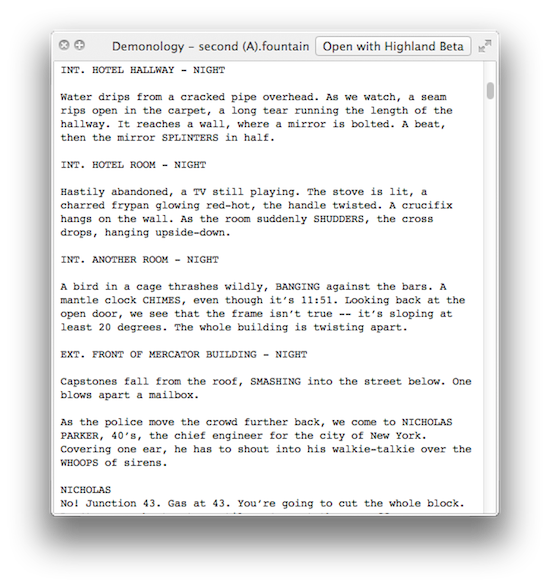
Speaking of Highland, my favorite new feature in the [Highland beta](http://quoteunquoteapps.com/highland) is Quick Look previews.

Do you ever find yourself staring at a folder of scripts, confused which draft is which? You open the files one at a time, skimming through them to find what you’re looking for.

Stop. Just select a file and press the spacebar. Up pops a preview of the script.

highland quick look

You can even up-arrow and down-arrow through all the files in the folder.

“Well sure,” you say. “That works great for your fancy new Fountain files, but who has folders full of those?”

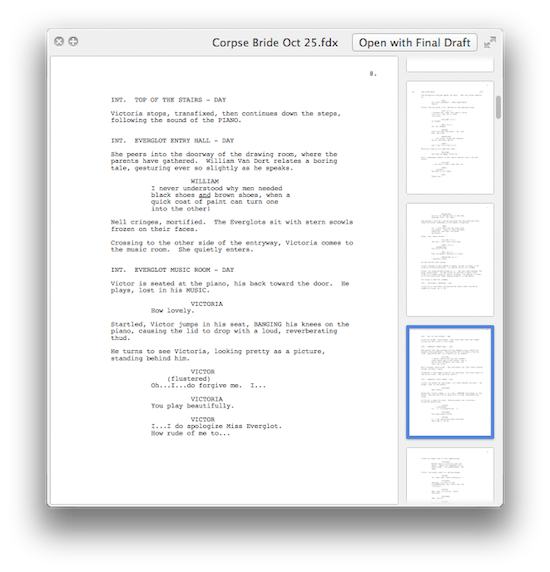
Here’s the thing: Highland’s previews **even work with Final Draft (.fdx) files.**

final draft quick look

For whatever reason, Final Draft itself doesn’t support Quick Look. Highland does. So now you can Quick Look those files.

It works even if Highland isn’t running. Even if Final Draft isn’t installed. It’s just an extra little bonus because you deserve nice things.

Fountain, 10x faster

June 25, 2012 Geek Alert, Highland, Screenwriting Software

We’re keeping Nima Yousefi busy working on Highland, but he’s found time to push a major update to [Fountain](http://fountain.io/), the open-source format and code library that [makes the magic possible](http://nimayousefi.com/2012/06/fountain-update/):

> It came to our attention that on iOS devices the parser’s performance was less than stellar. In fact, it was pretty terrible.

> Long story short, now there’s FastFountainParser. It’s a traditional line-by-line parser and roughly ten times faster than the old one. So, that’s a win.

What this means for screenwriters: Fountain-based screenwriting apps for the Mac and iPad will be much, much faster.

Also included in the package: our libraries for HTML export and pagination.

> It splits large dialogue blocks up across pages, adding the appropriate MORE and CONT’D, and is smart enough not to split in the middle of a sentence.

Fountain is designed to be completely agnostic — you can write Fountain in almost any app that generates text. That said, specialized apps can do amazing things, and we want developers to have a consistent base to jump off from.

I’ve had the chance to try out some of the forthcoming apps. You’re going to love them.

« Previous Page
Next Page »

Primary Sidebar

Newsletter

Inneresting Logo A Quote-Unquote Newsletter about Writing
Read Now

Explore

Projects

  • Aladdin (1)
  • Arlo Finch (27)
  • Big Fish (88)
  • Birdigo (2)
  • Charlie (39)
  • Charlie's Angels (16)
  • Chosen (2)
  • Corpse Bride (9)
  • Dead Projects (18)
  • Frankenweenie (10)
  • Go (29)
  • Karateka (4)
  • Monsterpocalypse (3)
  • One Hit Kill (6)
  • Ops (6)
  • Preacher (2)
  • Prince of Persia (13)
  • Shazam (6)
  • Snake People (6)
  • Tarzan (5)
  • The Nines (118)
  • The Remnants (12)
  • The Variant (22)

Apps

  • Bronson (14)
  • FDX Reader (11)
  • Fountain (32)
  • Highland (75)
  • Less IMDb (4)
  • Weekend Read (64)

Recommended Reading

  • First Person (87)
  • Geek Alert (151)
  • WGA (162)
  • Workspace (19)

Screenwriting Q&A

  • Adaptation (65)
  • Directors (90)
  • Education (49)
  • Film Industry (489)
  • Formatting (128)
  • Genres (89)
  • Glossary (6)
  • Pitches (29)
  • Producers (59)
  • Psych 101 (118)
  • Rights and Copyright (96)
  • So-Called Experts (47)
  • Story and Plot (170)
  • Television (165)
  • Treatments (21)
  • Words on the page (237)
  • Writing Process (177)

More screenwriting Q&A at screenwriting.io

© 2026 John August — All Rights Reserved.