• Skip to primary navigation
  • Skip to main content
  • Skip to primary sidebar

John August

  • Arlo Finch
  • Scriptnotes
  • Library
  • Store
  • About

Highland

Writing screenplays with Scrivener and iA Writer

July 20, 2012 Apps, First Person, Fountain, Highland, Screenwriting Software

A reader named Gerry wrote in to share his screenwriting workflow, which uses [Fountain](http://fountain.io) as a bridge between Scrivener, iA Writer, Dropbox and Highland.

—

first person[iA Writer](http://www.iawriter.com/) is my favorite application to write in because of its minimalist UI and Focus Mode. I just wish it had features similar to [Scrivener’s](http://www.literatureandlatte.com/scrivener.php) Binder and Compile. I love the flexibility of having one scene or one sequence per document and organizing them within Scrivener’s Binder — as was [described so well](http://prolost.com/blog/2010/6/17/the-state-of-screenwriting-software.html) by Stu Maschwitz on Prolost.

Fortunately, Fountain lets me leverage both iA Writer and Scrivener.

I write scenes in iA Writer using Fountain syntax, saving them as plain text files in a [Dropbox](http://dropbox.com) folder. I can then work with them using iA Writer on a Mac, iPad, or iPhone, which is handy.

iA Writer is perfect for scenes, while Scrivener is great for the bigger script.

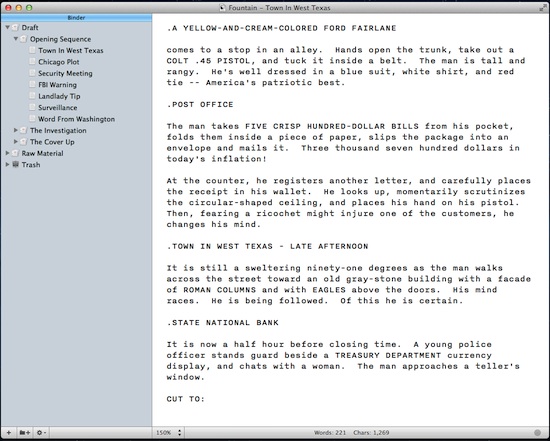
Because Fountain files are plain text, Scrivener is happy to handle them. I use Scrivener’s “Sync > with External Folder…” command to build a binder for the script, which maintains a link to those original files.

scrivener screenshot

(I prefer working with a minimized Scrivener UI. I “borrowed” icons from the Storyist application to customize Scrivener’s Binder.)

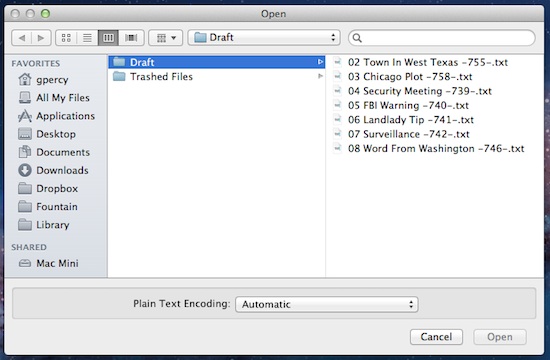
Meanwhile, iA Writer still sees the individual files. If I edit them, those changes appear within Scrivener after the next “Sync > with External Folder…”

iawriter screenshot

Using Scrivener’s “Compile…” command, I can then export a group of Scene and Sequence documents as a single plain text Fountain file.

With [Highland](http://quoteunquoteapps.com/highland), I can then convert that Fountain file to PDF or Final Draft.

—

Gerry’s workflow is more complicated than many screenwriters would prefer, but I like that he’s using the tools he wants for each part of the process. Rather than being boxed in by one monolithic app, he’s taking the best of various apps.

With Fountain, we’ve worked hard to keep the format as agnostic as possible. Scrivener and iA Writer didn’t have to add support for Fountain, because they’ve always had it.

Some upcoming apps will do more with the format — using its built-in notes and sectioning, for example — but even the most basic text editors can do 90% of what you’d want.

For now, Highland helps complete the loop by letting you convert to and from Fountain easily. The free public beta is still going, so if you’re curious, by all means [try it out](http://quoteunquoteapps.com/highland).

Falling in love with plain text

July 16, 2012 Highland, Screenwriting Software, Tools

Stu Maschwitz explains how blogging led him to get over his need for as-you-type formatting and [embrace plain text](http://prolost.com/blog/2012/7/16/gradually-falling-in-love-with-plain-text.html):

> I’d often find myself battling that little WYSIWYG text window. I’d press Return after some quoted text and it would create another quoted paragraph. I’d press the “quote” button to un-quote the current paragraph, and an extra line would be inserted. I’d try to delete it and now there was no separation between the paragraphs. I’d press “Publish” and the extra line would be back.

> I’d eventually go into the post HTML and try to remove the offending line break, crossing my fingers that I wasn’t destroying something else in the process. After all this, I’d be afraid to touch the WYSIWYG editor again. A typo or broken link would have to be pretty important for me to risk touching this house of HTML cards I’d created.

For his blog, the solution was [Markdown](http://daringfireball.net/projects/markdown/). For screenwriting, the solution ultimately became [Fountain](http://fountain.io), our joint spec for writing screenplays in any old text editor.

Tools like Markdown and Fountain don’t replace dedicated apps, which can do sophisticated things that would otherwise be very difficult. But too often we’re trying to do too much too soon.

If you’re fighting to get Final Draft to recognize a parenthetical, you’re no longer writing. You’re formatting. You’re a poet picking fonts. You’re a novelist worrying about hyphenation.

Plain text keeps you from worrying about the wrong things at the wrong time.

Highland and the Kindle are friends

July 3, 2012 Apps, Challenge, Geek Alert, Highland

Ben Godar uses Highland to read screenplays on his Kindle by [converting PDFs](http://www.bengodar.com/2012/07/john-augusts-highland-and-kindle-are.html):

> Once you drag the PDF into Highland, it will convert it into Fountain – recognizing all the screenplay elements. Export as a Fountain file, then save as plain text. From there, you can get the file onto your Kindle by e-mailing it to your Kindle address, upload using a program like Calibre, etc.

Fountain files are really just text files. You can change the .fountain extension to .txt and Kindle will happily read them.

> The file still won’t look *exactly* like a screenplay on your Kindle. Everything will be left justified. But the line breaks will stay the same, character names will be capitalized… all in all, it will look like a screenplay.

Ben’s solution works, but I’d love to see a little more screenplay formatting. If any clever readers feel like some geekery this holiday weekend, here’s my challenge to you:

**Build a converter that takes a Fountain file and formats it nicely for the Kindle.**

In addition to text files, Kindle understands RTF and HTML/CSS, so one of those might be a good option.

If you make something interesting, email or tweet me a link. I will be delighted to hype anything cool that comes of it.

Highland adds Quick Look previews

June 25, 2012 Apps, Highland

Speaking of Highland, my favorite new feature in the [Highland beta](http://quoteunquoteapps.com/highland) is Quick Look previews.

Do you ever find yourself staring at a folder of scripts, confused which draft is which? You open the files one at a time, skimming through them to find what you’re looking for.

Stop. Just select a file and press the spacebar. Up pops a preview of the script.

highland quick look

You can even up-arrow and down-arrow through all the files in the folder.

“Well sure,” you say. “That works great for your fancy new Fountain files, but who has folders full of those?”

Here’s the thing: Highland’s previews **even work with Final Draft (.fdx) files.**

final draft quick look

For whatever reason, Final Draft itself doesn’t support Quick Look. Highland does. So now you can Quick Look those files.

It works even if Highland isn’t running. Even if Final Draft isn’t installed. It’s just an extra little bonus because you deserve nice things.

« Previous Page
Next Page »

Primary Sidebar

Newsletter

Inneresting Logo A Quote-Unquote Newsletter about Writing
Read Now

Explore

Projects

  • Aladdin (1)
  • Arlo Finch (27)
  • Big Fish (88)
  • Birdigo (2)
  • Charlie (39)
  • Charlie's Angels (16)
  • Chosen (2)
  • Corpse Bride (9)
  • Dead Projects (18)
  • Frankenweenie (10)
  • Go (29)
  • Karateka (4)
  • Monsterpocalypse (3)
  • One Hit Kill (6)
  • Ops (6)
  • Preacher (2)
  • Prince of Persia (13)
  • Shazam (6)
  • Snake People (6)
  • Tarzan (5)
  • The Nines (118)
  • The Remnants (12)
  • The Variant (22)

Apps

  • Bronson (14)
  • FDX Reader (11)
  • Fountain (32)
  • Highland (74)
  • Less IMDb (4)
  • Weekend Read (64)

Recommended Reading

  • First Person (87)
  • Geek Alert (151)
  • WGA (162)
  • Workspace (19)

Screenwriting Q&A

  • Adaptation (65)
  • Directors (90)
  • Education (49)
  • Film Industry (489)
  • Formatting (128)
  • Genres (89)
  • Glossary (6)
  • Pitches (29)
  • Producers (59)
  • Psych 101 (118)
  • Rights and Copyright (96)
  • So-Called Experts (47)
  • Story and Plot (170)
  • Television (165)
  • Treatments (21)
  • Words on the page (237)
  • Writing Process (177)

More screenwriting Q&A at screenwriting.io

© 2026 John August — All Rights Reserved.