• Skip to primary navigation
  • Skip to main content
  • Skip to primary sidebar

John August

  • Arlo Finch
  • Scriptnotes
  • Library
  • Store
  • About

Archives for 2014

Highland as a bona fide screenwriting app

May 6, 2014 Apps, Highland, Screenwriting Software

As of this afternoon, version 1.7.1 of Highland has exactly one review on its main page in the Mac App Store:

I honestly never knew how much time I was spending formatting and making pages look pretty, until I started writing in Highland. I’m a more efficient writer, focusing on what a writer should be focusing on: words. I’ve switched over to Highland for my latest screenplay and I can honestly say that I will never go back. Highland is where I will write from now on.

The highest compliment I can pay this program is that it gets out of my way. It makes me want to KEEP writing. Which is a writer’s dream.

Jmedwarren’s five-star review is so lovely that I almost don’t want to tell him the backstory: Highland wasn’t meant for writing at all.

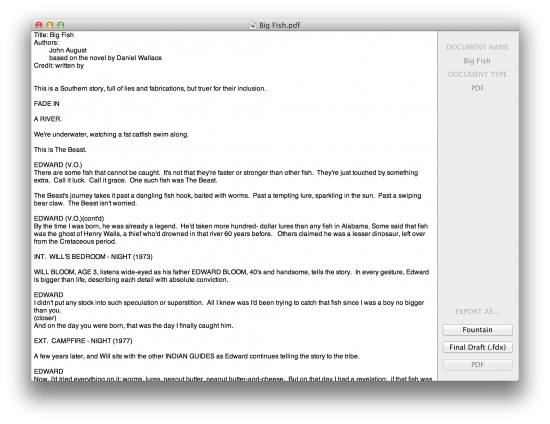
When we announced Highland in 2012, we billed it as a “screenplay utility” for converting between formats: PDF, FDX and the newly-minted Fountain. You dropped a file on it and selected a new file type.

This is what it looked like:
highland screenshot

The initial betas had no editing view, because we assumed users would write and edit Fountain using any of the excellent plain-text editors available. Likewise, we had no preview, because we were going to export a PDF or Final Draft file anyway.

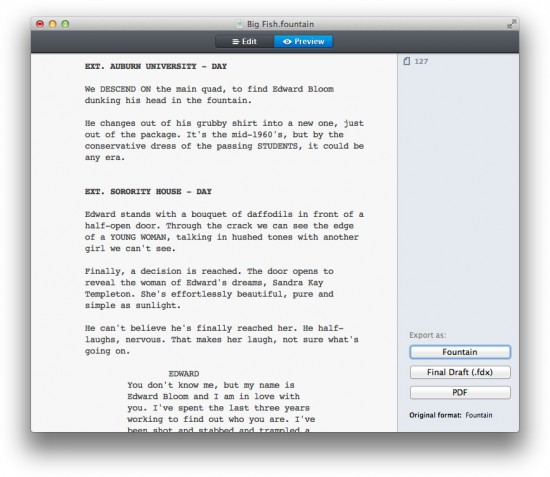
In practice, we discovered that we often wanted to make small tweaks to a file we had just converted. For example, if we needed to modify title page information, it was a hassle to have to save the Fountain text, open it in iAWriter, fix it, then re-open it in Highland.

To avoid this round-tripping, we added a very basic editor and a preview. The user could switch between these views to see the changes reflected before export.
highland screenshot

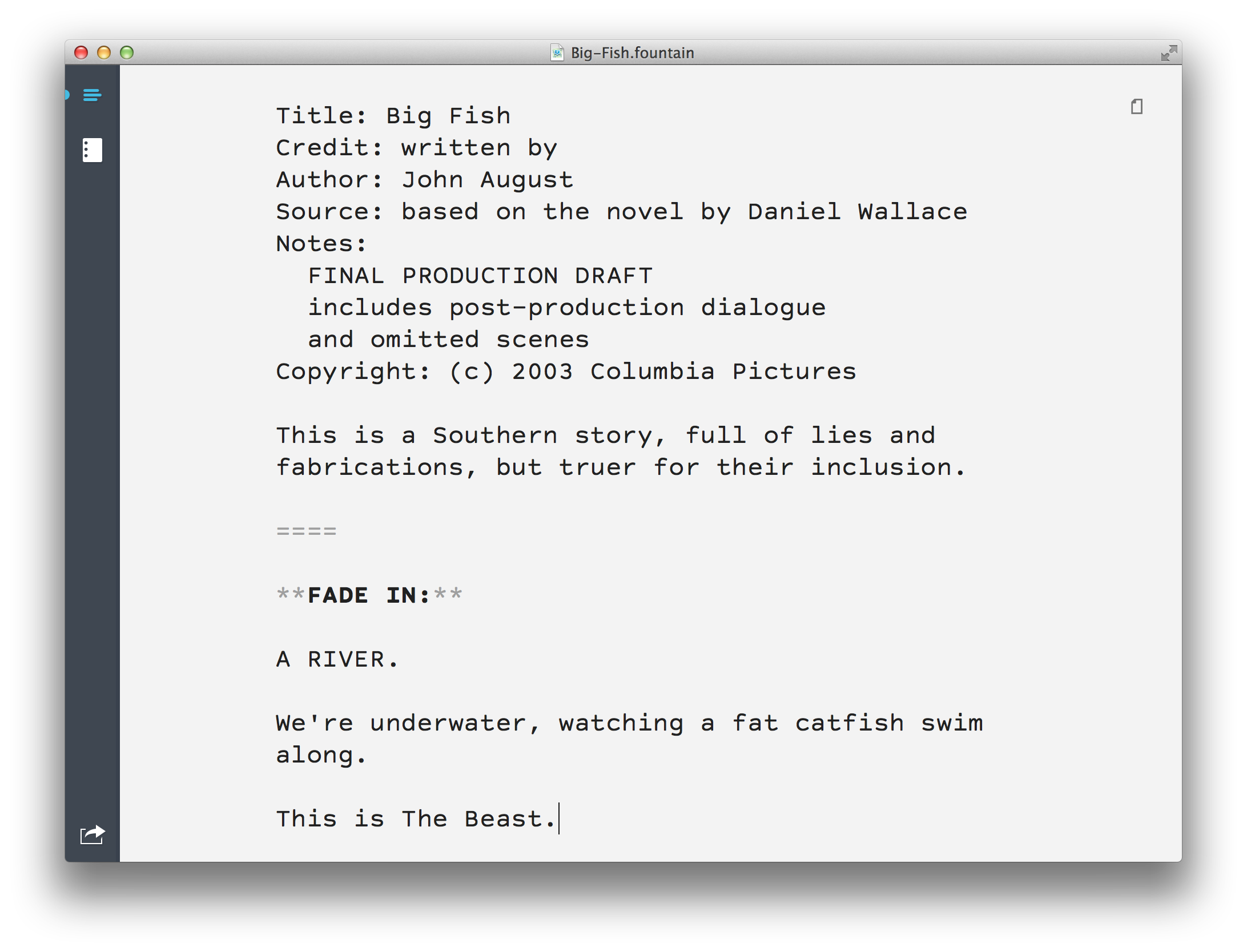
As the betas progressed, we changed the UI significantly, moving from two tabs on the top to the current sidebar. ((The sidebar was prompted largely by plans for an iPad version of Highland.)) This is what version 1.7 looks like:
Highland 1.7

By the time we shipped — almost a year later — we saw ourselves largely as a companion to Slugline. They focused on writing while we converted files. ((To this day, Slugline still has a “Send to Highland” menu command.))

Still, I started to be comfortable calling Highland a screenplay editor rather than a screenplay utility. Last year, I wrote:

Highland is a great bridge between apps, but over the last year we’ve found more and more users are simply doing their writing in Highland. It’s a full-featured editor, with spelling, versions and find-and-replace. Because it’s plain text, you can focus on the words and not the formatting.

When asked if someone could write a script in Highland, my answer was generally, “Well, you could. But that’s not really what it’s for.” I steered users to other apps as alternatives. As a company, we spent our time refining Highland’s underlying engine for parsing PDFs and dealing with edge cases.

But people kept using Highland like a traditional screenwriting app. Or perhaps it’s better to say they used Highland in lieu of a traditional screenwriting app.

People like our app store reviewer Jmedwarren saw Highland as primarily a writing tool, not a converter.

So with version 1.7 of Highland, we’re embracing the fact that we’re really a screenwriting app. We don’t do everything other apps do, but we do some things significantly better, enough so that we’re the right choice for some screenwriters.

Highland pros and cons

Here’s where Highland is actually better:

Focus. When you’re writing in Highland, it’s just the words. There’s nothing to distract you. You can’t fiddle with margins, or futz with how the pages break. Even the little bits of syntax gray themselves out so all you see is your text.

Speed. Highland is lean and mean. From scrolling to previews, Highland is blisteringly fast. Because it’s Mac-only, we optimize it using the latest Apple technologies. Because we separate editing from preview, you’re never waiting for a long document to reformat as you type.

It’s hard to market speed as a feature, because you don’t think of a screenwriting app needing to be fast. But in practice, Highland feels better under your fingers.

Typography. Highland features Courier Prime and Highland Sans, two typefaces we commissioned. Screenwriters shouldn’t have to look at ugly fonts all day.

Standards. Because we helped forge the Fountain standard, Highland does it well. We’re often the first to incorporate new specs, such as lyrics and forced character names. But you can always open Highland’s files in any plain text editor, so you’re never stuck with us. If another screenwriting app comes along that’s vastly better, you can jump ship instantly.

Dark Mode. I don’t understand why more apps don’t offer it. It makes writing in dark places — or public spaces — much more comfortable.

PDF melting. This was Highland’s breakout feature. While other apps have added it, our PDF parsing is unmatched. It’s a tricky, thankless task, but a key part of both Highland and now Weekend Read, so we keep getting better.

Active development. Highland receives regular updates, sometimes twice a month, incorporating user-requested features in almost every build. We’re small enough to move quickly, but big enough that we’re not going out of business tomorrow. When things break — and they do — we fix them fast.

Created by working screenwriters. This is the hardest advantage to show, but probably the most important factor in why Highland works the way it does. I use Highland every day for actual paid work. I rely on it, so major and minor annoyances get addressed.

I’m not the only one using it, either. Justin Marks wrote me to say he was doing his latest feature largely in Highland, in part because it made working with lyrics so much easier.

These are some of Highland’s advantages, but there are things other screenwriting apps do better than Highland — or that we don’t do at all. Our work this next year will be figuring out what we can do to make Highland more useful without losing focus.

Outlining. I use Workflowy for outlining, but I’d love an integrated outliner that smartly leverages Fountain’s section and synopsis lingo. Slugline sort of does it, but its sidebar outline is mostly a navigator rather than a writing tool. (Still, Slugline’s sidebar is really useful for long documents, and I miss it sometimes.)

Revisions. Last week, I needed to turn in a draft with small changes. I really wanted to create starred changes in the margins without having to leave the comfort of Highland. We have ideas for dealing with revisions, both within the Fountain spec and on an app level, but it’s a challenging problem. For all my issues with Final Draft, it actually does a solid job with starred changes (and more complicated production features) once you understand how it works.

Collaboration. This is a topic for a longer blog post, but collaboration can mean both two people typing in the same document at the same time (like Google Docs) or the ability to suggest edits (like Draft). Both are useful. Both are difficult. But Fountain’s plain-text background is a huge help. Fully online tools like WriterDuet may be plenty for some writers, but I have a hunch there’s more to be done here, particularly for writers working on the staff of a show.

Title Pages. This is a Fountain issue as much as anything, but creating a title page in Highland is frustratingly hit-or-miss. We had good intentions; title and author metadata is part of the file itself, as it should be. But it’s very hard to get title pages to look the way you really want. We may call a mulligan and find a better way.

All of these issues are shortcomings, not showstoppers.

For my daily use, Highland is still a better way to write a screenplay. Particularly for my first drafts, I agree with Jmedwarren in that the best thing about Highland is that it gets out of your way.

We’ve redesigned the Highland site to reflect Highland’s role as a screenwriting app. Take a look and see how it works for you.

The Angeles Crest Fiasco

Episode - 142

Go to Archive

May 6, 2014 Scriptnotes, Story and Plot

Screenwriter Kelly Marcel joins John and Craig to play Fiasco, resulting in a tale of art, murder and sexual blackmail in the Hollywood Hills.

This extended, unlike-all-before-it episode will probably be polarizing, but it was a chance to explore story in ways that you can’t do in abstract. In Fiasco, plot really does come out of character choices.

This episode is filthy. If this were a cable drama, it would be TV-MA DSLV. If that makes you more or less likely to listen, trust your gut. (There’s no nudity. It’s radio.)

Our thanks to Kelly Marcel for hosting. Next week, we’ll return with a more conventional episode.

Links:

  • Kelly Marcel on IMDb, and on Scriptnotes episodes 115, 123 and 124, and the recent WGF Bonus Episode
  • Fiasco and on Amazon
  • Hollywood Wives by Jobe Bittman and other Fiasco Playsets
  • Rawson Thurber on IMDb
  • Richard Kelly on IMDb
  • Colin Jost, and on IMDb
  • John’s teaser tweet with images of the cards
  • Fiasco on TableTop with Wil Wheaton: Set-up, Part 1, and Part 2
  • Angeles Crest National Forest
  • Zoom H4N recorder on Amazon
  • Outro by Scriptnotes listener Betty Spinks (send us yours!)

You can download the episode here: AAC | mp3.

Because of the length of this episode and the cost involved, there will not be a transcript of episode 142.

Me on Mac Power Users

May 5, 2014 Apps, Bronson, Weekend Read

I’m the guest on the new episode of the [Mac Power Users podcast](http://www.macpowerusers.com/2014/05/04/mac-power-users-190-workflows-with-john-august/).

I talk with David Sparks and Katie Floyd about my writing workflow, the Scriptnotes podcast, and the apps [my company](http://quoteunquoteapps.com) makes. Along the way, we discuss Bates numbering, CodeRunner, David Wain and MacWEEK.

It’s interesting being a guest on someone else’s podcast, particularly a show that’s not about writing per se. David uses [Bronson Watermarker](http://quoteunquoteapps.com/bronson/) a lot, one of our apps that appeals to users who will never open a screenplay. It’s easy to forget that I live in a bubble of 12-pt Courier Prime.

Full Whedoncé

May 5, 2014 Directors, Film Industry, Follow Up

Back in Scriptnotes [episode 125](http://johnaugust.com/2014/egoless-screenwriting), I wondered if a filmmaker could pull a beyoncé and release a film without any advance notice. I speculated that someone like JJ Abrams or Joss Whedon probably could pull it off.

Then a few weeks ago, Whedon seemed to do just that with [In Your Eyes](http://inyoureyesmovie.com/?utm_source=external_display&utm_medium=vod-google-search-na-na-20140420&utm_campaign=9868&gclid=CNvIqvDelb4CFYxufgod1RgAtg&dclid=CM-0ufDelb4CFQkIhQod9yQAYQ).

But was that really a beyoncé, or just the new version of direct-to-video? Was it more or less of a beyoncé than Much Ado About Nothing, which predated Beyoncé’s beyoncé. (Preyoncé’d?)

Popjustice wants to make sure we don’t forget what it really means to [pull a beyoncé](http://www.popjustice.com/briefing/anatomy-of-a-beyonce-a-proposed-classification-system-for-surprise-album-releases):

> We all think we know what a beyoncé is, but it’s vital that we do not assign beyoncé status to every album release that breaks with established release patterns. If we do misuse the term, we risk devaluing the purity of Beyoncé’s original ‘BEYONCÉ’ beyoncé.

Popjustice is looking at albums, but many of the criteria apply equally well to films:

> A Full Beyoncé must contain ALL these elements.

> This must be a full album, ideally but not necessarily containing a larger than average number of tracks.

In Your Eyes is a feature. That counts.

> The artist must be a global superstar, a multi-platinum act in at least one major territory, or an artist with a huge/deranged online fanbase.

Fanbase, check.

> Trickily, it must be common knowledge that the artist has been working on new material – but the release must still also, somehow, be a surprise.

> There must have been no legitimate leaked information about the nature of the release in advance of the release. A beyoncéd album that has been trailed by an interview regarding its release could potentially be regarded as little more than a conventional album release with a shorter promotional window.

Everyone knows Whedon is doing the Avengers sequel. But this, a script he wrote and produced but didn’t direct, was nowhere on the radar.

> There must be no conventionally promoted single leading into the album’s release.

There wasn’t a trailer. In fact, the online trailer is the first few minutes of the film. ((The trailerless-ness may ultimately work against In Your Eyes. The promo only shows kids; the film is mostly about adults.))

> It must be a standalone album release – it can’t just be an addition to a previous album campaign, a deluxe edition or any sort of repackage.

Check.

> By its nature this album will almost certainly be released digitally first – it’s impossible to send CDs into production then get them to retail without news leaking. (If an album does indeed make it to stores with literally no warning before, say, shops open at 9am, it will be permitted as a full beyoncé.)

In the podcast, I speculated that a filmmaker like James Cameron could conceivably create a release date for a fake film and use that to book theaters. But realistically, digital is how this would work, and that’s what happened with In Your Eyes.

> The nature of the release must be convincingly presented as an artistic statement or creative choice, rather than being a transparent attempt to drum up interest in an album campaign that hasn’t been working out properly.

It’s fair to ask whether the surprise-here’s-a-movie tactic was mostly because it didn’t make financial sense to do a more conventional release. The movie has no marketable stars other than Whedon.

> Total beyoncégeddon must be achieved across all social networks for at least 24 hours.

While I got a lot of tweets about it, I didn’t sense the universe going apeshit over this movie. Part of the problem is that movies require significant time to watch. You can watch a music video in three minutes and tweet while you’re doing it. With a feature, you’re asking people to stop doing everything else for 90 minutes or more.

In the end, I don’t think In Your Eyes pulled a beyoncé. But I think it’s rightly classified as a Whedon anyway. As a release strategy, it fits much more in the tradition of Dr. Horrible and Much Ado. He’s been doing this for years, and doing it well.

But I hold out hope that we will get our surprise film one day. It will have stars you recognize, and production values that leave you wondering how the hell they kept this under wraps.

« Previous Page
Next Page »

Primary Sidebar

Newsletter

Inneresting Logo A Quote-Unquote Newsletter about Writing
Read Now

Explore

Projects

  • Aladdin (1)
  • Arlo Finch (27)
  • Big Fish (88)
  • Birdigo (2)
  • Charlie (39)
  • Charlie's Angels (16)
  • Chosen (2)
  • Corpse Bride (9)
  • Dead Projects (18)
  • Frankenweenie (10)
  • Go (29)
  • Karateka (4)
  • Monsterpocalypse (3)
  • One Hit Kill (6)
  • Ops (6)
  • Preacher (2)
  • Prince of Persia (13)
  • Shazam (6)
  • Snake People (6)
  • Tarzan (5)
  • The Nines (118)
  • The Remnants (12)
  • The Variant (22)

Apps

  • Bronson (14)
  • FDX Reader (11)
  • Fountain (32)
  • Highland (73)
  • Less IMDb (4)
  • Weekend Read (64)

Recommended Reading

  • First Person (87)
  • Geek Alert (151)
  • WGA (162)
  • Workspace (19)

Screenwriting Q&A

  • Adaptation (65)
  • Directors (90)
  • Education (49)
  • Film Industry (489)
  • Formatting (128)
  • Genres (89)
  • Glossary (6)
  • Pitches (29)
  • Producers (59)
  • Psych 101 (118)
  • Rights and Copyright (96)
  • So-Called Experts (47)
  • Story and Plot (170)
  • Television (165)
  • Treatments (21)
  • Words on the page (237)
  • Writing Process (177)

More screenwriting Q&A at screenwriting.io

© 2026 John August — All Rights Reserved.