The Kindle is not good for screenplays
Many friends and readers have written to ask, so I thought I’d bump this note out of the comment thread. The new Kindle is terrific for books. But it doesn’t yet handle formatted text like screenplays well at all.
This is a sample of Go, converted from pdf:
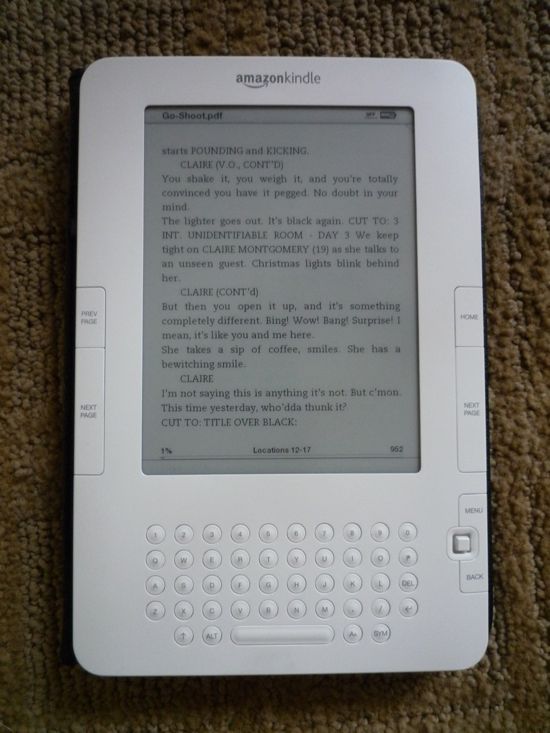
(I’ve gotten roughly the same results when sending it in Word format.)
Are you an unemployed coder? A wanna-be web entrepreneur? Are you Nima?
Consider this a call to adventure. I’m envisioning a web service to which you could submit (or email) a screenplay pdf (or text file) and have it sent to your Kindle, nicely formatted. Charge a nickel for it, or just do it for free until Amazon buys you out.


March 2nd, 2009 at 12:06 pm
What format did you start with? I do a lot of conversion to get things to my Kindle – there are a few tricks w/ it for some formats.
March 2nd, 2009 at 12:16 pm
I want it on my iPhone too — thanks.
March 2nd, 2009 at 12:16 pm
That’s a pdf, the exact same one you can find in the Library.
It was originally a (very old) Microsoft Word file. You can find a more-or-less equivalent RTF file here:
Go word file
March 2nd, 2009 at 12:45 pm
Good to know. While I would definitely do plenty of book reading on the Kindle, I was primarily looking at one to store the enormous amount of PDF’s I reference daily, including scripts, white papers on video codecs and things, manuals, references, etc. I was worried about how the Kindle would reformat them. Guess that fear was not without some truth.
March 2nd, 2009 at 1:06 pm
The Kindle is not good for screenplays, but the iRex digital reader 1000 series is GREAT for screenplays. I use this for reading submissions, samples, and drafts of projects I’m producing. It even has a built in Wacom tablet for making notes directly on the PDF. The system is pretty buggy, but on the whole it’s very impressive. I highly recommend it for someone who needs to read a lot of screenplays.
http://www.irextechnologies.com/irexdr1000
March 2nd, 2009 at 1:29 pm
(LOL the shout out :)
That thing has a web browser on it, doesn’t it? How does a Scrippets formatted page look on it? That might be the super easy answer.
March 2nd, 2009 at 2:35 pm
John, thanks for putting out the call for this much-needed Kindle fix. I just picked up a used Kindle 1, which I love thus far, and have been using it to read screenplays. It’s not horrible, but it’s far from perfect, as you’ve shown. I would definitely pay a nickel a conversion.
March 2nd, 2009 at 2:56 pm
Trying to get a screenplay to work on the Kindle 1 was my white whale for about a year. I’ve searched the web, begged their customer support, tried every format and every way of getting it onto the device…nothing really works.
It looks like the Kindle 2 formats it slightly better than the 1 does, where character names that belong above dialog are usually tossed wherever the computer delights in putting them.
Please, please post if you find out how to get a screenplay on one of these things, my brain hurts from thinking about it.
March 2nd, 2009 at 3:15 pm
I didn’t think one could upload pdf’s to the Kindle, either … have they updated that? If so, that would be awesome.
John, what about the Kindle using scrippets?
March 2nd, 2009 at 3:22 pm
Checked out the iRex…a little pricey at $859.00 compared to $359.00 for a Kindle, though it does seem to have some nice features. Anyone know of anything more affordable?
March 2nd, 2009 at 5:12 pm
What about just getting an Acer Aspire for $299? Then you could not only read screenplays, but write them.
http://www.amazon.com/Acer-Aspire-Laptop-Intel-Processor/dp/B001DL2BUM/ref=pd_bbs_6?ie=UTF8&s=electronics&qid=1236042349&sr=8-6
No, I don’t work for Acer.
And I know that’s not an e-reader, but it is cheap and small (and a comoputer). Maybe there’s a filter you can put over your screen to make it look like the Kindle? Or wear sunglasses while you read?
March 2nd, 2009 at 7:11 pm
According to a friend who works there, William Morris got all of its employees Kindles for Christmas, in the hopes that people would save paper and read the scripts on there. Evidently, someone didn’t do their homework, if the format is so wanky.
March 2nd, 2009 at 7:27 pm
If you save a screenplay as a “text only with layout” file from Final Draft, it’s a bit more readable. Line breaks are messed up, but character and dialogue indentations are better.
March 2nd, 2009 at 8:14 pm
Here’s a somewhat cumbersome but better-looking solution.
http://files.me.com/offmango/9tid2h
With your script open in Final Draft, choose Elements from the Format menu.
In the Elements window, click Apply a Template and choose the kindle.fdt template.
Save your screenplay as a “text only with layout” file from Final Draft and copy it to your Kindle.
Again, it’s a bit cumbersome, but it looks nice. And maybe someone more clever (and less tired) than me could figure out a way to automate it.
March 3rd, 2009 at 8:16 am
I’ve been considering getting a kindle for screenplays, blocking charts, and storyboards on set as a production binder. That settles it – gotta go for a straight PDF reader, like CyBook.
Thanks, John! You actually saved me a chunk of change, right there!
March 4th, 2009 at 6:48 am
John,
I don’t have any hands-on experience with the Kindle, but I was led to believe that the only way to get something translated and put on your Kindle was to email it to Amazon. I’d be happy to take a swipe at screenplay translation for the Kindle if amazon isn’t a hold up about it.
March 4th, 2009 at 11:22 am
The Irex Iliad is the only e-reader currently on the market that will consistently give you a readable, properly formatted screenplay. It’s expensive and bulky and the interface is wonky but it works because the Iliad has a large enough screen to effectively display a PDF file, especially in landscape mode.
Though the Sony Reader, the Kindle, and the Cybook are all capable of displaying PDFs, the fact is that their screens are too small for the text to be readable when displaying an industry standard page of screenplay. And forget about having one of those readers properly display a text file in proper screenplay format, due to the issue of text reflow.
There is an option however that will work equally well in any of these readers, including the Kindle… As Erik pointed out in his earlier post, what you need to do is format your Final Draft document to be displayed on the reader. Building on Erik’s template idea I can add the following suggestions:
Align all screenplay elements to the left. Including character names and dialogue and transitions. Everything. It’s not the industry standard, but it will be readable.
Using Final Draft, make all of the character names BOLD. They’ll stand out. (Note, Kindle 2.0 supports bold, italicized, and underlined text.)
With Final Draft, underline all scene headings and add an extra space before each scene heading.
Italicize all dialogue. Again, it’s not industry standard, but it makes the dialogue stand out and for a more readable dialogue.
Hope this helps.
March 12th, 2009 at 10:23 am
WRONG! Don’t take it for granted until you’ve tried all methods! Screenplay formats show fine if you upload them into the Kindle via USB, and they are .txt (text) files. Another alternative is reading screenplays online, using the kindle browser. It may take a while for the script page to load, but once it does you can bookmark the page and return to the script whenever you want to. You can also download screenplays from websites directly into your Kindle with the condition that the script is .txt. I tried this with American History X. and it worked just fine!
April 4th, 2009 at 12:05 pm
V- you’re wrong. Text doesn’t work either, the Kindle still reformats it and ruins it. It doesn’t matter if you put it on there with a USB or if you mail it to the device.
The closest solution is the Final Draft Template…but even those can cause entire sentences to be converted into single character streams that run down the side of the device l i k e
t h i s
and that gets really old really
f a s t .
April 8th, 2009 at 1:16 pm
Thanks to Jeff and Eric for the great tips on reading screenplays for Kindle in Final Draft 7. Guess it’s time to upgrade! I have tried to work with text files and make some format fixes, but also find that the Kindle likes to scramble it somehow. I look forward to reading clean screenplays on the Kindle.
April 14th, 2009 at 9:55 am
I figured out a way of putting a PDF with the formatting on the Kindle. You need a program that converts PDF files to JPGs. I used Adobe Acrobat’s export function. It outputs each page of the PDF as a JPG image. You then compress all the JPG files into a single ZIP. That ZIP can be put on the Kindle as is and can be read by the Kindle. You might want to crop the borders on the JPGs or the PDF to leave the screen being as much text as possible. The downside to this method is that the text on the images of each page is VERY small, though still readable. There are some options in the Kindle’s menu to play around with the size of the images on screen, but I couldn’t find anything more satisfactory than displaying the full page on the screen.