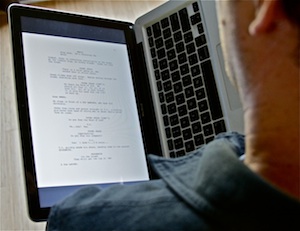
Reading scripts on a MacBook, book-style

bookstyleIf you could physically remove your laptop screen and hold it vertically, it would be the perfect size for reading a script. That’s the hope behind the mythical Apple tablet that always seems six months away.

But until Mr. Jobs decides we’re ready for the future, reader Douglas has a suggestion that is surprisingly close. Turn your laptop on its side, and hold it like a hardcover book.

No, really. It works much better than you’d think, particularly with one of the unibody MacBooks.

I suspect there’s a way to get the screen rotated in the proper direction on almost any laptop. But on a Mac running Snow Leopard, it’s pretty easy to get a .pdf turned the right way.

  1. Open the .pdf in Preview.
  2. Click on one of the pages, then Select All (⌘-A) to highlight all the pages.
  3. Choose Rotate Right (⌘-R) or Rotate Left (⌘-L).
  4. Choose Full Screen (Shift-⌘-F).
  5. Click the zoom-to-fit button.

I’ve found it more comfortable to read with the screen on the left-hand side, using my right hand to advance pages with the arrow keys. But experiment to see what works best for you.

Update: Several readers have pointed to a free utility called ReadRight which basically does steps 1-6 all at once, with some other handy options thrown in. I particularly like being able to advance pages with a click on the trackpad.

Since Preview is already included on every Mac, I’ll keep it as the general-case solution.

  • Digg
  • Facebook
  • Reddit
  • SphereIt
  • StumbleUpon
  • Twitter
December 3, 2009 @ 11:41 am | Comments (23)
Filed under: Follow Up,Geek Alert

23 Responses to “Reading scripts on a MacBook, book-style”

  1. Clay

    John,

    There’s a nice utility for this, that removes some of the steps. It’s called ReadRight.

    http://www.twilightedge.com/mac/readright/

  2. Greig

    I’ve been using Read Right (http://www.twilightedge.com/mac/readright/index.html) to do this, although rather than rotating the MacBook, I tend to leave it on the bedside table and I lie down with my head on the pillow. Sometimes even make it through several pages before drifting off…

    But it does the job quite nicely.

  3. Todd

    this. is. AWESOME.

  4. Mike

    I can’t imagine a less comfortable way to read.

  5. Bill

    I tried something like this for a few minutes on a Windows netbook, using the free Kindle software. At first it seemed promising, but the navigation was disorienting. I’m going to try again and see if I can get it to work.

  6. Jim

    If anyone has ever used CDisplay as a digital comic book reader this works great for it too. I read Watchmen this way. I’ve also read The Dark Knight script on the screen this way. Wasting paper gets old so I’m always looking for the best way to do things digitally.

  7. Old Comic Book Ads Revealed

    I do this to read comic books in bed at night on my laptop. It’s a terribly old laptop and that’s basically all it can be used for.

  8. JR

    Doesn’t your new ‘book’ then sear the flesh from your hands as it heats up?

  9. Scriptwrecked

    Sometimes the best ideas have been right there under our noses the entire time. Great suggestion. Thanks John.

  10. Matt Bird

    I’ve done this for pdfs and cbzs with my laptop and it works great, though it is disorienting. Then one day I got the bright idea to try it with my iMac too. I propped up my iMac on its side and it looked beautiful. Then the whirring started. Like a motor revving, louder and louder and louder… It sounded more and more like a bomb was about to go off. In a panic, I righted my iMac again. It turns out that an iMac on its side can’t cool itself and it was overheating. Oh well. They make PC screens that can rotate 90 degrees on their stand, but no luck for Macs.

  11. Mark

    If you’re a PC user, another great option is an HP swivel screen/tablet laptop. If you have anything to do with publishing and reading is part of your job, I highly recommend it.

    You can swivel the screen around and lay it flat, so your whole laptop turns into, well, the aforementioned mythical tablet. Info here:

    http://www.amazon.com/Pavilion-TX1210US-12-1-inch-Processor-Premium/dp/B000RNG2ZC

  12. Julian Friedmann

    As an agent I read literally 100s of scripts and much longer manuscripts every year and I need to annotate them. The iRex 1000 allows this with brilliantly comfortable epaper (no backlight) – I can do 8 hours at a stretch, And I can write all over the pages and then email them. I love Macs but for serious reading the iRex will beat anything. It won’t stop me buying the tablet but I will go on reading on it.

  13. John Shea

    I’ve had this thought for a long time but I had tried to have the screen display rotate, which makes using the trackpad just about impossible. It never occurred to me to change the view within Acrobat. This works just fine on my PC netbook. Switch to fullscreen view and the page fills the screen nicely. Then just tap the arrow keys to flip pages.

  14. Racicot

    I’m curious John, do you plan on writing more prose-centric work for online reading?

    The army is growing.

  15. RyanJackson

    ReadRight is awesome!! Thanks for posting this John! :)

  16. Hugh

    For anyone using Preview to rotate documents – you don’t actually need to select all pages first – if you just go Tools -> Rotate, it pops up a dialog box asking if you want to just rotate this page or the whole document…

  17. Jonny Kurzman

    A year or so back I was going on a trip and had a script I had to read. I just couldn’t face schlepping ’round town all day with the extra weight of the script and/or a laptop in my backpack so I emailed it to myself as as PDF and read it on my iPhone… it worked surprisingly well!

  18. Anthony Peterson

    Yep, I’ve been reading scripts on my EEEPC like this for ages. I just replaced it with a Macbook and it works fine as well.

  19. Matthew

    One other new cool bit of software that just got a lot more useful is Screenplay by Black Mana for the iPhone. The new version has full fdx support so you can read and edit Final Draft scripts on the iphone. Not sure where this would be absolutely necessary except maybe set. Then again the last set I was on the crew started making fun of me for having the iPhone glued to my face.

  20. S.Spencer

    I’ve been using Preview on my MBA (which weighs about the same as one 120 page script) like this for a year or more – but, unless you need to annotate, ReadRight is much better suited to the task. Thanks.

  21. Script Doctor Eric

    Is there any chance that it’s not good for your computer to hold it like that? Maybe I’m just paranoid.

  22. Dave Kittredge

    OMG! Beautiful and simple– I never would have thought of it. Totally doing this. Thanks!

  23. Tasty Ballsack

    Just converted a dell mini 10v to a hackintosh, and the read right works great. Much better than preview. Balls.


About

This site is run by screenwriter John August. Mostly, he answers reader-submitted questions about the craft, but occasionally he goes on tangents that run far afield of writing and filmmaking. You'll also find info on past, present and future projects.

Follow Me

On Twitter: @johnaugust

Ask a Question

If you have a question about screenwriting or my movies that hasn't been answered, by all means ask. There are a few guidelines to follow.

Featured Articles

101: Some screenwriting basics


There are more than 900 articles on the site. You can find category archives at the bottom of every page.

Read Me

  • The Variant
  • A new short story available for download, Kindle and iPhone.

Feeds