• Skip to primary navigation
  • Skip to main content
  • Skip to primary sidebar

John August

  • Arlo Finch
  • Scriptnotes
  • Library
  • Store
  • About

Follow Up

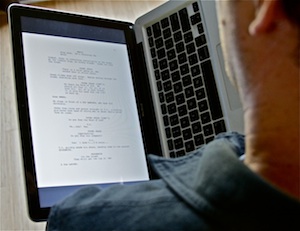
Reading scripts on a MacBook, book-style

December 3, 2009 Follow Up, Geek Alert

bookstyleIf you could physically remove your laptop screen and hold it vertically, it would be the perfect size for reading a script. That’s the hope behind the mythical Apple tablet that always seems six months away.
But until Mr. Jobs decides we’re ready for the future, reader [Douglas](http://johnaugust.com/archives/2009/reading-scripts-on-the-kindle#comment-174771) has a suggestion that is surprisingly close. Turn your laptop on its side, and hold it like a hardcover book.

No, really. It works much better than you’d think, particularly with one of the unibody MacBooks.

I suspect there’s a way to get the screen rotated in the proper direction on almost any laptop. But on a Mac running Snow Leopard, it’s pretty easy to get a .pdf turned the right way.

1. Open the .pdf in Preview.
2. Click on one of the pages, then Select All (⌘-A) to highlight all the pages.
3. Choose Rotate Right (⌘-R) or Rotate Left (⌘-L).
4. Choose Full Screen (Shift-⌘-F).
5. Click the zoom-to-fit button.

I’ve found it more comfortable to read with the screen on the left-hand side, using my right hand to advance pages with the arrow keys. But experiment to see what works best for you.

**Update:** Several readers have pointed to a free utility called [ReadRight](http://www.twilightedge.com/mac/readright/) which basically does steps 1-6 all at once, with some other handy options thrown in. I particularly like being able to advance pages with a click on the trackpad.

Since Preview is already included on every Mac, I’ll keep it as the general-case solution.

Reading scripts on the Kindle

December 1, 2009 Follow Up, Geek Alert

kindle
Ever since I got my Kindle, ((I started with the original model, and later replaced it with the Kindle 2
.)) I’ve been looking for a good way to read scripts on it.

Emailing a .pdf would result in mangled margins and bizarre gaps. Converting to a .doc format with a very specific template would give me something almost acceptable, but meant a lot of extra labor, and wouldn’t work for .pdfs of existing scripts.

So it was with great anticipation that I installed the free [2.3 software update](http://www.amazon.com/gp/help/customer/display.html?nodeId=200324680) that finally gave my little Kindle the option of using honest-to-goodness .pdfs.

It works just as I had hoped, except for the fact that the type is pretty damn small. Like, list-of-ingredients small. My friend Cort pointed out that the Kindle screen is only as wide as a buck slip, so there’s only so much real estate available.

After all this wishing and hoping, I’m not sure I’ll be reading many scripts on my Kindle. (The upcoming Nook from Barnes and Noble has essentially the same size screen, and will likely have the same kind of problem.)

The update gives you the option of rotating the screen, so you can see it much closer to full size, but then you have to read half a page at a time. The update is also supposed to increase battery life dramatically.

kindle DXBottom line: if you have a small Kindle, install the update. You might be willing to live with the tiny type (or half-pages) for reading screenplays.

If you’re thinking about buying a Kindle, take a second look at the bigger Kindle DX, which has a screen better suited for scripts. I know a lot of people who are using it daily to read screenplays.

How to handle a meeting

November 5, 2009 Film Industry, Follow Up

questionmarkI’m a twenty-five year old aspiring TV writer living in LA. After a friend of mine sent my spec pilot to a few people, one (who works at a cable channel) said she’d like to set a general meeting with me to discuss my writing and the upcoming pilot season.

This will be the first time someone is acknowledging me as a writer rather than as an assistant (my boss is kind enough to let me take off work for the meeting). Do you have any advice for how one should conduct oneself in such a meeting? They’ve already passed on picking up the pilot, and staffing season hasn’t started yet, so it appears that this is just a “get to know you” meeting. Should I prepare pitches for alternate projects? Do I dress casual or professional? What should I do as far as follow-up goes?

— James

I have much more extensive answers to your questions in two previous posts, [How to Meet](http://johnaugust.com/archives/2008/how-to-meet) and
[What to do in a general meeting](http://johnaugust.com/archives/2009/what-should-i-do-in-a-general-meeting). But for newcomers, I can offer a bit of a summary.

Your goal in a general meeting is to figure out what they might be able to hire you to write — if not now, then at some point in the future. They want to put a face with the name with the words they’ve read.

At a certain point, they’ll talk about the kinds of projects they have in development, and the things they’re looking for. If anything sparks, pursue it. Talk about it in the room, then follow up the next day, and the next week. You’ll be chasing a lot of half-baked projects, most of which will never come to be. But one or two might. And that’s what you need.

Your advantage at this point is that you’re cheap and available. A producer could likely hire you with discretionary funds to rewrite a mediocre project she has sitting on the shelf. A show might bring you on at the lowest level of staff writer. And if that opportunity comes up, take it. Do an amazing job, then let that momentum carry you into your next assignment. And your next.

You don’t have to put on a suit. In fact, it’s better to be [the worst-dressed person in the room](http://johnaugust.com/archives/2004/the-not-so-well-dressed-screenwriter).

My overall advice is to not freak out over any given meeting. Pretend it’s just having coffee with somebody who went to your same school. Unless you’re pitching a specific project, don’t approach it with any particular expectation — simply enthusiasm — and it’s likely to go fine.

Taking indie films on the road

October 20, 2009 Follow Up, Indie

Todd Sklar, who last year [wrote up his experiences](http://johnaugust.com/archives/2008/self-distributing-an-indie-feature) touring his indie feature Box Elder, is back with a new tour and a new name: [Range Life](http://www.rangelifeentertainment.com/).

This year, he and his cohorts are taking eight movies around the country, in sort of a traveling film festival. The site gives all the info about dates, locations and the films. ((One of the movies, Mystery Team, effectively scratches one entry off my to-write-someday list. That’s okay. It looks funny.)) The fall tour is nearly wrapped up, with only LA, Vegas and Arizona dates left.

I recently hosted a panel for Film Independent talking about the challenges facing indie distribution, and the Range Life model is one I’d love to see work. Not only is it a chance to get these movies on big screens, it allows filmmakers the chance to sell DVDs and merchandise directly, much like a touring band. I hope to have him write up his experiences with this expanded version.

« Previous Page
Next Page »

Primary Sidebar

Newsletter

Inneresting Logo A Quote-Unquote Newsletter about Writing
Read Now

Explore

Projects

  • Aladdin (1)
  • Arlo Finch (27)
  • Big Fish (88)
  • Birdigo (2)
  • Charlie (39)
  • Charlie's Angels (16)
  • Chosen (2)
  • Corpse Bride (9)
  • Dead Projects (18)
  • Frankenweenie (10)
  • Go (29)
  • Karateka (4)
  • Monsterpocalypse (3)
  • One Hit Kill (6)
  • Ops (6)
  • Preacher (2)
  • Prince of Persia (13)
  • Shazam (6)
  • Snake People (6)
  • Tarzan (5)
  • The Nines (118)
  • The Remnants (12)
  • The Variant (22)

Apps

  • Bronson (14)
  • FDX Reader (11)
  • Fountain (32)
  • Highland (73)
  • Less IMDb (4)
  • Weekend Read (64)

Recommended Reading

  • First Person (87)
  • Geek Alert (151)
  • WGA (162)
  • Workspace (19)

Screenwriting Q&A

  • Adaptation (65)
  • Directors (90)
  • Education (49)
  • Film Industry (490)
  • Formatting (128)
  • Genres (89)
  • Glossary (6)
  • Pitches (29)
  • Producers (59)
  • Psych 101 (118)
  • Rights and Copyright (96)
  • So-Called Experts (47)
  • Story and Plot (170)
  • Television (165)
  • Treatments (21)
  • Words on the page (237)
  • Writing Process (177)

More screenwriting Q&A at screenwriting.io

© 2026 John August — All Rights Reserved.