• Skip to primary navigation
  • Skip to main content
  • Skip to primary sidebar

John August

  • Arlo Finch
  • Scriptnotes
  • Library
  • Store
  • About

John

Bronson Watermarker, rebooted

May 30, 2014 Apps, Bronson

We have a new app out today: [Bronson Watermarker PDF](http://quoteunquoteapps.com/bronson/).

Bronson Watermarker PDF screenshot

It’s in the Mac App Store, and [50% off through Sunday, June 8th](https://itunes.apple.com/us/app/bronson-watermarker-pdf/id881629098?mt=12).

The new Bronson features a stripped-down UI that indicates where we think Mac app design is headed. Many buttons have lost their edges, relying on color and context to indicate their clickability. Title bars are integrated into the window. Animations take the place of progress bars. ((WWDC is Monday, so we’ll know soon which of our guesses were correct.))

You can see more [screenshots here](https://itunes.apple.com/us/app/bronson-watermarker-pdf/id881629098?mt=12).

The changes are more than cosmetic. Bronson has new features to protect screenplays and other documents, including password encryption and invisible watermarks.

Bronson Watermarker was our first Mac app, [released January 2012](http://johnaugust.com/2012/introducing-bronson-watermarker). It was deliberately minimalist: one list field, five watermark styles, one checkbox. Over time, we added a button to change the font and opacity, but the app remained essentially unchanged.

It also remained kind of ugly.

Of all our apps, Bronson was starting to feel like the odd duck. It sold well, and we got appreciative emails from people who used it daily. But we weren’t proud of it.

So we took two weeks to remake it. From pixels to code, it’s an entirely new app, with almost nothing carried over from the original. We added in the features users wanted most (passwords, saved lists, better customization) and removed things that never fit quite right (image watermarking, line burn).

Removing features is a tough thing. You end up with a better, more-focused app, but users can argue that it’s a downgrade. The Mac App Store makes it especially difficult, because it replaces the original app with the new version. For almost everyone, the new Bronson is a much better app — unless you really liked what we used to do with JPGs. ((It’s easy to see this conundrum with word processors and screenwriting software, which get bloated with rarely-used features. Most users wouldn’t know if you removed these vestigial bits — but some users rely on them. When was the last time you used Mail Merge? For most people, never. For some, three times since lunch.))

In the end, we decided to make a clean break, shipping the new version as a new app and appending PDF to the name. This let us increase the minimum OS requirements and move it from the Productivity category to Business, where it really belongs. It also means users of the old Bronson can keep their app, or choose to switch to the new one.

Through June 8th, everyone gets the [upgrade price of $15](https://itunes.apple.com/us/app/bronson-watermarker-pdf/id881629098?mt=12). After that, it’s $30.

Just to keep things even, [Highland](https://itunes.apple.com/us/app/highland/id499329572?mt=12) and unlimited library for [Weekend Read](https://itunes.apple.com/us/app/weekend-read/id502725173?mt=8) are also 50% off through June 8th.

Green Umbrage, or That Escalated Quickly

May 22, 2014 First Person, Follow Up

Craig Mazin wrote in to respond to criticism of his remarks in [last week’s Scriptnotes](http://johnaugust.com/2014/the-summer-superhero-spectacular).

—-

I typed the words “She-Hulk” a lot yesterday.

During our live podcast, I took a swipe at the intentions behind the creation of She-Hulk. Specifically, I felt that she was drawn in such a way to peddle a sexist caricature to teenaged boys.

That’s not some kind of revisionist explanation. I used the word “sexist” in the podcast. It’s audible.

I said this because I believe it. Unlike the Hulk, whose appeal was clearly divorced from any kind of normative standard of physical beauty, She-Hulk was initially drawn (and consistently drawn for many years) as slender, long-legged and large-breasted with flowing locks. Her face was the same old media-model-pretty version we see time and time again.

The cover of her debut features She-Hulk in what I guess I’d describe as a revealing monokini. There are lots and lots of additional examples of artwork on the internet (actual covers, not alt covers) that are clearly pushing sex appeal.

This is a [pretty good example](http://turnerwatson.files.wordpress.com/2012/04/she-hulk.jpg).

All that aside, some people felt that what I said was sexist. I used the word “slut,” which they took to mean that I think She-Hulk is a slut.

They think I slut-shamed She-Hulk.

First off, my point wasn’t that I think She-Hulk is a slut. I don’t. I don’t think anyone is a slut. I don’t think there’s anything shameful about female sexuality or the female body.

What I don’t like is the practice of pushing exaggerated images of female bodies to boys because it sells comic books or video games. Women in comics and video games aren’t accidentally drawn over and over and over again with outsized breasts, long legs and narrow waists. It’s marketing. Having a character remark recursively on that marketing doesn’t negate the marketing, of course. It’s a clever way to defuse criticism with grownups while selling issues to hormone-addled boys. John and I have [talked about this issue](http://johnaugust.com/2013/damsels-in-distress) on the podcast before as it relates to video games (specifically in support of the work done by [Anita Sarkeesian](http://www.feministfrequency.com/)).

Bottom line: I wasn’t saying that I think she’s a slut. I was saying I think the people who created her were at one time pushing a visual image of Hulk as Slut in order to make money. And I don’t like that. My comment was entirely about the illustration of a fictional character. It was not a reflection of my opinion of the mind or actions of the character.

On the other hand, using the word “slut” was a bad move. It’s far too loaded, it’s not even accurate to what I meant, and for many it obscured my point. It may be obscuring my point right now, so lesson learned… and I’ll not use it again.

Also, if the people who created She-Hulk think I’m totally wrong, I can accept that. They might not be sexist, their intentions may have been pure, and if so, I am guilty of seeing sexism where none was intended. If fans of She-Hulk suspect that I’m not one of them, and that I clumsily wandered into their culture… yup. No question. Guilty as charged. And there’s also no question that the appearance and character of She-Hulk has evolved dramatically and positively over the years. My comments were entirely about the early appearance of the character. She-Hulk isn’t being drawn in the style of a cheesecake model anymore. I think that’s a very good thing.

And that’s all I have left to say about She-Hulk for the rest of my life.

Find and Replace, a screenwriter’s best friends

May 14, 2014 Apps, Fountain, Highland

Since the early days, I’ve been using Find and Replace to take care of small issues in scripts. For example, I change the location in a series of scene headers. Or I’ll search for two spaces and replace them with one, because I’m [now a one-spacer](http://johnaugust.com/2014/period-space).

Today, I came upon a new use for Find and Replace.

In Fountain, you can leave notes for yourself by surrounding them in double brackets [[like this]]. These notes don’t show up when you print or export, so it’s fine to leave them in your script.

But sometimes, you want the notes to print. David Wain wrote me this afternoon:

> I’d love to be able to send a PDF of my Fountain script that looks like a screenplay, but still has the bracketed notes inline so the reader can see all info in the document.

A super-simple way to do this is to get rid of the closing brackets on those notes. That way, they’ll print as action lines.

Just do a Find/Replace. Search for ]], and replace them with nothing. If you don’t want the opening [[, just search for those and replace them with nothing — or maybe something like “Note: ”

This technique works in any text editor. But if you’d like a little more power, there’s now a better way.

[Highland 1.7](https://itunes.apple.com/us/app/highland/id499329572?mt=12) has new find-and-replace talents that can do much more sophisticated matching.

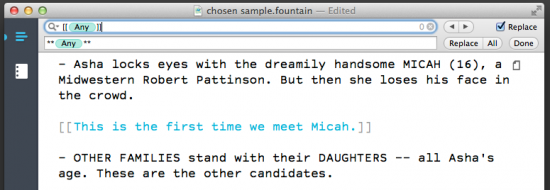
screenshot of find

Using the pattern above, you can change out double brackets for double asterisks all in one pass. Your notes will print in the script as bold action lines.

Here’s how to do it.

First off, save your document. Better saved than sorry, and you’ll want a version that keeps your notes all note-like.

Do a Find (⌘F).

The pattern you’re looking for is [[(any random text)]]. The brackets are easy. Matching the text between them has traditionally been more difficult.

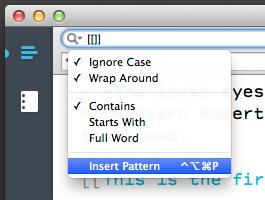
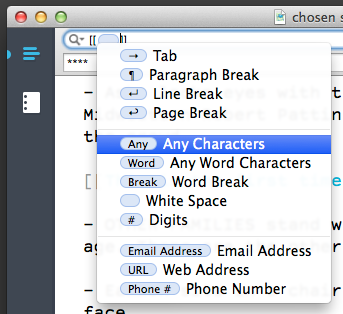
Highland now has a wildcard token called (Any). You can find it by clicking the magnifying glass and choosing Insert Pattern from the menu.

screenshot insert pattern

In the next menu, choose “Any Characters.”

screenshot insert

Your find field should now be [[(Any)]].

Tick the Replace checkbox on the right. In the next field, you tell Highland what you want it to put in place of what you found.

Let’s start with two asterisks. Then put another (Any) token. You can get it from the same Insert Pattern menu, or just copy-paste it from the line above. ((Behind the scenes, this is done with regular expressions. If you copy-and-paste this (Any) token, you’ll find it works in many Mac apps, even ones that use older Find dialog boxes.)) Finally, put another two asterisks so the whole line gets bold formatting.

Click the All button to replace all of the notes in the script. Those bracketed notes are now bolded action lines.

The options in the magnifying glass are useful for other things as well.

– By unchecking Ignore Case, you can match TOM versus Tom. To swap out a character’s name, do one pass for TOM, another for Tom.
– Use Full Word in order to match “ant” but not “antagonize.”
– The find menu lists recent searches, saving you a step.

Finally, one of my favorite features in Highland 1.7 is the faceless Find Again. Even when the Find field is closed, ⌘G will repeat your last search. It’s a handy way to hop through your script.

Almost all of this functionality comes for free with Mac OS. It’s one of the reasons it’s not easy to port Highland directly over to Windows or Linux or a web-based application.

Beware of miserable success

May 14, 2014 Psych 101, Treatments

I really like Dan Harmon’s advice to young writers in the sidebar to [THR’s showrunner feature](http://www.hollywoodreporter.com/news/mindy-kaling-dan-harmon-top-703435):

> Entertain yourself. Luck comes just as often (and just as rarely) to every writer. Don’t be the writer that got lucky doing something they hate.

« Previous Page
Next Page »

Primary Sidebar

Newsletter

Inneresting Logo A Quote-Unquote Newsletter about Writing
Read Now

Explore

Projects

  • Aladdin (1)
  • Arlo Finch (27)
  • Big Fish (88)
  • Birdigo (2)
  • Charlie (39)
  • Charlie's Angels (16)
  • Chosen (2)
  • Corpse Bride (9)
  • Dead Projects (18)
  • Frankenweenie (10)
  • Go (29)
  • Karateka (4)
  • Monsterpocalypse (3)
  • One Hit Kill (6)
  • Ops (6)
  • Preacher (2)
  • Prince of Persia (13)
  • Shazam (6)
  • Snake People (6)
  • Tarzan (5)
  • The Nines (118)
  • The Remnants (12)
  • The Variant (22)

Apps

  • Bronson (14)
  • FDX Reader (11)
  • Fountain (32)
  • Highland (75)
  • Less IMDb (4)
  • Weekend Read (64)

Recommended Reading

  • First Person (87)
  • Geek Alert (151)
  • WGA (162)
  • Workspace (19)

Screenwriting Q&A

  • Adaptation (65)
  • Directors (90)
  • Education (49)
  • Film Industry (489)
  • Formatting (128)
  • Genres (89)
  • Glossary (6)
  • Pitches (29)
  • Producers (59)
  • Psych 101 (118)
  • Rights and Copyright (96)
  • So-Called Experts (47)
  • Story and Plot (170)
  • Television (165)
  • Treatments (21)
  • Words on the page (237)
  • Writing Process (177)

More screenwriting Q&A at screenwriting.io

© 2026 John August — All Rights Reserved.