• Skip to primary navigation
  • Skip to main content
  • Skip to primary sidebar

John August

  • Arlo Finch
  • Scriptnotes
  • Library
  • Store
  • About

Highland

Fountain 1.1 — “Use The Force”

January 29, 2014 Apps, Fountain, Highland, Screenwriting Software

We’re about to put out the first revision to [Fountain](http://fountain.io) since we launched it two years ago, and are calling for comment from users and developers.

When we were developing the plain text screenwriting syntax, we tried to balance normal uses and edge cases. Overall, I think we think we got Fountain mostly right. But Stu Maschwitz and I always expected that we’d evolve the specification as we learned more about how people use it on a daily basis.

The theme of the Fountain 1.1 update is “Use The Force.” It’s all about better control over “forcing” elements.

Most times in Fountain, you don’t need to force anything. It just understands what you want. But when you need to, you can force a Scene Heading with a leading period. You can force a Transition using a leading greater-than symbol.

For Fountain 1.1, we’re discussing adding two new forceable elements, and making a change to how Action is forced.

## LYRICS

Highland has been testing a Lyrics variation on Dialogue for a while now, and it works. We think it’s time to make it official.

You create a Lyric by starting with a tilde ~.

~Willy Wonka! Willy Wonka! The amazing chocolatier!

~Willy Wonka! Willy Wonka! Everybody give a cheer!

The parser will remove the ~ and leave it up to the app to style the Lyric appropriately. For screenplays, lyrics are often handled like a dialogue element, but in italics. ((Courier Prime italics are especially nice for lyrics.)) For stage musicals, it’s often uppercase and placed on the left margin.

Lyrics are always forced. There is no “automatic” way to get them.

## CHARACTER

The ability to force a Character element will be helpful for names that require lower-case letters, and for non-Roman languages, where a character might be named something like 黒澤.

To force a Character element, precede a line with the “at” symbol: @

@McCLANE

Yippie ki-yay! I got my lower-case C back!

The parser will remove the @ and interpret McCLANE as Character, preserving its mixed case.

Speaking of lowercase, one other change is that Character Extensions, the parenthetical notations that are on the same line as a Character element, are no longer required to be uppercase:

HANS (on the radio)
What was it you said?

The parser interprets HANS (on the radio) as a Character element.

## ACTION

Figuring out how to handle forced action required the most discussion.

Fountain interprets an uppercase line followed by a second line as a Character. Most of the time, that’s what you want:

MARY

Hi, Tom.

But sometimes you really want two lines of action, with no blank line between them. You’re going to for a style — but Fountain doesn’t know that. So instead you get:

BOOM

BOOM BOOM. Closer.

In Fountain 1.0, we allowed the user to force Action elements with two trailing spaces.

BOOM{two spaces}

BOOM BOOM. Closer.

This has turned out to be problematic in practice. The spaces are invisible, and can be introduced by accident as you write. Highland and Slugline users got confused. Hell, I got confused, and I co-created the syntax.

MARY{two spaces I didn’t realize were there}

Wait! Why isn’t my character name where it should be? Why isn’t my dialogue being handled like dialogue? Nima!

Furthermore, not all Fountain apps supported the spaces consistently.

In the end, we’d like more transparency and less invisibility. Using spaces to force Action should be deprecated.

In Fountain 1.1, we propose that users force Action by preceding a line with an exclamation point:

!BOOM
BOOM BOOM. Closer.

The parser removes the ! and interprets BOOM as Action.

BOOM  

BOOM BOOM. Closer.

Since forcing action is rare, and the other changes are purely additive (and evident to the naked eye), we don’t anticipate huge issues for most users.

Unless we hear a hue and cry about these changes, we anticipate making them official next week. Apps can start supporting this syntax shortly thereafter.

But we’re not stopping there. Upcoming goals for Fountain include:

1. Better consistency among apps when parsing Fountain. We keep finding edge cases, and want to make sure they are handled the same way regardless of which app you’re using.
2. New syntax for marking changes or highlighting elements in finished documents.
3. Continued development of screenplay-like formats, including three-camera and stageplays.

If you have notes or suggestions, I’d invite you to join the discussion on the [Take Fountain](https://app.glassboard.com/web/app/boards/dff2b3bf-5f61-4ab6-8a64-16c71dd57160) Glassboard. Registration is free and open to everyone.

Highland wins 2013 Macworld Eddy

December 16, 2013 Apps, Highland

The editors of Macworld named Highland one of the [best products of 2013](http://www.macworld.com/article/2071020/macworld-editors-choice-awards-the-best-products-of-2013.html?page=2):

> Writing is hard. Writing a script or screenplay can be harder. That’s why we like Highland, Quote-Unquote Apps’ minimalistic $20 screenwriting tool. Highland offers writers a clean, unadorned space to work on their screenplay.

> All Highland files are saved as plain text, allowing you to open them in just about any program on your Mac, PC, or iOS device. You can even import your PDFs and Final Draft files into the app for easy editing, and then export them back into their original formats for further work.

> Certainly for those in the film industry, this app is more than worth its price.

Many thanks to the editors of Macworld, and big congratulations to the Quote-Unquote apps team for their hard work on Highland.

Nima Yousefi has built and rebuilt Highland’s parsing engine a dozen times, taking it from impressive to magical to so-good-you-forget-it’s-difficult. (The next build is even better.)

Ryan Nelson has designed and tweaked our graphics down to the pixel. Minimalism is hard, because there’s nothing to hide behind.

Stuart Friedel keeps tabs on sales figures and industry chatter. He and I use the app daily, so it’s often our observations and annoyances that set the agenda.

I was excited to see so many other apps I love on the list of Eddy winners, incluing 1Password, Badland, Bartender, Capo, Drafts 3, Fantastical 2 for iPhone, Gone Home (Craig’s One Cool Thing), IFTTT, Launch Center Pro, and nvAlt.

For 2014, we’ll be keeping up development of Highland while introducing a new app that works related magic for folks who deal with screenplays.

In the meantime, you can [check out Highland](http://highland.quoteunquoteapps.com/blog-eddy) on the Mac App Store.

Writing in Fountain on the iPad, using Editorial

December 3, 2013 Apps, Fountain, Geek Alert, Highland

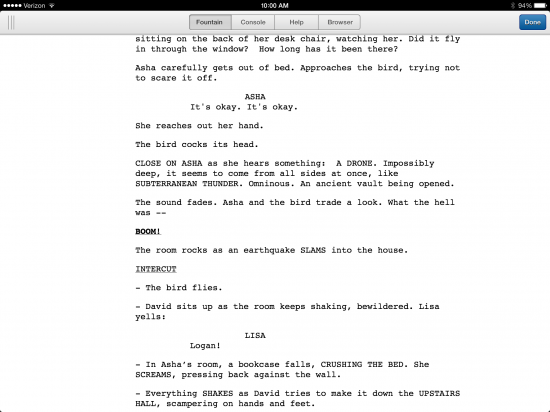
[Editorial](https://itunes.apple.com/us/app/editorial/id673907758?mt=8) is one of the slickest text editors for the iPad, and thanks to some clever Python scripting, it can now show [previews of Fountain scripts](http://editorial-app.appspot.com/workflow/5215636485570560/diZz8hHAW1c):

fountain preview

The Fountain preview is not perfect. I noticed parentheticals didn’t find the right margins and other bits of minor weirdness. But this workflow demonstrates one of the big advantages of Fountain’s plain-text heritage: you can adapt existing tools to work with it.

Fountain-centric iPad apps are coming, but until then there are no shortage of great text editors for iOS, so it’s worth experimenting. Anything you write in Fountain can easily be transformed into a PDF by apps like [Highland](http://taps.io/JdQA) or [Slugline](https://itunes.apple.com/us/app/slugline/id553754186?mt=12).

Shift-return, Highland’s little helper

December 2, 2013 Highland

This weekend, Neil Cross (creator of [Luther](http://www.imdb.com/title/tt1474684/)) emailed me with a feature request:

> I love Fountain in general and Highland in particular. I’d live there all-but permanently, but for one issue: I’m a very fast but very poor two-fingered typist. One of my worst habits is accidentally hitting the CAPS LOCK key — so I disable it.

> I wonder if there’s any chance the Fountain syntax could incorporate a FORCE CHARACTER instruction, the way it currently incorporates FORCE SCENE HEADING?

> I can’t be the only clumsy typist in the world for whom this would be a godsend.

I started to brainstorm syntax changes and work-arounds, until I realized we’d already built a solution into Highland: shift-return.

highland-shift-return

At the end of a line, if you hit shift-return rather than just return, you’ll make the entire line uppercase. It’s useful for character names, scene headings and transitions.

« Previous Page
Next Page »

Primary Sidebar

Newsletter

Inneresting Logo A Quote-Unquote Newsletter about Writing
Read Now

Explore

Projects

  • Aladdin (1)
  • Arlo Finch (27)
  • Big Fish (88)
  • Birdigo (2)
  • Charlie (39)
  • Charlie's Angels (16)
  • Chosen (2)
  • Corpse Bride (9)
  • Dead Projects (18)
  • Frankenweenie (10)
  • Go (29)
  • Karateka (4)
  • Monsterpocalypse (3)
  • One Hit Kill (6)
  • Ops (6)
  • Preacher (2)
  • Prince of Persia (13)
  • Shazam (6)
  • Snake People (6)
  • Tarzan (5)
  • The Nines (118)
  • The Remnants (12)
  • The Variant (22)

Apps

  • Bronson (14)
  • FDX Reader (11)
  • Fountain (32)
  • Highland (74)
  • Less IMDb (4)
  • Weekend Read (64)

Recommended Reading

  • First Person (87)
  • Geek Alert (151)
  • WGA (162)
  • Workspace (19)

Screenwriting Q&A

  • Adaptation (65)
  • Directors (90)
  • Education (49)
  • Film Industry (489)
  • Formatting (128)
  • Genres (89)
  • Glossary (6)
  • Pitches (29)
  • Producers (59)
  • Psych 101 (118)
  • Rights and Copyright (96)
  • So-Called Experts (47)
  • Story and Plot (170)
  • Television (165)
  • Treatments (21)
  • Words on the page (237)
  • Writing Process (177)

More screenwriting Q&A at screenwriting.io

© 2026 John August — All Rights Reserved.